



(59,- Kc)
Pozadavky: Android 1.6 a vyssi
Popis: Shows your CPU usage stats on a small bar graph in the corner of the screen.
Screen:
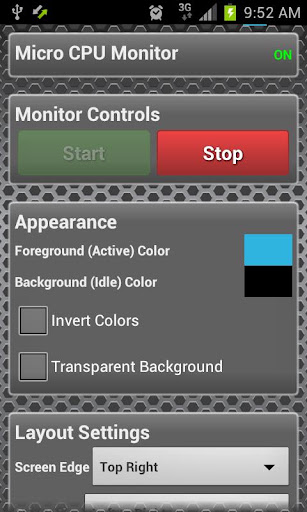


What's in this version:
Version 3.1.1
+ Fixed default height for Free version
Version 3.1:
+ Multi-core CPU support
+ Option for Left-Right or Right-Left orientation
+ Stability & Efficiency improvements
-- PRO --
+ Option for Height
+ Option for Update Speed
Vice info:
Kód: Vybrat vše
https://play.google.com/store/apps/details?id=com.bb.microcpu
https://play.google.com/store/apps/details?id=com.bb.microcpu.keyKód: Vybrat vše
http://uloz.to/xgypjgh/micro-cpu-monitor-pro-v3-1-1-proper-zip
http://www42.zippyshare.com/v/9449017/file.html
http://www.directmirror.com/files/1CFOK7IWShows your CPU usage stats on a small bar graph in the corner of the screen. The bar can be as small as 1 pixel high. CPU use is shown as a percentage filled with color.
*Compatible with HTC One X and Galaxy S3 Quad-Core Phones*
Features include:
+ Custom foreground & background colors
+ Alpha transparency enabled
+ Auto-start (run at boot)
+ Custom width (100px to full screen width)
+ Display above or below status bar
+ Multi-core CPUs displayed on separate bars, or combined
And for PRO users, these extra features:
+ Customizable Height
+ Customizable Update Speed (save more battery life!)
Suitable for:
==Developers==
This tool is perfect for developers debugging apps. See your system CPU usage at a glance, without an annoying popup or overlay interfering with your app usage. Grab the PRO version to set the update interval as small as 100ms!
==Gamers==
Micro CPU Monitor is ideal for use while playing games - the 1 pixel screen footprint means you won't miss any of the action!
==Battery Saving Gurus==
This CPU monitor is a great way to keep an eye on your battery drain. No matter what app you're using, the Micro CPU Monitor can tell you at a glance which applications are chewing up your CPU cycles.
---Frequently Asked Questions (FAQ)---
Q. I've got a quad core device. Why don't I see all four cores being used?
A. Android tries to optimise the CPU usage, by shutting down cores when they're not needed. Your phone will rarely use all 4 cores. Try downloading a CPU Stress Test app, and you'll see the four cores then

---Permissions---
+ SYSTEM_ALERT_WINDOW - Required to create a system-wide overlay for the monitor on edge of screen
+ RECEIVE_BOOT_COMPLETED - Required for the auto-start feature
+ INTERNET & ACCESS_NETWORK_STATE - Used for error reporting, and anonymous usage reporting using Google Analytics.


