A unique To Do List with a Radar Dashboard & Auto-prioritization of To Do Tasks
A unique To Do List with two very different features that save time, stress and make task management fun.
- A Radar Dashboard to quickly show incoming To Do deadlines
- Automatic re-prioritization of To Do Tasks as deadlines approach
“Task Radar’s UI is gorgeous” - Robert Nazarian, TalkAndroid
“With an ingenious layout, Task Radar is a nice break from the many bland task managers currently on the market” - Philip Chan, AndroidAppsReview (5 Star Review rating!!)
“The radar scope is pure genius!” - Pete Thompson, AndroidMNZ
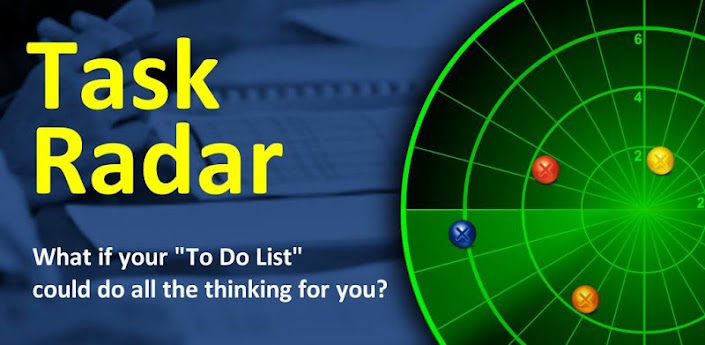
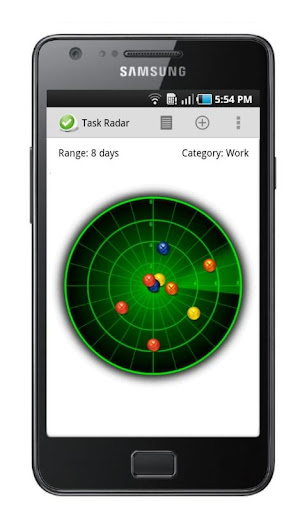
Get a “heads up” of incoming deadlines through the awesome Radar so you can quickly decide where to invest your time!
Task Radar uses Artificial Intelligence to auto prioritize To Do tasks which means as you complete tasks, or your boss brings you more work or deadlines get closer, just shake your device and your list will automatically re-order in priority – without the hassle of reviewing all tasks!
Customise “Impact” definitions to your style of thinking so you can use Task Radar in a way that fits with you.
See lots of other cool features in the demo video!
Task Radar is a To Do List that can be used to remind you of the Term Paper that’s due, the sports event you want to watch live, those flowers for your anniversary, gift ideas and occasions, personal goal setting, work task management or just as a general shopping List.
Helpful tips:
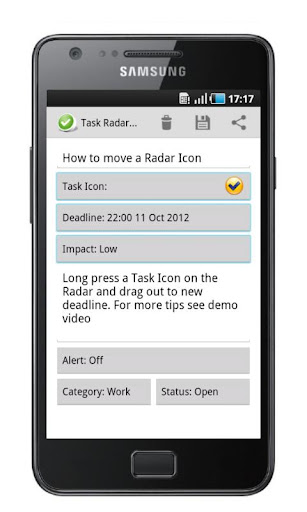
- A Task/To-Do requires 3 things for the AI to work (name, deadline & impact rating)
- Tap the Category and Range indicators to change them quickly
- Long press radar markers to see task name and remaining time to deadline
Please also note:
Screen is locked to portrait
Sound can be turned off in settings menu
Pozadavky: Android 2.1 a vyssi Popis: A unique To Do List with a Radar Dashboard & Auto-prioritization of To Do Tasks. A unique To Do List with two very different features that save time, stress and make task management fun.
Screen:
Video:
What's in this version:
Fixed minor issue with Android V3.2
Landscape now available in all screens
What if your Task List / To Do List could do all the thinking for you?
Task Radar is a simple Task List / To Do List that helps you achieve more by enabling you to focus on the right thing at the right time!
• Get better visibility of incoming To Do deadlines on an awesome Radar dashboard
• Save time and stress with automatic task prioritization of To Do tasks
Task Radar uses Artificial Intelligence to auto prioritize tasks which means when you complete tasks, your boss brings you more work or deadlines get closer, just shake your device and your list will automatically re-order in priority – without the hassle of reviewing all tasks!
“Task Radar’s UI is gorgeous” - Robert Nazarian, TalkAndroid
“With an ingenious layout, Task Radar is a nice break from the many bland task managers currently on the market” - Philip Chan, AndroidAppsReview (5 Star Review rating!!)
“The radar scope is pure genius!” - Pete Thompson, AndroidMNZ
Helpful user tips:
• Tap the Category and Range indicators to change them quickly
• Long press task icons to drag and drop them around radar to quickly change deadlines
• Change task icon to a shape to easily recognize incoming deadlines
• Shake device to re-order task list by priority
• Add alerts to remind you of high priority tasks
• Swipe to close tasks
See lots of other cool features in the demo video!
Task Radar can be used for reminding you of the Term Paper that’s due, the sports event you wanted to watch live, those flowers for your anniversary, Gift Ideas, Gift occasions, a Task Manager, Time Management tool, personal goal setting, Priority List, Shopping List, General Purpose List, Gift List, a List Manager, a Priority task list or a general purpose to-do list. To Do List, Things To Do, To-Do List, This To-Do, Task List, Task Manager, Time Management, Self Management, Priority List, Shopping List, List, Gift List, List Manager, Tasks, Priority task list
Key Features:
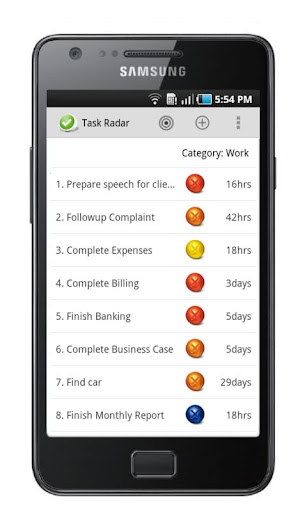
• To Do / Task list can be viewed in Radar or List view
• Radar Dashboard that tracks incoming To Do task deadlines
• Change Radar range to 8 day or 8 hour to track To Do task deadlines
• Tap the Category Indicator quickly view To Do tasks by “Home”, “Work” or “All” categories
• Tap Range indicator to quickly view To Do tasks on Radar
• Long press radar markers to see To Do task name and remaining time to deadline
• Alert reminders for each To Do task can be set to 1 hour, 8 hours or 24 hours
• Artificial intelligence is used to assign a current priority number for each To Do task
• To Do task priority is indicated by priority number to the left of To Do task
• New To Do task will always appear at the top of the To Do list to ensure easy visibility of tasks
• To Do task naming is remembered so they can be reused for future task creation
• A standard list of To Do task lists are cached for ease of task creation
• To Do List will only re-order when you are ready
• Shake to reorder To Do tasks to reorder based on priority number assigned
• Swipe a To Do task in order to conveniently close
• Closed To Do tasks will remain on To Do List until 24 hours after they were closed
• Ability to allocate an “Impact” rating for each To Do task (None, Low, Medium, High)
• To Do task “Impact” naming can be customized to suit your own style