


Požadavky: Android 2.3 a vyšší
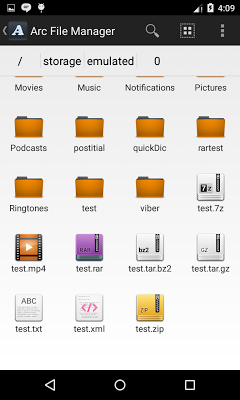
Popis: Arc File Manager is a powerful file manager support common file operations.
Screen:
Vice info:
Kód: Vybrat vše
https://play.google.com/store/apps/details?id=com.resonancelab.arcfilemanagerKód: Vybrat vše
http://ulozto.cz/xBWprCr9/arc-file-manager-4allmobile-eu-apk
http://ulozto.net/xoxgXiXT/arc-file-manager-4allmobile-eu-apk
https://webshare.cz/file/4Hd1cj4Yyg/arc-file-manager-4allmobile-eu-apk
Stahuj zde: Mod:
Kód: Vybrat vše
http://ulozto.cz/xhtLF2Fm/arc-file-manager-v2-2-1-ad-free-mod-4allmobile-eu-apk
http://ulozto.net/x8GY8s87/arc-file-manager-v2-2-1-ad-free-mod-4allmobile-eu-apk
https://webshare.cz/file/68r41y6p06/arc-file-manager-v2-2-1-ad-free-mod-4allmobile-eu-apk
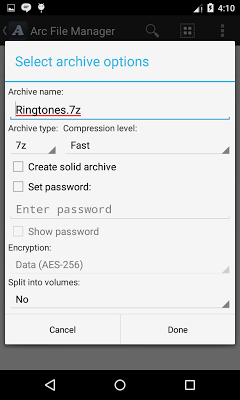
The main feature is compressing and decompressing files in popular archive formats like 7z(7zip), rar zip. You can extract more than 30 formats with a single click. It is built with 7zip library which provides faster compression and decompression. You can create/extract password protected, multi-part archives easily. Create shortcut to home screen or create bookmark for faster folder/file access. The supported operations are listed below -
RAR5 support added. You can now extract RAR5 files.
File manager operations
=================
1. Basic file operations - open, copy, move, delete, send, rename, view details.
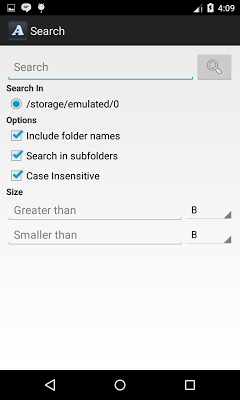
2. Search files.
3. Support list & grid listing.
4. Create shortcut to home screen.
5. Bookmark favorite file/folders.
Archive operations
=============
1. Create following type of archives - 7z(7zip), zip, tar, gz(gzip), bz2(gzip2), xz
2. Extract following type of archives - 7z(7zip), rar, zip, tar, gz, bz2, xz, iso, jar, cab, lzh, lha, lzma, tgz, tbz, deb, rpm, zipx and more.
3. View/open archive content of following type - 7z(7zip), rar, zip, tar, gz, bz2, xz, apk, jar, iso, cab, lzh, lha, lzam, tgz, tbz, deb, rpm, zipx and more.
4. Add/Delete files from supported archives.
5. Support creating/extracting of password protected archives.
6. Partial extract archive.
7. Open archive directly from email & downloads.
8. Create/Extract multi-part archives.
9. Unicode support.
10. Multi-threading on supported devices.
11. Support large archives (Size larger 2GB)
12. Rar5 support.
and More (Explore yourself).
All the features are absolutely free.
***This app is supported by Ads***
*** This app is still in initial development stage. More features will be added. Be patient & please send me email if you encounter anything incorrect. Any suggestions are welcome.***
FAQ
1. Why this app is asking for password. It's a free app after all.
Ans: The app is not asking you for password but the file you are decompressing. Some files are password protected to protect it's content from unauthorized access. You need to know the password in order to decompress the file. Extracting password protected archives are just another feature by Arc File Manager. Non password protected files will work fine.


