Tegrak Overclock Ultimate
Napsal: 30. 05. 2012 11:44
Tegrak Overclock Ultimate v1.6.8
Požadavky: Android 2.2+ ROOT

Popis:
This is for family of Galaxy Note(Exynos4210), Galaxy S II(Exynos4210), Galaxy S II LTE(Snapdragon), Galaxy S(Hummingbird), Galaxy Player(Hummingbird), Galaxy Tab(7.0)(Hummingbird), Galaxy Tab 7.0+(Exynos4210) and Galaxy Tab 7.7(Exynos4210) devices.
You can set maximum CPU frequency of your device on available models EASILY.
This works with STOCK kernel, STOCK rom, many custom kernels and roms. (Not available on CM and MIUI) You just need to do rooting.
Available models
Galaxy S II(Exynos4210) - Android 2.3.x / 4.0.3
Galaxy Note(Exynos4210) - Android 2.3.x
Galaxy S II LTE(Snapdragon) - Android 2.3.x
Galaxy S(Hummingbird) - Android 2.2.x / 2.3.x
Galaxy Player(Hummingbird) - Android 2.2.x / 2.3.x
Galaxy Tab(7.0)(Hummingbird) - Android 2.3.x
Galaxy Tab 7.0+(Exynos4210) - Android 3.2.x
Galaxy Tab 7.7(Exynos4210) - Android 3.2.x
Ultimate Features:
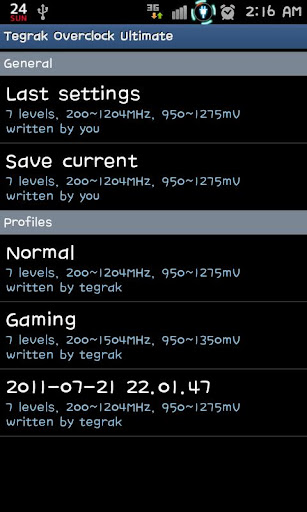
Profile management
profiles are stored in /sdcard/tegrak/overclock/*.oc
Lock GPU clock to 267MHz (Galaxy S II/Galaxy Note/Galaxy Tab 7.0+)
Set customized GPU clock. (Galaxy S II/Galaxy Note/Galaxy Tab 7.0+)
Set customized GPU voltage. (Galaxy S II/Galaxy Note/Galaxy Tab 7.0+)
Set scaling governor and min/max frequency.
2x1 and 3x1 home screen widgets
Set customized frequency (1.0 ~ 2.0 GHz)
Set customized voltage (750 ~ 1400 mV, OV or UV available)
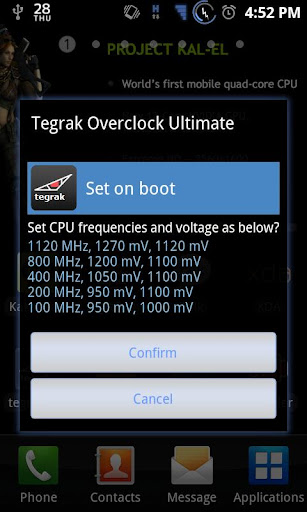
Available set last settings on boot automatically.
Stability checking background service is turned on about 5 minutes every time when you change settings.
If your device freeze or shutdown while it is running, app will show you popup to apply the last setting on boot.
Show ARM core voltage at max frequency.
Show your device information
Free from Advertisement
Tweaks (Io Scheduler)
Features:
Lock GPU clock to 267MHz (Galaxy S II/Galaxy Note/Galaxy Tab 7.0+)
Set scaling governor and min/max frequency.
Set cpu max frequency
Galaxy S: 1.0 ~ 1.3GHz
Galaxy S II: 1.2 ~ 1.452GHz
Galaxy Note: 1.4 ~ 1.6GHz
Galaxy Tab 7.0+: 1.4 ~ 1.6GHz
Show ARM core voltage at max frequency.
Show your device information
Tweaks (Io Scheduler)
About voltage control
Galaxy S II/Galaxy Note Gingerbread: +-25 step
Galaxy S Froyo: +-25 step
Galaxy S Gingerbread: +-1 step
How to use?
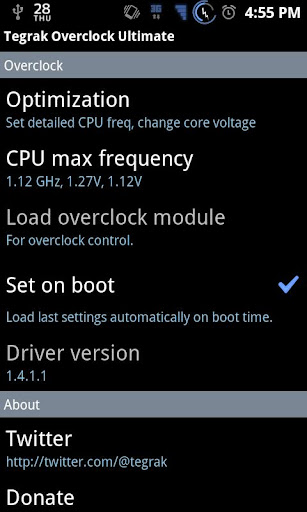
1. First, click "Load overclock module.
2. Second, click "CPU max frequency" and choose one frequency from preset options.
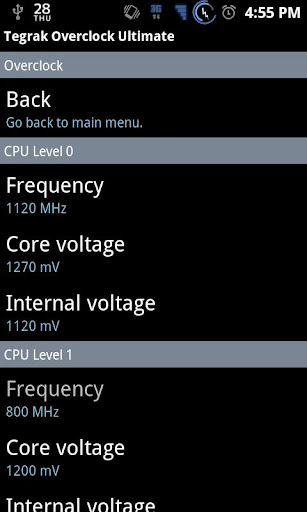
3. You can control more detailed option in "Optimization" menu.
Instalation:
Copy 3 Files in RAR in to Titaniumback folder Open TitaniumBankup and find ‘Tegrak Overclock Ultimate v1.6.8' Select ‘Restore App+Data’
What's in this version:
fixed repeitive reboot symtom while using "set on boot" option.
remove invalid messages on some devices.
Další info:
Download:
Mirror:
Požadavky: Android 2.2+ ROOT
Popis:
This is for family of Galaxy Note(Exynos4210), Galaxy S II(Exynos4210), Galaxy S II LTE(Snapdragon), Galaxy S(Hummingbird), Galaxy Player(Hummingbird), Galaxy Tab(7.0)(Hummingbird), Galaxy Tab 7.0+(Exynos4210) and Galaxy Tab 7.7(Exynos4210) devices.
You can set maximum CPU frequency of your device on available models EASILY.
This works with STOCK kernel, STOCK rom, many custom kernels and roms. (Not available on CM and MIUI) You just need to do rooting.
Available models
Galaxy S II(Exynos4210) - Android 2.3.x / 4.0.3
Galaxy Note(Exynos4210) - Android 2.3.x
Galaxy S II LTE(Snapdragon) - Android 2.3.x
Galaxy S(Hummingbird) - Android 2.2.x / 2.3.x
Galaxy Player(Hummingbird) - Android 2.2.x / 2.3.x
Galaxy Tab(7.0)(Hummingbird) - Android 2.3.x
Galaxy Tab 7.0+(Exynos4210) - Android 3.2.x
Galaxy Tab 7.7(Exynos4210) - Android 3.2.x
Ultimate Features:
Profile management
profiles are stored in /sdcard/tegrak/overclock/*.oc
Lock GPU clock to 267MHz (Galaxy S II/Galaxy Note/Galaxy Tab 7.0+)
Set customized GPU clock. (Galaxy S II/Galaxy Note/Galaxy Tab 7.0+)
Set customized GPU voltage. (Galaxy S II/Galaxy Note/Galaxy Tab 7.0+)
Set scaling governor and min/max frequency.
2x1 and 3x1 home screen widgets
Set customized frequency (1.0 ~ 2.0 GHz)
Set customized voltage (750 ~ 1400 mV, OV or UV available)
Available set last settings on boot automatically.
Stability checking background service is turned on about 5 minutes every time when you change settings.
If your device freeze or shutdown while it is running, app will show you popup to apply the last setting on boot.
Show ARM core voltage at max frequency.
Show your device information
Free from Advertisement
Tweaks (Io Scheduler)
Features:
Lock GPU clock to 267MHz (Galaxy S II/Galaxy Note/Galaxy Tab 7.0+)
Set scaling governor and min/max frequency.
Set cpu max frequency
Galaxy S: 1.0 ~ 1.3GHz
Galaxy S II: 1.2 ~ 1.452GHz
Galaxy Note: 1.4 ~ 1.6GHz
Galaxy Tab 7.0+: 1.4 ~ 1.6GHz
Show ARM core voltage at max frequency.
Show your device information
Tweaks (Io Scheduler)
About voltage control
Galaxy S II/Galaxy Note Gingerbread: +-25 step
Galaxy S Froyo: +-25 step
Galaxy S Gingerbread: +-1 step
How to use?
1. First, click "Load overclock module.
2. Second, click "CPU max frequency" and choose one frequency from preset options.
3. You can control more detailed option in "Optimization" menu.
Instalation:
Copy 3 Files in RAR in to Titaniumback folder Open TitaniumBankup and find ‘Tegrak Overclock Ultimate v1.6.8' Select ‘Restore App+Data’
What's in this version:
fixed repeitive reboot symtom while using "set on boot" option.
remove invalid messages on some devices.
Další info:
Kód: Vybrat vše
https://play.google.com/store/apps/details?id=com.tegrak.overclock.ultimateKód: Vybrat vše
http://www.2shared.com/file/MSxsCH2w/TOU_v168.htmlKód: Vybrat vše
http://uploadmirrors.com/download/0ER04VCR/TOU_v1.6.8.zip
http://directmirror.com/files/GLVQMNIG