Secret Audio Recording Pro
Napsal: 04. 09. 2012 19:38
Secret Audio Recording Pro v1.3
(68,- Kc)
Pozadavky: Android 2.3.3 a vyssi
Popis: Aplikace pro skryte (diskretni) nataceni videa.
Screen:
Vice info:
Stahuj zde:
QR code download:
One of the best Secret Audio Recorders. Extremely easy to use. Just click on the App's Icon to Start or Stop the Recording. During the Recording, the phone can be used for any other normal operation, including Game Playing, Web Browsing and Phone Calls
Use it to Record Audio secretly. Nobody will notice that you are recording
Use this App when you do not need to Record Pictures (i.e. Video). Audio Files only require a fraction of the File Size compared to Video Files
This App will only work on devices with an (internal or external) SD Card, to save the Audio Files on. E.g. It may not work on some HTC devices. Download the App, and check to see if it works on your device!
Use this App to Record Secret Audio in business meetings, lectures, conferences, on work as a spy, etc., while reading the news, browsing the web, sending messages, checking your email account, making phone calls, and for most other purposes (except for making another Recording). You can also black out (or close) the screen - if you want - without affecting the Audio Recording
The difference between the Free Version (SARF) and this PRO version (SARP) is that this version has (for all practical purposes) no short Recording Time Limit. However, in order to protect your device against unwanted huge Audio Files, each Audio Recording is limited to 1 GB, corresponding to a continuous Recording for about FIVE days!
FEATURES:
- Recording starts and stops in the background
- Records Sound/Voices
- One Touch Recording
- No User Interface
- No Configuration or Settings required
- No additional Instructions needed (see below)
- Just click on the Icon to Start or Stop Recording
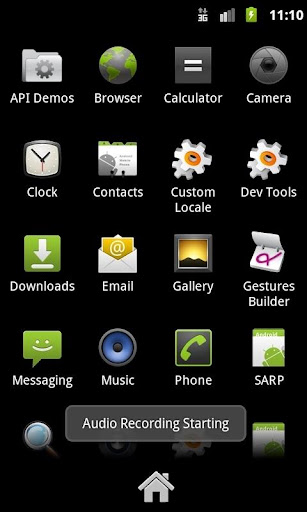
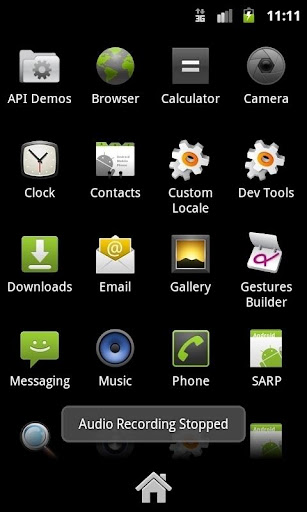
- Text Notifications are shown when Recording Starts and Stops
- Click on the Status Bar Notification to see the Recorded Audio files(s)
- Discrete App Name and Icon
- Installed with the Name SARP and a common Launch Icon, to hide its real purpose
- All Audio Files are stored on the SD Card, in folder /mnt/sdcard/tmp
(Remember to check this folder now and then, and delete the Audio Files that you no longer want to keep.)
- Audio File Names start with SAR_AUDIO_, date and time, and end with .3gp
- On a PC, Audio Files can be played by e.g. QuickTime, which can be downloaded free of charge
- An Audio Sampling Rate of 16 kHz is used, which shoudl be an acceptable compromise between Audio Quality and Recording File Size
- This is NOT a High Quality Sound Stereo Recorder
- Recording File size is approx. 160 kB per minute, corresponding to approx 6 minutes pr MB, or 5 days pr GB!)
- Extremely small apk-file, conserves space on your device
- Note that the Audio Volume is determined by your device only, and not this App
ISSUES:
- This App may not work on some devices.
Download it, and check to see if it works on your device!
HOW TO USE:
1. To Start an Audio Recording, click on the Icon with the Name SARP
A Text Notification will briefly show that the recording has Started
While a Recording is ongoing, the word SAR is shown in the Statur Bar Notification Window (On some devices, the Recording Start Time is also shown)
2. To Stop an Audio Recording, click on the Icon again
A Text Notification will briefly show that the Recording has Stopped
3. To Hear the Audio recorded, click on the Notification Text in the Status Bar, which shows that an Audio File is Recorded
4. The Audio Files are stored in Folder /mnt/sdcard/tmp
You should delete the Files that you do not want to keep
If you want to remove the sound and vibration which you normally hear when you touch a button, use the Menu of your device, normally found at Settings->Sound, and disable the required sounds
(68,- Kc)
Pozadavky: Android 2.3.3 a vyssi
Popis: Aplikace pro skryte (diskretni) nataceni videa.
Screen:
Vice info:
Kód: Vybrat vše
https://play.google.com/store/apps/details?id=com.terboel.sarpKód: Vybrat vše
http://www19.zippyshare.com/v/69826980/file.html
http://www.directmirror.com/files/SHSA83A7
http://www.embedupload.com/?d=2TRJDWQPFSOne of the best Secret Audio Recorders. Extremely easy to use. Just click on the App's Icon to Start or Stop the Recording. During the Recording, the phone can be used for any other normal operation, including Game Playing, Web Browsing and Phone Calls
Use it to Record Audio secretly. Nobody will notice that you are recording
Use this App when you do not need to Record Pictures (i.e. Video). Audio Files only require a fraction of the File Size compared to Video Files
This App will only work on devices with an (internal or external) SD Card, to save the Audio Files on. E.g. It may not work on some HTC devices. Download the App, and check to see if it works on your device!
Use this App to Record Secret Audio in business meetings, lectures, conferences, on work as a spy, etc., while reading the news, browsing the web, sending messages, checking your email account, making phone calls, and for most other purposes (except for making another Recording). You can also black out (or close) the screen - if you want - without affecting the Audio Recording
The difference between the Free Version (SARF) and this PRO version (SARP) is that this version has (for all practical purposes) no short Recording Time Limit. However, in order to protect your device against unwanted huge Audio Files, each Audio Recording is limited to 1 GB, corresponding to a continuous Recording for about FIVE days!
FEATURES:
- Recording starts and stops in the background
- Records Sound/Voices
- One Touch Recording
- No User Interface
- No Configuration or Settings required
- No additional Instructions needed (see below)
- Just click on the Icon to Start or Stop Recording
- Text Notifications are shown when Recording Starts and Stops
- Click on the Status Bar Notification to see the Recorded Audio files(s)
- Discrete App Name and Icon
- Installed with the Name SARP and a common Launch Icon, to hide its real purpose
- All Audio Files are stored on the SD Card, in folder /mnt/sdcard/tmp
(Remember to check this folder now and then, and delete the Audio Files that you no longer want to keep.)
- Audio File Names start with SAR_AUDIO_, date and time, and end with .3gp
- On a PC, Audio Files can be played by e.g. QuickTime, which can be downloaded free of charge
- An Audio Sampling Rate of 16 kHz is used, which shoudl be an acceptable compromise between Audio Quality and Recording File Size
- This is NOT a High Quality Sound Stereo Recorder
- Recording File size is approx. 160 kB per minute, corresponding to approx 6 minutes pr MB, or 5 days pr GB!)
- Extremely small apk-file, conserves space on your device
- Note that the Audio Volume is determined by your device only, and not this App
ISSUES:
- This App may not work on some devices.
Download it, and check to see if it works on your device!
HOW TO USE:
1. To Start an Audio Recording, click on the Icon with the Name SARP
A Text Notification will briefly show that the recording has Started
While a Recording is ongoing, the word SAR is shown in the Statur Bar Notification Window (On some devices, the Recording Start Time is also shown)
2. To Stop an Audio Recording, click on the Icon again
A Text Notification will briefly show that the Recording has Stopped
3. To Hear the Audio recorded, click on the Notification Text in the Status Bar, which shows that an Audio File is Recorded
4. The Audio Files are stored in Folder /mnt/sdcard/tmp
You should delete the Files that you do not want to keep
If you want to remove the sound and vibration which you normally hear when you touch a button, use the Menu of your device, normally found at Settings->Sound, and disable the required sounds