AirPlay/DLNA Receiver (PRO)
Napsal: 26. 10. 2012 14:56
AirPlay/DLNA Receiver (PRO) v1.5.5
Požadavky: Android 2.1+
Popis:
★NOTE: This is a professional version of "AirPlay/DLNA Receiver (LITE)". The professional version works more stably and gives you much better experience.
★If you have installed the (LITE) version(1.4.0 or older) before, please uninstall it first.
★If you install it on Android 3.1 or greater, PLEASE DO RUN THIS APP AT LEAST ONCE AFTER INSTALLATION OR UPDATION(CLICK NOT "DONE" BUTTON BUT "OPEN" BUTTON ON THE INSTALLATION FINISH PAGE,
OR CLICK AirPlay DMR ICON IN THE APP LIST), then the AirPlay DMR auto boot service at every time device booted can be registered to the Android system.
Forget AppleTV. Use your Android device or phone (Android TV/Box are preferred) to receive videos, pictures, and music wirelessly from multiple devices.
Once the app is installed (and you've run it after installation) it runs in the background waiting to receive the media you send to it from another device. Just like you would for a DLNA/UPnP enabled TV or AppleTV.
Send music, videos, or pictures from your iPhone/iPad/Mac via Apple's AirPlay.
Or use your Android Phone/Tablet/PC with a compatible DLNA/UPnP app/program (i.e. iMediaShare, Twonky, UPnPlay, etc) to send media directly to or stream from a home media server (i.e. Serviio, PS3 Media Server, etc) to "AirPlay and DLNA/UPnP Receiver" installed on your Android device or phone.
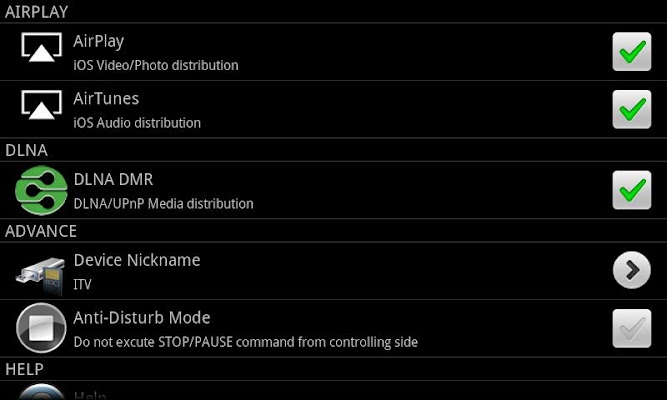
Your "AirPlay and DLNA/UPnP Receiver" device will show up in your other devices app/program as "ITV@" followed by a number. This is the identifier you will send your media to using your other devices. Follow your third party app/program instructions on how to send media from them.
"AirPlay and DLNA/UPnP Receiver" is not a media server. It is a DMR (digital media renderer/receiver) only. It requires the use of other apps/programs to send media to it via AirPlay/DLNA/UPnP to play. All devices must be on the same network to function properly.
Features:
★English Menu
★Support iPad/iPhone/Mac AirPlay
★Support DLNA/UPnP
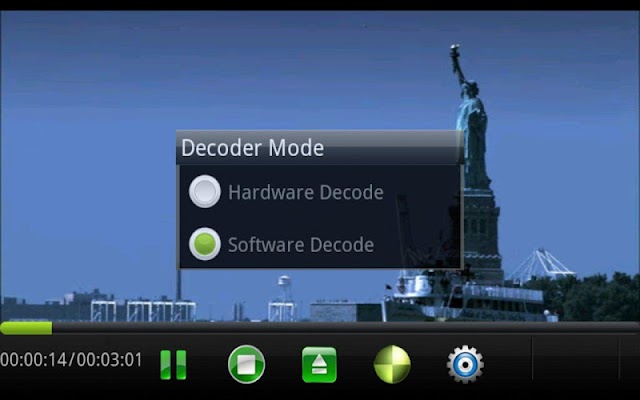
★Software Decoders extend inside
★Background service
★Android 2.1 or greater
What's in this version:
v1.5_R121021
1)AirTunes delay fixed;
2)Stablity improved/Media playing improved;
3)Auto select language;
4)Rockchip box video playing fixed.
Další info:
Download:
Mirror:
Požadavky: Android 2.1+
Popis:
★NOTE: This is a professional version of "AirPlay/DLNA Receiver (LITE)". The professional version works more stably and gives you much better experience.
★If you have installed the (LITE) version(1.4.0 or older) before, please uninstall it first.
★If you install it on Android 3.1 or greater, PLEASE DO RUN THIS APP AT LEAST ONCE AFTER INSTALLATION OR UPDATION(CLICK NOT "DONE" BUTTON BUT "OPEN" BUTTON ON THE INSTALLATION FINISH PAGE,
OR CLICK AirPlay DMR ICON IN THE APP LIST), then the AirPlay DMR auto boot service at every time device booted can be registered to the Android system.
Forget AppleTV. Use your Android device or phone (Android TV/Box are preferred) to receive videos, pictures, and music wirelessly from multiple devices.
Once the app is installed (and you've run it after installation) it runs in the background waiting to receive the media you send to it from another device. Just like you would for a DLNA/UPnP enabled TV or AppleTV.
Send music, videos, or pictures from your iPhone/iPad/Mac via Apple's AirPlay.
Or use your Android Phone/Tablet/PC with a compatible DLNA/UPnP app/program (i.e. iMediaShare, Twonky, UPnPlay, etc) to send media directly to or stream from a home media server (i.e. Serviio, PS3 Media Server, etc) to "AirPlay and DLNA/UPnP Receiver" installed on your Android device or phone.
Your "AirPlay and DLNA/UPnP Receiver" device will show up in your other devices app/program as "ITV@" followed by a number. This is the identifier you will send your media to using your other devices. Follow your third party app/program instructions on how to send media from them.
"AirPlay and DLNA/UPnP Receiver" is not a media server. It is a DMR (digital media renderer/receiver) only. It requires the use of other apps/programs to send media to it via AirPlay/DLNA/UPnP to play. All devices must be on the same network to function properly.
Features:
★English Menu
★Support iPad/iPhone/Mac AirPlay
★Support DLNA/UPnP
★Software Decoders extend inside
★Background service
★Android 2.1 or greater
What's in this version:
v1.5_R121021
1)AirTunes delay fixed;
2)Stablity improved/Media playing improved;
3)Auto select language;
4)Rockchip box video playing fixed.
Další info:
Kód: Vybrat vše
https://play.google.com/store/apps/details?id=com.waxrain.airplaydmrKód: Vybrat vše
http://www64.zippyshare.com/v/24403644/file.htmlKód: Vybrat vše
http://www.embedupload.com/?d=4GEUISIDFH
http://uploadmirrors.com/download/AYLG1FNK/AirPlay_DMR.apk