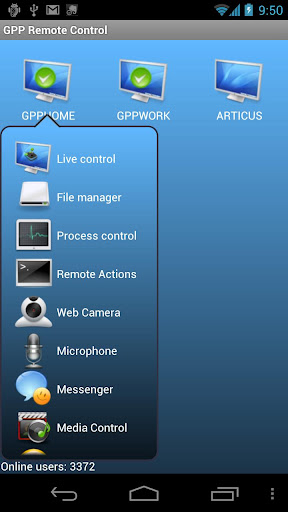
Jste daleko od svého pracovního stolu nebo domácí počítač? Jste naléhavě potřebují soubor z něj? Tento program je pro vás! Program je určen pro vzdálený přístup k počítači. Kde
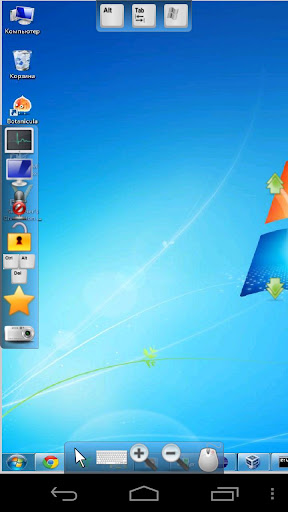
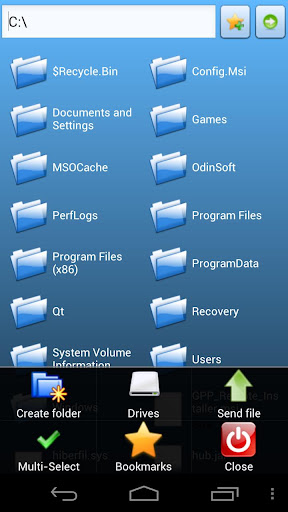
jste, vaše soubory jsou vždy s vámi. Program automaticky najde váš počítač a vyberte nejlepší způsob, jak se k němu připojit. Můžete kopírovat, mazat, stahovat a nahrávat soubory a nainstalovat Android aplikací z počítače na jedno kliknutí. Můžete sledovat obrazovku na vašem PC, sledovat, co se stane s vaší domácnosti prostřednictvím webové kamery, posílání zpráv a další ... Ideální pro rodiče sledování počítače svých dětí využití, zaměstnavatele potvrzující zaměstnanců činnosti nebo podnikání lidí. No nastavení sítě vyžaduje. Nastavení je snadné.
1.Live pohled
2.Live ovládání
3.Webcam Live View
4.Remote souborový manažer
5.Remote řízení procesu
6.Send zprávy
7.Power Správce
8.Media Control
9.Remote Akce
Re: GPP Remote Control
Napsal: 09. 10. 2012 08:24
od tee
Perfektna vecicka, akurat neviem dojst na to ako sa prepina tlacitko mysi... ? Vie mi niekto poradit? V Live pohlade mam nastavene prave tlacitko mysi a vzdy ked kliknem, tak mi vyskoci kontextova ponuka... ako sa to da prepinat? Potrebujem hlavne lave... asi ako vsetci.
Re: GPP Remote Control
Napsal: 30. 10. 2012 08:17
od Gulin
Muze nekdo poradit jak to nastavit? me to vubec nejde, dik.
Re: GPP Remote Control
Napsal: 10. 11. 2012 13:34
od Germanicus
GPP Remote Control v3.5.5
Požadavky: Android 2.1+
What's in this version :
Updated : Nov 9, 2012
•Web Camera in Control mode!
•Improved sound transmission (reduced bitrate and change the priority of audio packets)
•New server(auto update)
•Added a log (it is written to the file log.txt in the app catalog)
Popis:
You are away from their desk or home computer? You urgently need a file from it? This program is for you! The program is designed for remote access to your computer. Wherever
you are, your files are always with you.
The program will automatically find your computer and choose the best way to connect to it. You can copy, delete, download and upload files and install Android apps from your PC in one click.
You can watch screen on your PC, watch what happens to your home via WEBCAM, send messages and other... Perfect for parents monitoring their children’s computer usage, employers verifying employee activities, or business people. No network setup required. Setup is easy.
1.Live view
2.Live control
3.Webcam Live View
4.Remote file manager
5.Remote process control
6.Send messages
7.Power manager
8.Media Control
9.Remote Actions
What's in this version :
(Updated : Nov 18, 2012)
Due to the enormous number of pirated versions we have decided to completely revise the program architecture. Now to enter the program requires an account. We hope for your understanding.
WARNING!
You have to re-create your own list of computers.
What's in this version:
Due to the enormous number of pirated versions we have decided to completely revise the program architecture. Now to enter the program requires an account. We hope for your understanding.
Changes in 1.0.1:
1. Added French and Korean localization
2. Fixed some bugs. Improved stability of the application.
WARNING!
If you are upgrading from version 3.5.x, you will have to re-create your own list of computers.
What's in this version:
Due to the enormous number of pirated versions we have decided to completely revise the program architecture. Now to enter the program requires an account. We hope for your understanding.
Changes in 1.0.4:
1. Added icon to notification bar
2. Fixed some bugs. Improved stability of the application.
WARNING!
If you are upgrading from version 3.5.x, you will have to re-create your own list of computers.