Tactile Player
Napsal: 11. 12. 2012 22:58
Tactile Player v2.1
(20,- Kc)
Pozadavky: Varies with device
Popis: Control your music player with your phone's hard buttons.
Screen:
Video:
What's in this version:
**Hotfix for toggle pause/play while in call**
Tactile Player 2.0 added:
-Now working properly on Android 4 and 4.1
-You must choose the specific media player you want to use in the Tactile Player application.
-Tactile Player will now work properly with most other media players.
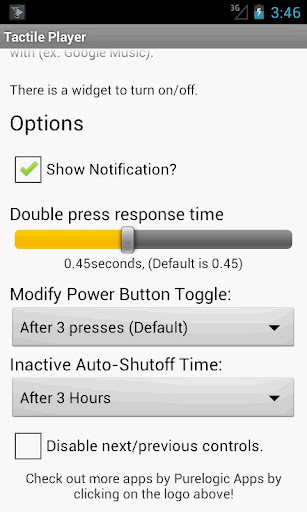
-Now you can adjust the double press response time, lower response times will make changing the volume (instead of skipping tracks) easier.
-You can disable the next/previous controls.
-Updated the UI.
Vice info:
Stahuj zde:
Tactile Player 2.0!
Control your music player with your phone's hard buttons.
Control your music player with your phone's volume and power buttons! Finally you don't have to take out your phone, unlock the screen, and navigate to your music player just to change the song. With Tactile Player you can change the song just by using your phone's volume and power buttons.
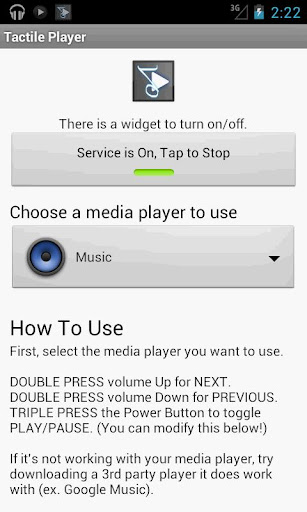
Double Press the volume UP key for NEXT.
Double Press the volume DOWN key for PREVIOUS.
Triple Press the Power key to toggle PAUSE/PLAY. (You can change this to double press or never if you like).
Simple as that.
Tactile Player supports most stock players (the "Music" app) along with third party media players such as:
PowerAMP, Pandora, Google Music, Google Listen, doubleTwist, PlayerPro, Amazon MP3, Mixzing, and most other popular media players (just select the music player that you want use in the application).
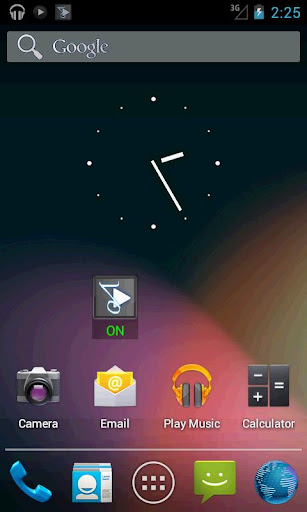
This full version also comes with a widget so you can easily turn the service on and off anytime.
Now you can use your favorite music player and control it with your phone's tactile buttons, thanks to Tactile Player. Try it out.
(20,- Kc)
Pozadavky: Varies with device
Popis: Control your music player with your phone's hard buttons.
Screen:
Video:
What's in this version:
**Hotfix for toggle pause/play while in call**
Tactile Player 2.0 added:
-Now working properly on Android 4 and 4.1
-You must choose the specific media player you want to use in the Tactile Player application.
-Tactile Player will now work properly with most other media players.
-Now you can adjust the double press response time, lower response times will make changing the volume (instead of skipping tracks) easier.
-You can disable the next/previous controls.
-Updated the UI.
Vice info:
Kód: Vybrat vše
https://play.google.com/store/apps/details?id=com.purelogicapps.android.tactileplayerKód: Vybrat vše
http://uloz.to/xAUegPJ/tactile-player-2-1-apk
http://www18.zippyshare.com/v/2924366/file.html
http://www.directmirror.com/files/1DKBBSZAControl your music player with your phone's hard buttons.
Control your music player with your phone's volume and power buttons! Finally you don't have to take out your phone, unlock the screen, and navigate to your music player just to change the song. With Tactile Player you can change the song just by using your phone's volume and power buttons.
Double Press the volume UP key for NEXT.
Double Press the volume DOWN key for PREVIOUS.
Triple Press the Power key to toggle PAUSE/PLAY. (You can change this to double press or never if you like).
Simple as that.
Tactile Player supports most stock players (the "Music" app) along with third party media players such as:
PowerAMP, Pandora, Google Music, Google Listen, doubleTwist, PlayerPro, Amazon MP3, Mixzing, and most other popular media players (just select the music player that you want use in the application).
This full version also comes with a widget so you can easily turn the service on and off anytime.
Now you can use your favorite music player and control it with your phone's tactile buttons, thanks to Tactile Player. Try it out.