



(95,- Kc)
Pozadavky: Android 2.2 a vyssi
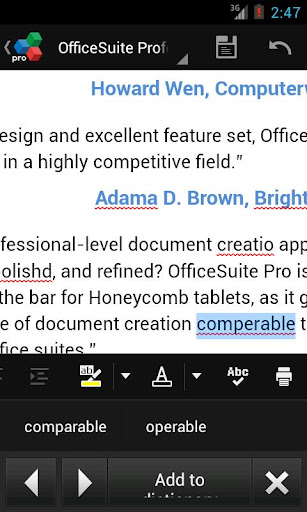
Popis: Improve your typing accuracy and document editing in 40 languages with QuickSpell!
Screen:
What's in this version:
v 2.1.63
* Improvements
Vice info:
Kód: Vybrat vše
https://play.google.com/store/apps/details?id=com.mobisystems.spellcheckerKód: Vybrat vše
http://uloz.to/x9qBTfP/quickspell-v2-1-63-apk
https://mega.co.nz/#!iV0DmAwb!HyccXBaahnxuag2iEee17RMT5pgpxNRBAtU5-3JH_iQ
http://www26.zippyshare.com/v/39540174/file.htmlYou will be able to fix misspelled words easily, by visually locating the underlined errors and correcting them by tapping on suggested replacement words. Applications like Contacts, Calendar, Email, Facebook, etc. along with all spell-check enabled Edit fields and Views are using this functionality by default, provided that Spell Checking is enabled in System Settings.
Offered from the developer of the renowned OfficeSuite, QuickSpell provides full integration with the office productivity application.
*** How is QuickSpell better than the other spelling tools? ***
* QuickSpell offers a range of languages not available in the standard Android spelling tool.
* QuickSpell is based on the well-known and proven Hunspell engine that is used in Chrome, Mac OS X, Firefox, OpenOffice and many others.
* QuickSpell uses a number of proven spell check algorithms such as Morphological analysis, Twofold suffix stripping, Extended affixes and Homonyms, thus dramatically improving the spell check efficiency.
* The spelling dictionaries in QuickSpell are developed and supported by large community efforts.
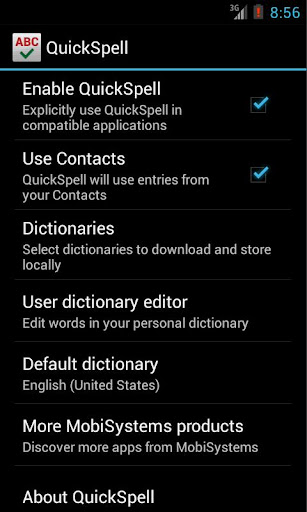
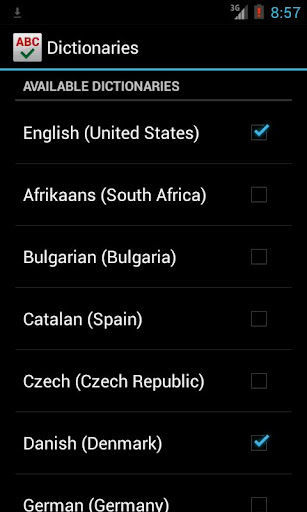
* You can download and store locally only dictionaries that you need.
* You are able to use entries from phone's Contacts list and standard Android user dictionary.
* QuickSpell has a built-in User Dictionary Editor for your convenience.
*** Supported Languages: ***
QuickSpell is available in more than 40 languages.
Users can download and use only spelling dictionaries of their choice.
English (Australia)
English (Canada)
English (United Kingdom)
English (United States)
German (Germany)
Italian (Italy)
French (France)
Spanish (Spain)
……………………………….
Albanian (Albania)
Bulgarian (Bulgaria)
Afrikaans (South Africa)
Catalan (Spain)
Croatian (Croatia)
Czech (Czech Republic)
Danish (Denmark)
Dutch (Netherlands)
Greek (Greece)
Estonian (Estonia)
Faroese (Faroe Islands)
Hebrew (Israel)
Hindi (India)
Hungarian (Hungary)
Indonesian (Indonesia)
Korean (Korea)
Lithuanian (Lithuania)
Latvian (Latvia)
Norwegian Bokmål (Norway)
Polish (Poland)
Portuguese (Brazil)
Portuguese (Portugal)
Romanian (Romania)
Russian (Russia)
Serbo-Croatian (Bosnia and Herzegovina, Croatia)
Slovak (Slovakia)
Slovenian (Slovenia)
Serbian (Serbia)
Swedish (Sweden)
Tamil (India)
Turkish (Turkey)
Ukrainian (Ukraine)
Vietnamese (Vietnam)
*** OS Version Support: ***
* Ice Cream Sandwich Android 4.0 or higher
* The software also works on all devices having Android 2.2 and later with supported by MobiSystems apps as OfficeSuite Pro.
Warning: QuickSpell cannot work as default Android spell checker on heavily customized Android distributions, such as for example Samsung TouchWiz devices. Users with such devices might not be able to see Android Spell Check settings screen and thus not being able to benefit from QuickSpell in the built-in Android applications. However, QuickSpell will continue to work with MobiSystems OfficeSuite Pro.
Please note that on some customized Android 4.0.x device restart might be needed after the initial installation, in order for QuickSpell to appear in Android Spell Checker settings.
*** How to activate QuickSpell? ***
After installation, go to Settings->Language and input->Spell checker (if available on your device) in order to select QuickSpell as default Android spell check provider.
*** Privacy Statement ***
At MobiSystems we take your privacy very seriously – QuickSpell will never collect your personal data, like passwords or credit card numbers. Internet access permission is used to download dictionaries only.


