



Pozadavky: Android 2.2 a vyssi
Popis: Helium is the missing app sync and backup solution for Android.
Helium does NOT require root. All Android users can use Helium to backup and sync Android applications.
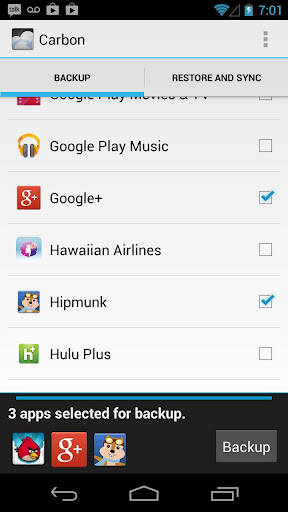
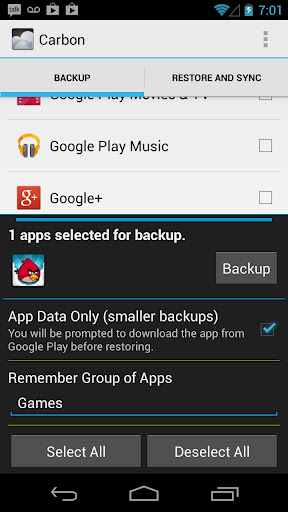
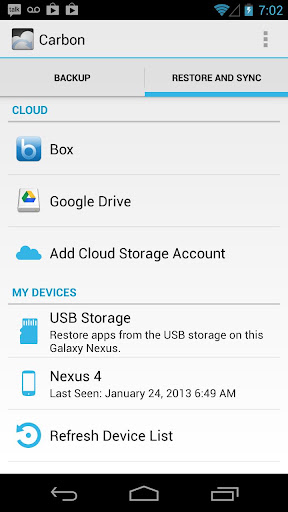
Helium lets you backup your apps and data to your SD card or cloud storage. With Helium, you can sync app data from your other Android devices-- even if they are not on the same network. Set up backup schedules with Helium, and never lose data again.
Screen:
Video:
What's in this version:
Carbon has been renamed to "Helium" (trademark issue)
Cloud backups are now managed separately per device
Wifi settings can now be backed up (root required)
Backup dates are now shown for apps
Backup are now more error tolerant, if an app backup fails, Helium will continue to the next app
Fix Google drive double upload bug
Cancelled scheduled backups will show a notice if not on wifi or charging
Fix PC restore
Add support for bulk deletes
Fix bug where external sdcard restore required premium
Helium (Premium) features:
No ads
Automatic Backup schedules
Android to Android sync
Cloud backup and restore
* Dropbox
* Box
* Google Drive
Vice info:
Kód: Vybrat vše
https://play.google.com/store/apps/details?id=com.koushikdutta.backupKód: Vybrat vše
http://uloz.to/xjts4ttg/carbon-premium-app-sync-and-backup-v1-1-0-1-apk
https://mega.co.nz/#!KpRymaZC!Dwcz6WHTdHBG2wut64PvbG4sEisOnmAtMkgxnoaEc-U
http://www38.zippyshare.com/v/44755351/file.html1. Install Helium on Android
a) Root user? You're done!
2. Install and run Helium Desktop (link below)
3. Connect Android to computer.
a) You may need to set your USB Connection Mode to "PTP". (Nexus 7, Nexus 10, etc)
4. Helium on Android should now be enabled.
Helium (Free) features:
Backup and restore to SD card
Backup and restore from PC
Note: Helium is NOT available to Motorola devices. This is because Motorola phones have a bug that break Android's backup mechanism. Until this is fixed by Motorola, Helium will not work on those Androids.
Note: Some Sony devices have issues with Helium. This includes the Xperia S and Xperia Z. Sony has *disabled* backup on these devices completely.
Why do you need so many Permissions?
Contacts - Backup call log and sms
SMS - Backup call log and sms
Accounts - Backup and restore from Drive
Phone State - Uniquely identify phone for Android to Android sync
Read Logs - Debugging and bug reports
Wifi - Make sure scheduled backups only happen on wifi


