Veškeré programy pro Androidy.
4 příspěvky •Stránka 1 z 1

Kakudo Pro

Veškeré programy pro Androidy.
Uživatelský avatar
Kamilos
Moderátor
Zařízení:
SG S9+, SG Gear S3 Frontier
Příspěvky:
34228
Registrován:
24. 12. 2006 00:13
Odesláno:
25. 05. 2013 01:01
Kakudo Pro
Kakudo Pro v1.2

(20,- Kc)

Pozadavky: Android 2.3 a vyssi
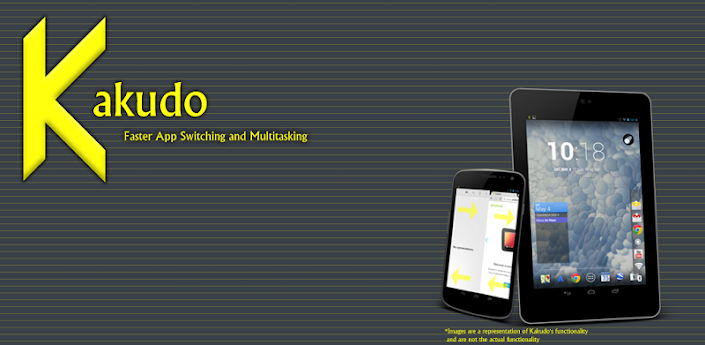
Popis: Introducing Kakudo Pro an app for faster app switching and multitasking.

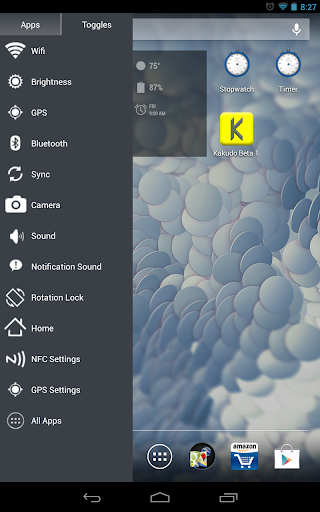
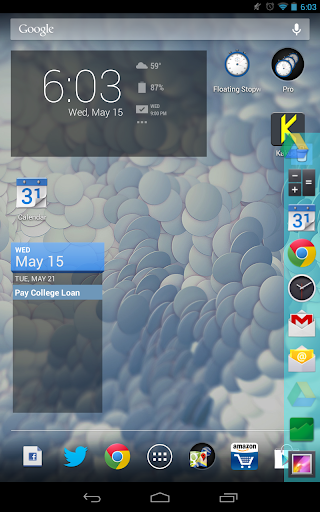
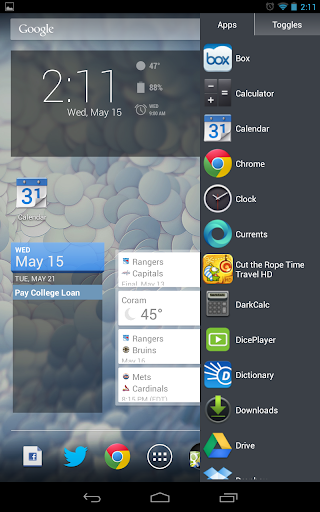
Screen:
Obrázek

Obrázek Obrázek Obrázek


Video:


What's in this version:
**1.2**
------WARNING
IF IMAGES ARE INCORRECT AFTER UPDATE DELETE THEM AND PUT THEM BACK INTO THE FAV APPS DRAWER
------
-Home button, GPS and NFC Settings added to toggles
-Fixed NoClassDefinition crash on 2.3 devices
-Fixed Kakudo starting on boot when unchecked
**1.1**
-Three new toggles (Sound, Notification Sound, Rotate Lock
-New app icon
-Haptic feedback for touches
-Stability fixes in settings menu

Vice info:

Kód: Vybrat vše

https://play.google.com/store/apps/details?id=com.acelaapps.kakudopro
Stahuj zde:

Kód: Vybrat vše

http://uloz.to/xxXt66Tk/kakudo-pro-v1-2-apk
https://mega.co.nz/#!nB5DkAKZ!dx7Ac3Zm0jYlFGG0eddz53ccRsVbX0EbFh3RyGbH2IE
http://www54.zippyshare.com/v/3943551/file.html
WHAT IT DOES:
Kakudo allows users to switch between apps faster by just swiping. Swiping from the left or right sides of their devices opens the most recent open apps. If you want to copy text from a website to paste in a document, Kakudo makes it easier and faster to switch back and forth between your apps. Swiping up from the bottom and adding your most used apps to the Favorite Apps Drawer allows you to open your favorite apps without having to navigate back to the homescreen to do so. Adding toggles to the Favorite Apps Drawer allows you to turn them on without having to leave the app your currently in or to just check to see if the toggle is on/off since Kakudo's toggles show whether they are on/off.

Kakudo is also ergonomically designed to make it easier to use on larger screens. It's easier for your thumb to reach down when holding your device in the middle instead of up.

FEATURES:
- Swipe from the left or right to cycle through recent open apps
- Swipe from the bottom to open your Favorite Apps Drawer
- Add your most used apps/toggles to the Favorite Apps Drawer
- Unlimited apps/toggles on Favorite Apps Drawer
- Choose to start on boot
- Toggles indicate whether they are on/off
- Drag and Drop to reorder/remove apps/toggles from the Favorite Apps Drawer (Android Honeycomb and Above)
- Favorite Apps Drawer ergonomically design for easier use
- Minimal RAM/CPU footprint and closes fully when turned off
- Change sensitivity and size of swipe detection areas
- Adjust Icon size to best suit your preferences
- Favorite Apps Drawer on the Right Side
- Change gravity location of side swipe detection areas
- Customize Favorite Apps Drawer Color and Opacity
-Choose from 8 Color Schemes or Create your Own
- Disable Notification Icon

-Languages Supported:
English, Spanish, German, French, Italian, Russian, Hungarian, Chinese, Portuguese, Polish, Romanian

- Additional features to come...
Moderátor
Uživatelský avatar
Kamilos
Moderátor
Zařízení:
SG S9+, SG Gear S3 Frontier
Příspěvky:
34228
Registrován:
24. 12. 2006 00:13
Odesláno:
01. 06. 2013 00:31

Re: Kakudo Pro

Kakudo Pro v2.0.1


What's in this version:
KAKUDO 2.0:
**PLEASE CLEAR APP DATA OR UNINSTALL THEN REINSTALL BEFORE USING THE NEW UPDATE**
-New Settings Menu
-All Apps toggle
-True Swipe detection
-Imporved detection areas for Higher Res devices
Introducing:
-One-Side:
Have the swipe detection area on one-side, swipe up/down to cycle through apps
-All Recent Apps Window
Long Swipe or 2 finger Swipe to see All Recent Apps
Hold down to kill background processes
-Multi-Touch
Use 2 fingers for fast switching between apps

Vice info:

Kód: Vybrat vše

https://play.google.com/store/apps/details?id=com.acelaapps.kakudopro
Stahuj zde:

Kód: Vybrat vše

http://uloz.to/xgtb3i51/kakudo-pro-v2-0-1-apk
https://mega.co.nz/#!LEoVCTpZ!E56HL05047mDUN2r9ufCxnjbsZlTeo1N56zxsfA3gOE
http://www47.zippyshare.com/v/43833383/file.html
Moderátor
Uživatelský avatar
Kamilos
Moderátor
Zařízení:
SG S9+, SG Gear S3 Frontier
Příspěvky:
34228
Registrován:
24. 12. 2006 00:13
Odesláno:
05. 06. 2013 00:15

Re: Kakudo Pro

Kakudo Pro v2.0.2


What's in this version:
**2.0.2**
-Fixed keyboard closing when accidentally touching detection area
-Improved Italian Translations
-Minor bug fixes
KAKUDO 2.0:
-New Settings Menu
-True Swipe detection
Introducing:
-One-Side:
Have the swipe detection area on one-side, swipe up/down to cycle through apps
-All Recent Apps Window
Long Swipe or 2 finger Swipe to see All Recent Apps
Hold down to kill background processes
-Multi-Touch
Use 2 fingers for fast switching between apps

Vice info:

Kód: Vybrat vše

https://play.google.com/store/apps/details?id=com.acelaapps.kakudopro
Stahuj zde:

Kód: Vybrat vše

http://uloz.to/xvxPAH2G/kakudo-pro-v2-0-2-apk
https://mega.co.nz/#!2NB0Ha6J!OszT52ij0JgW7MCpuT2cM1zHcCl8HfpUSWp7Ltyawd8
http://www25.zippyshare.com/v/44152466/file.html
Moderátor
Uživatelský avatar
Kamilos
Moderátor
Zařízení:
SG S9+, SG Gear S3 Frontier
Příspěvky:
34228
Registrován:
24. 12. 2006 00:13
Odesláno:
28. 08. 2013 22:01

Re: Kakudo Pro

Kakudo Pro v2.1


What's in this version:
**2.1**
Added a Recent Apps Section in Settings
-Control the long swipe distance
-Change the theme of the recent apps window
-Change the background color of recent apps window
-Option to use Long Swipe only, Multi Touch only, or Both

Vice info:

Kód: Vybrat vše

https://play.google.com/store/apps/details?id=com.acelaapps.kakudopro
Stahuj zde:

Kód: Vybrat vše

http://uloz.to/xvgTa42G/kakudo-pro-v2-1-4allmobile-eu-apk
https://mega.co.nz/#!sw1TDBIL!H8AL0D1sRzGjSrRZp5F5ZUz9Bp40PQTBmsLi6aOHpM4
http://www33.zippyshare.com/v/14715468/file.html
Moderátor
4 příspěvky •Stránka 1 z 1