AFV - Donate
Napsal: 12. 01. 2014 20:54
AFV - Donate v2.3
(20,- Kc)
Pozadavky: Android 2.2 a vyssi
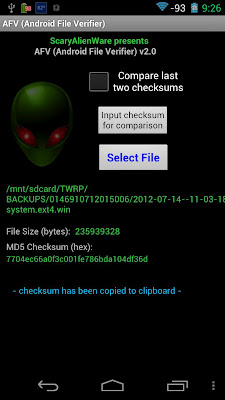
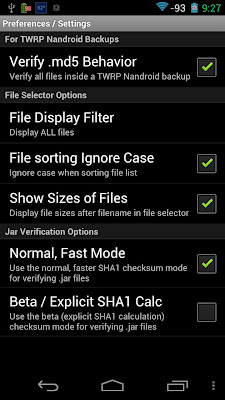
Popis: The AFV (Android File Verifier) application is a tool for helping to verify & validate that files transferred to your Android device are whole and uncorrupted.
Screen:
What's in this version:
[version 2.3 - 11-Jan-2014]:
- fix issue w/verifying TWRP Nandroid backups [thanks to Marc M. for the kind heads-up re. this]
Vice info:
Stahuj zde:
The AFV (Android File Verifier) application is a tool for helping to verify & validate that files transferred to your Android device are whole and uncorrupted. Functions include:
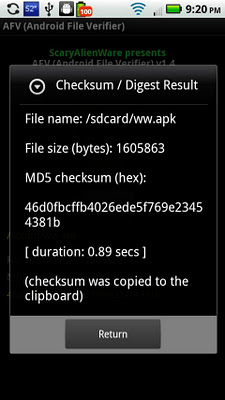
* MD5 / SHA1 checksum/digest calculation (also supports SHA-224, SHA-256, SHA-384, SHA-512 algorithms)
* Validation of signed jar-type files (.jar, .apk, .zip); you can use this to verify a signed .zip file even if you don't know the MD5 checksum
* Nandroid backup directory MD5 verification (i.e., verify backups created by custom recoveries such as ClockworkMod, Amon_RA, TWRP)
Excellent tool for root users (but does not require root).
How To Use:
* From the home screen, press the "Select File" button to enter the file-selector
* Top row (folder icon with the green up arrow) always displays the currently selected directory (touch this row to navigate UP one directory level)
* Back key can also be used to navigate UP one directory level (will return to main screen when back key is pressed at the root directory)
* Navigate to other subdirectories by touching a directory row (folder icon)
* Touch screen and drag up and down to scroll through all files and directories in currently selected directory
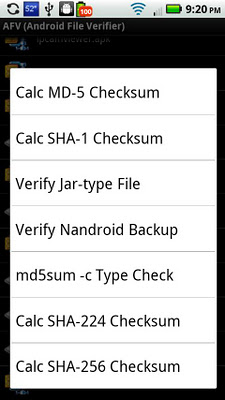
* Long-press on a file to view the available functions:
- Calc MD5 Checksum
- Calc SHA1 Checksum
- Verify Jar-type file
- Verify Nandroid Backup (long-press backup folder name or long-press nandroid.md5 file to verify the backup)
- md5sum -c Type Check (operates on any .md5 file)
- Calc SHA224 Checksum
- Calc SHA256 Checksum
- Calc SHA384 Checksum
- Calc SHA512 Checksum
(20,- Kc)
Pozadavky: Android 2.2 a vyssi
Popis: The AFV (Android File Verifier) application is a tool for helping to verify & validate that files transferred to your Android device are whole and uncorrupted.
Screen:
What's in this version:
[version 2.3 - 11-Jan-2014]:
- fix issue w/verifying TWRP Nandroid backups [thanks to Marc M. for the kind heads-up re. this]
Vice info:
Kód: Vybrat vše
https://play.google.com/store/apps/details?id=sa.afv.donateKód: Vybrat vše
http://www73.zippyshare.com/v/48759836/file.html
http://www.tusfiles.net/pap4kuitv88o
http://uloz.to/xKnVHBeW/afv-donate-v2-3-apk
http://ulozto.sk/xAD9WuXu/afv-donate-v2-3-apk
http://ul.to/9d7dzelx
http://www.kingfiles.net/353ihiuzmz7z
http://turbobit.net/glda0wlz8v5a.html
http://unlimitzone.com/1ky1bym7mfnb* MD5 / SHA1 checksum/digest calculation (also supports SHA-224, SHA-256, SHA-384, SHA-512 algorithms)
* Validation of signed jar-type files (.jar, .apk, .zip); you can use this to verify a signed .zip file even if you don't know the MD5 checksum
* Nandroid backup directory MD5 verification (i.e., verify backups created by custom recoveries such as ClockworkMod, Amon_RA, TWRP)
Excellent tool for root users (but does not require root).
How To Use:
* From the home screen, press the "Select File" button to enter the file-selector
* Top row (folder icon with the green up arrow) always displays the currently selected directory (touch this row to navigate UP one directory level)
* Back key can also be used to navigate UP one directory level (will return to main screen when back key is pressed at the root directory)
* Navigate to other subdirectories by touching a directory row (folder icon)
* Touch screen and drag up and down to scroll through all files and directories in currently selected directory
* Long-press on a file to view the available functions:
- Calc MD5 Checksum
- Calc SHA1 Checksum
- Verify Jar-type file
- Verify Nandroid Backup (long-press backup folder name or long-press nandroid.md5 file to verify the backup)
- md5sum -c Type Check (operates on any .md5 file)
- Calc SHA224 Checksum
- Calc SHA256 Checksum
- Calc SHA384 Checksum
- Calc SHA512 Checksum