CLZ Music
Napsal: 28. 01. 2014 17:07
CLZ Music v1.1.4
(99,- Kc)
Pozadavky: Android 1.6 a vyssi
Popis: Then CLZ Music is a great companion, to browse, sort and
search your music collection (and your wish list!) on your Android device.
Screen:

What's in this version:
Added:
- Improved sorting:
- Artist: albums by the same artist are now sorted by Title.
- Year: albums in the same year are now sorted by Artist then Title.
- New Help option (click the Menu button on your device),
that lets you Search the FAQ or Contact Support straight from the app.
- Import feature is now compatible with upcoming updates of Win/Mac software.
- High resolution app icon.
Fixed:
- Crashes on Galaxy Note 10.1
- Crash when deleting database
Vice info:
Stahuj zde:
Features:
* Import your collection data and images from the Windows or Mac edition
- Use Wi-Fi to transfer directly from Windows or Mac to your iPhone.
- Or: Export to a file in the Win/Mac version, then copy the file to
your Android's SD card.
* Browse your In Collection items, your Wish List, or your entire database,
using the 3 main tabs on the top left: All, Collection, Wish List
* View your album lists in 2 different views:
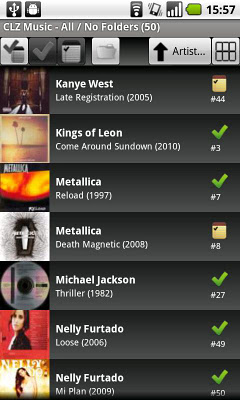
- List : showing a small cover image, artist, title, year, index nr & status.
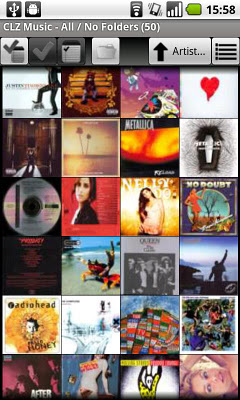
- Thumbnail Wall: just cover image thumbnails, but lots of em.
* Sort your album lists by Artist, Title, Year, Index, asc. or desc.
* Search your database by Artist, Title, Track Title or Barcode
* Group your items into folders. Choose from:
Artist, Genre, Composer, Label, Year, Format, Location, Rating and more...
* Tap an album in any view to go to the Album Details page:
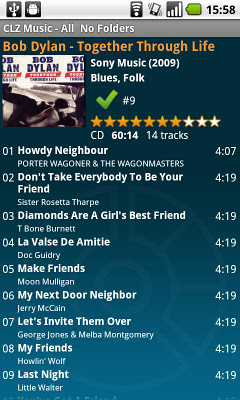
- Cover image, artist, title, track list, etc.. and your personal information.
- Use the Prev/Next go the previous or next album, or just swipe.
- Shake iPhone to go to a random album in your current list.
- Choose from 4 styles: Blue, Black, Orange, White
* Tap small cover image on Details Page to go the Large Cover Page:
- Use the Prev/Next go the previous or next album, or just swipe.
- Tap the image to return to Details Page.
* Supports Portrait and Landscape modes in all views and pages.
REQUIREMENTS:
- Music Collector 9.2 for Windows (or newer).
or
- Music Collector 3.4 for Mac OS X (or newer)
RECOMMENDED (needed to transfer data over Wi-Fi):
- Wi-Fi connection to the same local network that your desktop computer is in.
- Apple Bonjour service.
(99,- Kc)
Pozadavky: Android 1.6 a vyssi
Popis: Then CLZ Music is a great companion, to browse, sort and
search your music collection (and your wish list!) on your Android device.
Screen:
What's in this version:
Added:
- Improved sorting:
- Artist: albums by the same artist are now sorted by Title.
- Year: albums in the same year are now sorted by Artist then Title.
- New Help option (click the Menu button on your device),
that lets you Search the FAQ or Contact Support straight from the app.
- Import feature is now compatible with upcoming updates of Win/Mac software.
- High resolution app icon.
Fixed:
- Crashes on Galaxy Note 10.1
- Crash when deleting database
Vice info:
Kód: Vybrat vše
https://play.google.com/store/apps/details?id=com.collectorz.javamobile.android.musicKód: Vybrat vše
http://adf.ly/ck97h
http://ul.to/5wa9uwmm
http://depositfiles.com/files/70uerqa0o
http://www75.zippyshare.com/v/37741316/file.html
http://www.tusfiles.net/za1rp5hpx30r
http://uloz.to/xzo1BP51/clz-music-v1-1-4-apk
http://ulozto.sk/xwxEqjPD/clz-music-v1-1-4-apk* Import your collection data and images from the Windows or Mac edition
- Use Wi-Fi to transfer directly from Windows or Mac to your iPhone.
- Or: Export to a file in the Win/Mac version, then copy the file to
your Android's SD card.
* Browse your In Collection items, your Wish List, or your entire database,
using the 3 main tabs on the top left: All, Collection, Wish List
* View your album lists in 2 different views:
- List : showing a small cover image, artist, title, year, index nr & status.
- Thumbnail Wall: just cover image thumbnails, but lots of em.
* Sort your album lists by Artist, Title, Year, Index, asc. or desc.
* Search your database by Artist, Title, Track Title or Barcode
* Group your items into folders. Choose from:
Artist, Genre, Composer, Label, Year, Format, Location, Rating and more...
* Tap an album in any view to go to the Album Details page:
- Cover image, artist, title, track list, etc.. and your personal information.
- Use the Prev/Next go the previous or next album, or just swipe.
- Shake iPhone to go to a random album in your current list.
- Choose from 4 styles: Blue, Black, Orange, White
* Tap small cover image on Details Page to go the Large Cover Page:
- Use the Prev/Next go the previous or next album, or just swipe.
- Tap the image to return to Details Page.
* Supports Portrait and Landscape modes in all views and pages.
REQUIREMENTS:
- Music Collector 9.2 for Windows (or newer).
or
- Music Collector 3.4 for Mac OS X (or newer)
RECOMMENDED (needed to transfer data over Wi-Fi):
- Wi-Fi connection to the same local network that your desktop computer is in.
- Apple Bonjour service.