BootManager Donate
Napsal: 11. 02. 2014 23:38
BootManager Donate v1.4.7
(110,- Kc)
Pozadavky: Android 4.0.3 +/Xposed
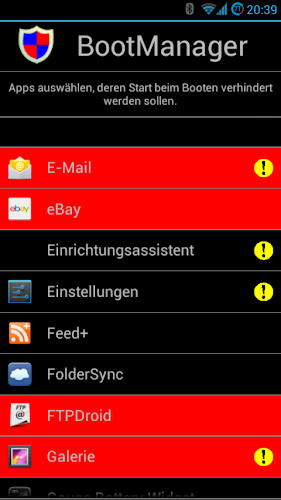
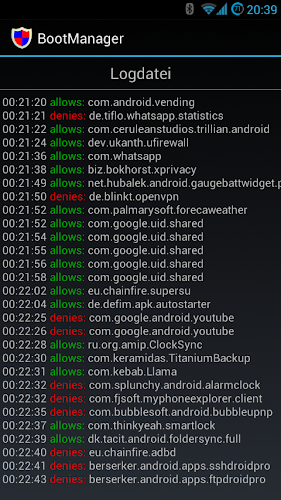
Popis: With this app modul you could prevent selected apps of running on system startup. Only apps with the permission BOOT_COMPLETED are shown in the list. System apps are marked with an exclamation mark.
Screen:
What's in this version:
Translation: Korean
Translation: Italian
Some other small improvements
Vice info:
Stahuj zde:
Description for non-developers:
Each app with permission "android.permission.RECEIVE_BOOT_COMPLETED" is placed in a (Windows slang) "startup folder". For my 200 installed apps that are about 33%. On system boot every of these apps gets started. Possible options:
- app shows a notification
- app starts a (hidden) service in background
- app exits again (eg user has set an option)
If you disable an app in the BootManager it does not get that event and is not started at *next system boot*.
ReceiverStop
An app still starts at system boot? Android has many other events which could start an app!
Example: Skype has the permission "android.permission.MOUNT_UNMOUNT_FILESYSTEMS". This means, (again Windows slang) if you insert a DVD into you drive, "autorun" is executed and starts Skype.
Note: As your sd-card is mostly always inserted, this could be used to start apps at system boot....
Other triggers are: A BlueTooth device (dis-)connect, connection type changes (2g/3g/wlan) or power adapter is (un-)plugged.
All these could be restriced with my other app "ReceiverStop". Be carefull and do not disable the wrong.
(110,- Kc)
Pozadavky: Android 4.0.3 +/Xposed
Popis: With this app modul you could prevent selected apps of running on system startup. Only apps with the permission BOOT_COMPLETED are shown in the list. System apps are marked with an exclamation mark.
Screen:
What's in this version:
Translation: Korean
Translation: Italian
Some other small improvements
Vice info:
Kód: Vybrat vše
https://play.google.com/store/apps/details?id=de.defim.apk.bootmanager
https://play.google.com/store/apps/details?id=de.defim.apk.bootmanager.donatorKód: Vybrat vše
http://ul.to/5arzfz7y
http://www.kingfiles.net/3dkdv8tyx888/7pldjfhB.rar
http://hugefiles.net/1td0im95mgwu
http://www.tusfiles.net/9qe06ej4ip3d
http://www41.zippyshare.com/v/47054574/file.html
http://www.tusfiles.net/7q75kfny4w0p
http://uloz.to/xaEZKzTk/bootmanager-donate-v1-4-7-apk
http://ulozto.sk/xfNFYjPD/bootmanager-donate-v1-4-7-apkEach app with permission "android.permission.RECEIVE_BOOT_COMPLETED" is placed in a (Windows slang) "startup folder". For my 200 installed apps that are about 33%. On system boot every of these apps gets started. Possible options:
- app shows a notification
- app starts a (hidden) service in background
- app exits again (eg user has set an option)
If you disable an app in the BootManager it does not get that event and is not started at *next system boot*.
ReceiverStop
An app still starts at system boot? Android has many other events which could start an app!
Example: Skype has the permission "android.permission.MOUNT_UNMOUNT_FILESYSTEMS". This means, (again Windows slang) if you insert a DVD into you drive, "autorun" is executed and starts Skype.
Note: As your sd-card is mostly always inserted, this could be used to start apps at system boot....
Other triggers are: A BlueTooth device (dis-)connect, connection type changes (2g/3g/wlan) or power adapter is (un-)plugged.
All these could be restriced with my other app "ReceiverStop". Be carefull and do not disable the wrong.