Ray Pro Sidebar Launcher
Napsal: 18. 02. 2014 13:01
Ray Pro Sidebar Launcher v1.2.1
(41,- Kc)
Pozadavky: Android 2.1 a vyssi + modded Google Play
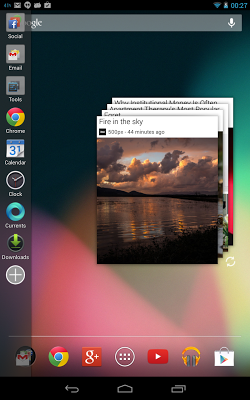
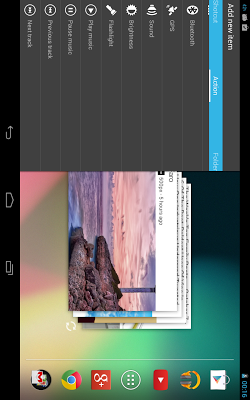
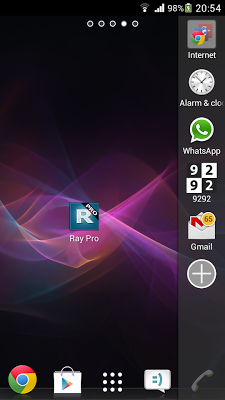
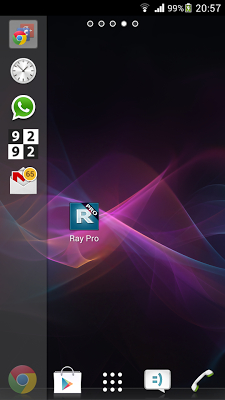
Popis: Stylish and extremely easy to use, Ray Pro lets you access and multitask between your favorite apps from anywhere by simply swiping your finger from the edge of the screen. It has all the functionality you need to customize your tailor-made, fast and hassle-free multitasking sidebar.
Screen:
What's in this version:
1.2.1:
- Added: links to an extensive online tutorial and FAQ under <b>Settings -> Help</b>
- Fixed: Changes after renaming folders or selecting custom icons do not show up immediately
- Fixed (Ray Pro only): The short general tutorial tells the user to swipe from the left edge of the screen, even if sidebar position is set to Right
Vice info:
Stahuj zde:
Stylish and extremely easy to use, Ray Pro lets you access and multitask between your favorite apps from anywhere by simply swiping your finger from the edge of the screen. It has all the functionality you need to customize your tailor-made, fast and hassle-free multitasking sidebar.
Ray Pro is suitable for both casual and power users due to its clean minimalistic design and flexibility.
In addition to all Ray features, Ray Pro offers:
- No advertising button (“Free apps”)
- Unlimited number of apps, shortcuts, actions and folders
- Choose between left or right sidebar alignment
- Adjust the text size and color of the item labels
- Add “Running apps” action with task management functionality (kill unwanted apps)
- Icon pack support (load app icons from ADW, Apex, Nova and some Go Launcher themes and icon packs)
- Unread counts for: missed calls, unread SMS and emails as well as any app that displays notifications, including: WhatsApp, Facebook, Skype, Viber, etc.
Base features of Ray:
- Add your favorite apps and shortcuts
- Add "actions" such as: app drawer, toggle Wi-Fi, toggle mobile data, screen brightness, etc.
- Organize your items (apps, shortcuts and actions) in folders*
- Option to remain open after launching apps and shortcuts - for even faster multi-tasking
- Easily rearrange items and remove unwanted ones
- Option to disable further addition, removal and rearrangement of items
- Adjust swipe area position and size
- Adjust the sidebar’s width
- Automatically adjust icon size, depending on the width of the sidebar
- Adjust the sidebar’s background color and transparency
- Adjust speed of the sidebar’s opening and closing animation
- Enable/disable showing item labels
*The free version of Ray is limited to 8 items or 7 items + 1 folder with up to 8 additional items in the folder
(41,- Kc)
Pozadavky: Android 2.1 a vyssi + modded Google Play
Popis: Stylish and extremely easy to use, Ray Pro lets you access and multitask between your favorite apps from anywhere by simply swiping your finger from the edge of the screen. It has all the functionality you need to customize your tailor-made, fast and hassle-free multitasking sidebar.
Screen:
What's in this version:
1.2.1:
- Added: links to an extensive online tutorial and FAQ under <b>Settings -> Help</b>
- Fixed: Changes after renaming folders or selecting custom icons do not show up immediately
- Fixed (Ray Pro only): The short general tutorial tells the user to swipe from the left edge of the screen, even if sidebar position is set to Right
Vice info:
Kód: Vybrat vše
https://play.google.com/store/apps/details?id=com.sunspot.ray.proKód: Vybrat vše
http://www.tusfiles.net/jie712qtedkz
http://rapidgator.net/file/0266bcc84388253cdc5779f3560b292c/Ray_Pro_1.2.1.apk.html
http://unlimitzone.com/vkl83w8jlo1l/Ray_Pro_1.2.1.apk.html
http://www45.zippyshare.com/v/111742/file.html
http://www.tusfiles.net/tawe9neyfjmx
http://uloz.to/xQzaA62G/ray-pro-v1-2-1-apk
http://ulozto.sk/xZFC2NBZ/ray-pro-v1-2-1-apk
https://www.tusfiles.net/j5a7b93wolu6
http://rapidgator.net/file/d9052d9a250fc75874af9a0d80a856ca/Ray.Pro.v.1.2.1.b.47.crk.apk.html
http://unlimitzone.com/l3zhlh0t6lwx/Ray.Pro.v.1.2.1.b.47.crk.apk.htmlRay Pro is suitable for both casual and power users due to its clean minimalistic design and flexibility.
In addition to all Ray features, Ray Pro offers:
- No advertising button (“Free apps”)
- Unlimited number of apps, shortcuts, actions and folders
- Choose between left or right sidebar alignment
- Adjust the text size and color of the item labels
- Add “Running apps” action with task management functionality (kill unwanted apps)
- Icon pack support (load app icons from ADW, Apex, Nova and some Go Launcher themes and icon packs)
- Unread counts for: missed calls, unread SMS and emails as well as any app that displays notifications, including: WhatsApp, Facebook, Skype, Viber, etc.
Base features of Ray:
- Add your favorite apps and shortcuts
- Add "actions" such as: app drawer, toggle Wi-Fi, toggle mobile data, screen brightness, etc.
- Organize your items (apps, shortcuts and actions) in folders*
- Option to remain open after launching apps and shortcuts - for even faster multi-tasking
- Easily rearrange items and remove unwanted ones
- Option to disable further addition, removal and rearrangement of items
- Adjust swipe area position and size
- Adjust the sidebar’s width
- Automatically adjust icon size, depending on the width of the sidebar
- Adjust the sidebar’s background color and transparency
- Adjust speed of the sidebar’s opening and closing animation
- Enable/disable showing item labels
*The free version of Ray is limited to 8 items or 7 items + 1 folder with up to 8 additional items in the folder