NiLS Floating Panel
Napsal: 19. 02. 2014 11:03
NiLS Floating Panel v1.0.4 (Patched) w/ Themes
(Patched)
Pozadavky: Android 4.0 a vyssi
Popis: NiLS Floating Panel is an extension app for NiLS - Notifications on Lock Screen.
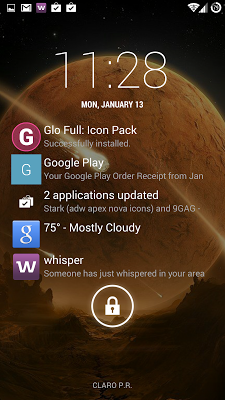
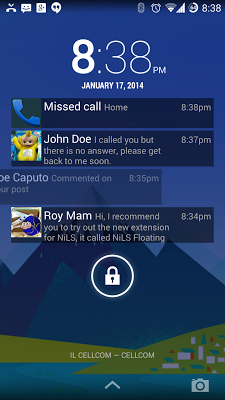
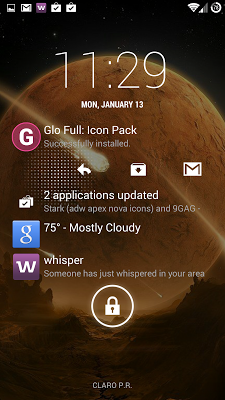
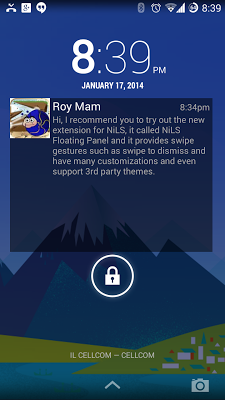
Screen:
Video:
What's in this version:
v1.0.5.1:
1. Added animations (on add, update or removal of a notification)
2. Fit preview height to content when smaller.
3. Fixed a crash on notifications with no icon.
4. Fixed thin line bug.
5. Fixed a bug with center/bottom vertical alignment.
v1.0.4:
1. Significantly reduced memory usage
2. Improved Always Visible mode.
3. Allow theme background transparency
4. Swipe down to dismiss all is now optional
5. Fixed a crashes on some devices.
Vice info:
Stahuj zde:
Themes
Works with almost any lock screen
It displayed on top of your lock screen, no matter if it support lock screen widgets or not and it don't need a widget to be placed. it supported on all native lock screens, WidgetLocker, Cover and many more.
Swiping Gestures
- Swipe notification left or right to dismiss.
- Swipe notifications list down to dismiss all.
- Swipe notification icon right to open notification or perform additional actions.
- Click to show a preview, scroll down or up in the preview to read all text.
Highly Customizable (Premium)
- Set position and size, anywhere you want on your lock screen.
- Set any colors you want as your title color, text color, icon background and notification background.
- Use 3rd party themes for great looking notifications. try TearDrop theme example: goo.gl/rlLPzT,
NiLS FP requires NiLS v1.3 to be up and running.
Installation:
1. Install NiLS from Google Play
2. Follow NiLS instructions and enable the service.
3. DO NOT Add NiLS widget to your lock screen.
4. Install NiLS FP.
5. Lock your screen, when you'll get a notification, it will be displayed on a floating panel above your lock screen. long click it to resize and set position, or go to NiLS FP settings to set up colors and alignment.
(Patched)
Pozadavky: Android 4.0 a vyssi
Popis: NiLS Floating Panel is an extension app for NiLS - Notifications on Lock Screen.
Screen:
Video:
What's in this version:
v1.0.5.1:
1. Added animations (on add, update or removal of a notification)
2. Fit preview height to content when smaller.
3. Fixed a crash on notifications with no icon.
4. Fixed thin line bug.
5. Fixed a bug with center/bottom vertical alignment.
v1.0.4:
1. Significantly reduced memory usage
2. Improved Always Visible mode.
3. Allow theme background transparency
4. Swipe down to dismiss all is now optional
5. Fixed a crashes on some devices.
Vice info:
Kód: Vybrat vše
https://play.google.com/store/apps/details?id=com.roymam.android.nilsplusKód: Vybrat vše
http://www74.zippyshare.com/v/82661846/file.html
http://www.2shared.com/file/9TcUYb2B/nil-unlocked.html
http://www.mediafire.com/download/v6kyuj09vgbzjul/nil-unlocked.apk
Kód: Vybrat vše
http://www74.zippyshare.com/v/15987693/file.html
http://www.2shared.com/file/zSO0sR3Z/NiLS_Themes.html
It displayed on top of your lock screen, no matter if it support lock screen widgets or not and it don't need a widget to be placed. it supported on all native lock screens, WidgetLocker, Cover and many more.
Swiping Gestures
- Swipe notification left or right to dismiss.
- Swipe notifications list down to dismiss all.
- Swipe notification icon right to open notification or perform additional actions.
- Click to show a preview, scroll down or up in the preview to read all text.
Highly Customizable (Premium)
- Set position and size, anywhere you want on your lock screen.
- Set any colors you want as your title color, text color, icon background and notification background.
- Use 3rd party themes for great looking notifications. try TearDrop theme example: goo.gl/rlLPzT,
NiLS FP requires NiLS v1.3 to be up and running.
Installation:
1. Install NiLS from Google Play
2. Follow NiLS instructions and enable the service.
3. DO NOT Add NiLS widget to your lock screen.
4. Install NiLS FP.
5. Lock your screen, when you'll get a notification, it will be displayed on a floating panel above your lock screen. long click it to resize and set position, or go to NiLS FP settings to set up colors and alignment.