ExcelSMS - Group Text Tools
Napsal: 23. 02. 2014 16:40
ExcelSMS - Group Text Tools v3.2.1
(65,- Kc)
Pozadavky: Android 2.2 a vyssi
Popis: ExcelSMS is the most efficient way to send group messages. You can add recipient names and phone numbers in an Excel file. You can enter static or personalized text messages right in the Excel spreadsheet.
Screen:
Video:
What's in this version:
1.Improved sending reliability.
Vice info:
Stahuj zde:
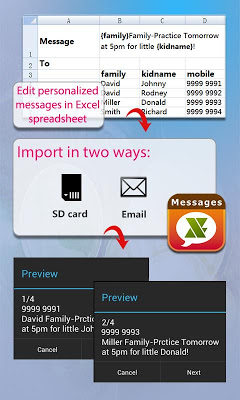
ExcelSMS is the most efficient way to send group messages. You can add recipient names and phone numbers in an Excel file. You can enter static or personalized text messages right in the Excel spreadsheet. For example, if you enter “Hi {first name}, ...” in a message, the app will take the first name of the recipients and personalize the message, generating text such as “Hi David, …” , “Hi Michael, …”…
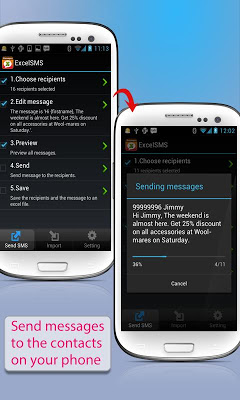
ExcelSMS is also an easy way to send text messages to the contacts on your Phone. Just pick groups or individual contacts, type in a static or personalized message and send it.
Who uses ExcelSMS ?
★ Small Businesses
★ Religious Groups
★ Retail
★ Nightlife - Bars & Nightclubs
★ Restaurants
★ Banks/Financial Institutions
★ Insurance Companies
★ Event Marketers (With hundreds (or even thousands) of people attending your events)
★ Traditional Media
★ Schools
★ Social Groups
★ Real Estate
With ExcelSMS you can :
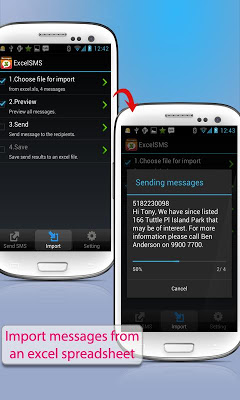
★ Import group SMS from an Excel file via USB/Email.
★ Create your own groups in an Excel spreadsheet and send messages to them.
★ Insert tags ({nickname},{firstname},{lastname},{nickname},{company} etc) in your text message in order to create personalized messages. When you use this function, each message has a personal touch. For example:
Dear {firstname}, Welcome to our dinner party.
★ Use MS Excel 2003 / 2007 / 2010 , OpenOffice.org , Apple Numbers or any other Excel-compatible applications to create your group text messages. Be sure to save as an Excel 97-2003 Workbook.
★ Send SMS to as many recipients as you need within your Excel file
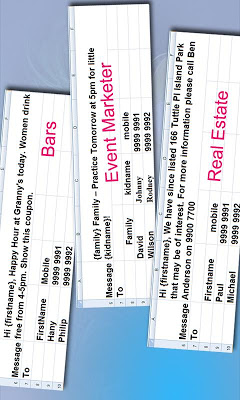
★ Create a formatted Excel file easily. The file can contain only two columns : Mobile and Message. You can find more example spreadsheets on the app’s website.
★ Create flexible group SMS in your spreadsheet.
For example “{family} Family – Practice Tomorrow at 5pm for little {kidname}!” becomes “David Family – Practice Tomorrow at 5pm for little Johnny!”. The names change over and over again.
★ Schedule your messages you want to send at a specific time.
★ The lite version allow you to send 20 messages each time, The full version has no limit.
★ Pause and resume schedules. You have to long press the schedule to access pause/resume option.
★ Import and send more 10,000 personalized messages in one time.
★ Send unsent messages. If the app is terminated while sending group sms, the app can continue the sending schedule after you launch the app.
★ Make send report and reply report.
★ Send SMS via Google Voice. You can add more than one google voice account. if one account reaches the daily limit(120 messages), the app will switch another account.
★ The lite version allow you to send 120 messages each time, The full version has no limit.
(65,- Kc)
Pozadavky: Android 2.2 a vyssi
Popis: ExcelSMS is the most efficient way to send group messages. You can add recipient names and phone numbers in an Excel file. You can enter static or personalized text messages right in the Excel spreadsheet.
Screen:
Video:
What's in this version:
1.Improved sending reliability.
Vice info:
Kód: Vybrat vše
https://play.google.com/store/apps/details?id=com.samapp.excelsms.excelsmsfullKód: Vybrat vše
http://www.tusfiles.net/dm6topcgyazn
http://hugefiles.net/e9buj0o7qg1a
http://unlimitzone.com/o6mqemi4iew8/cofgdhhgj321.rar.html
ExcelSMS is also an easy way to send text messages to the contacts on your Phone. Just pick groups or individual contacts, type in a static or personalized message and send it.
Who uses ExcelSMS ?
★ Small Businesses
★ Religious Groups
★ Retail
★ Nightlife - Bars & Nightclubs
★ Restaurants
★ Banks/Financial Institutions
★ Insurance Companies
★ Event Marketers (With hundreds (or even thousands) of people attending your events)
★ Traditional Media
★ Schools
★ Social Groups
★ Real Estate
With ExcelSMS you can :
★ Import group SMS from an Excel file via USB/Email.
★ Create your own groups in an Excel spreadsheet and send messages to them.
★ Insert tags ({nickname},{firstname},{lastname},{nickname},{company} etc) in your text message in order to create personalized messages. When you use this function, each message has a personal touch. For example:
Dear {firstname}, Welcome to our dinner party.
★ Use MS Excel 2003 / 2007 / 2010 , OpenOffice.org , Apple Numbers or any other Excel-compatible applications to create your group text messages. Be sure to save as an Excel 97-2003 Workbook.
★ Send SMS to as many recipients as you need within your Excel file
★ Create a formatted Excel file easily. The file can contain only two columns : Mobile and Message. You can find more example spreadsheets on the app’s website.
★ Create flexible group SMS in your spreadsheet.
For example “{family} Family – Practice Tomorrow at 5pm for little {kidname}!” becomes “David Family – Practice Tomorrow at 5pm for little Johnny!”. The names change over and over again.
★ Schedule your messages you want to send at a specific time.
★ The lite version allow you to send 20 messages each time, The full version has no limit.
★ Pause and resume schedules. You have to long press the schedule to access pause/resume option.
★ Import and send more 10,000 personalized messages in one time.
★ Send unsent messages. If the app is terminated while sending group sms, the app can continue the sending schedule after you launch the app.
★ Make send report and reply report.
★ Send SMS via Google Voice. You can add more than one google voice account. if one account reaches the daily limit(120 messages), the app will switch another account.
★ The lite version allow you to send 120 messages each time, The full version has no limit.