Ftp Server Pro
Napsal: 11. 03. 2014 08:48
Ftp Server Pro v1.14
(20,- Kc)
Pozadavky: Android 2.1 a vyssi
Popis: Read/write any folder, including sdcard, in your android device with this ftp server. You can backup your photos to your PC, copy music and movies to you device, etc.
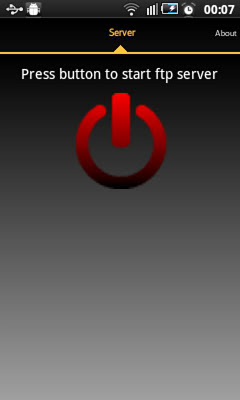
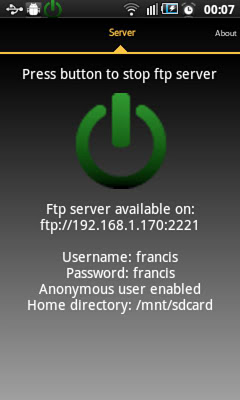
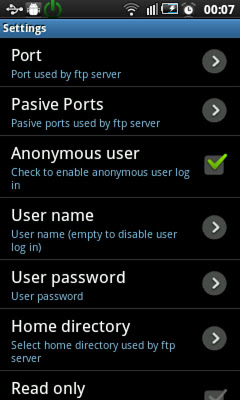
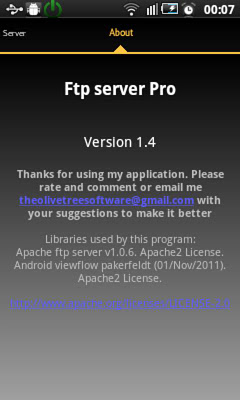
Screen:
What's in this version:
- Widget
- Bug fixes
Vice info:
Stahuj zde:
Read/write any folder, including sdcard, in your android device with this ftp server. You can backup your photos to your PC, copy music and movies to you device, etc.
If you still do not have a ftp client I recommend FileZilla client (you can download it on http://filezilla-project.org/) but you can also use file explorer on windows.
Free version does not allow landscape screen.
Features:
Use any network interface in your device including: WIFI, Ethernet, Mobile network, USB...
Anonymous user (can be disabled).
One Ftp user (can be disabled). Name and password can be changed.
Home directory can be root directory,
Read only mode.
Passive and active modes.
Show hidden files.
Custom home folder.
Option to run server as a foreground service.
Energy save mode.
Languages supported: English, Spanish, Romanian, French, Italian, Hungarian, German, Chinese, Portuguese, Korean, Russian and Catalan
Intents:
com.theolivetree.ftpserver.StartFtpServerPro
com.theolivetree.ftpserver.StopFtpServerPro
TODO:
Run server as root user (only rooted devices).
TLS/SSL support for secure connections.
How to connect with Ftp server using USB cable:
This can useful when you have USB cable and not network available.
1) On your phone go to Settings->Applications->Development and set option "USB debugging".
2) Connect your phone to your PC using USB cable.
3) Start adb server. On your PC run command "adb start-server".
adb is a program that you can find on android sdk. Usually you will find it on android-sdk\platform-tools\adb.
4) Forward needed ports from your PC to your phone. On your PC run command "adb forward tcp:2221 tcp:2221"
You will need to repeat this step for all ftp server and passive ports configured in your phone. It will be easier if you use a small range of passive ports.
With this, any connection in your pc to 127.0.0.1:2221 will be forwarded to your phone in port 2221.
5) Run Ftp server in your phone, open settings and in "Network interfaces" select "Loopback (127.0.0.1)" or "All"
6) Start ftp server.
7) In your PC connect your ftp client to ftp://127.0.0.1:2221 (port might be different, it depends on your Ftp Server configuration).
Connections in this mode need to be always started by PC so only passive mode is available when using USB connection.
(20,- Kc)
Pozadavky: Android 2.1 a vyssi
Popis: Read/write any folder, including sdcard, in your android device with this ftp server. You can backup your photos to your PC, copy music and movies to you device, etc.
Screen:
What's in this version:
- Widget
- Bug fixes
Vice info:
Kód: Vybrat vše
https://play.google.com/store/apps/details?id=com.theolivetree.ftpserverproKód: Vybrat vše
http://ul.to/90wfp3kd
http://www.kingfiles.net/s7hejk6xq057
http://turbobit.net/j3dl47aic68s.html
http://unlimitzone.com/f83uj20dp93t
http://www76.zippyshare.com/v/39042525/file.html
http://www.tusfiles.net/fgjt6odk3dgt
http://uloz.to/xZmDKTcy/ftp-server-pro-v1-14-apk
http://uloz.to/xTUDo751/ftp-server-pro-v1-14-apkIf you still do not have a ftp client I recommend FileZilla client (you can download it on http://filezilla-project.org/) but you can also use file explorer on windows.
Free version does not allow landscape screen.
Features:
Use any network interface in your device including: WIFI, Ethernet, Mobile network, USB...
Anonymous user (can be disabled).
One Ftp user (can be disabled). Name and password can be changed.
Home directory can be root directory,
Read only mode.
Passive and active modes.
Show hidden files.
Custom home folder.
Option to run server as a foreground service.
Energy save mode.
Languages supported: English, Spanish, Romanian, French, Italian, Hungarian, German, Chinese, Portuguese, Korean, Russian and Catalan
Intents:
com.theolivetree.ftpserver.StartFtpServerPro
com.theolivetree.ftpserver.StopFtpServerPro
TODO:
Run server as root user (only rooted devices).
TLS/SSL support for secure connections.
How to connect with Ftp server using USB cable:
This can useful when you have USB cable and not network available.
1) On your phone go to Settings->Applications->Development and set option "USB debugging".
2) Connect your phone to your PC using USB cable.
3) Start adb server. On your PC run command "adb start-server".
adb is a program that you can find on android sdk. Usually you will find it on android-sdk\platform-tools\adb.
4) Forward needed ports from your PC to your phone. On your PC run command "adb forward tcp:2221 tcp:2221"
You will need to repeat this step for all ftp server and passive ports configured in your phone. It will be easier if you use a small range of passive ports.
With this, any connection in your pc to 127.0.0.1:2221 will be forwarded to your phone in port 2221.
5) Run Ftp server in your phone, open settings and in "Network interfaces" select "Loopback (127.0.0.1)" or "All"
6) Start ftp server.
7) In your PC connect your ftp client to ftp://127.0.0.1:2221 (port might be different, it depends on your Ftp Server configuration).
Connections in this mode need to be always started by PC so only passive mode is available when using USB connection.