PicSlit - Banner for Instagram
Napsal: 11. 03. 2014 23:00
PicSlit - Banner for Instagram v1.0
(36,- Kc)
Pozadavky: Android 2.2 a vyssi
Popis: PicSlit is a BANNER and TILE option for your Instagram!!
NEW: PicSlit now has a BANNER and TILE option. What's the difference? The banner option allows you to upload and slit one picture. The tile option allows you to add more than one photo to your full grid.
Screen:
What's in this version:
PicSlit now has a separate free and paid version. Due to recent issues with the in-app purchase, we made two separate versions.
The new PicSlit now has a tiling option. Before, PicSlit only offered a banner option (1 picture). Use our tile option to have 2 or more pictures.
Vice info:
Stahuj zde:
Picslit allows you to create picture banners / tiles / grids / puzzles on your Instagram page. Make it so that when people are looking at your Instagram profile page, they will see blocks / squares of different photos and then they will see (AND BE AMAZED) and your PicSlit banner that they will see on your page.
HOW IT WORKS
1. Choose the (A) BANNER or (B) TILE option - both are very cool!!
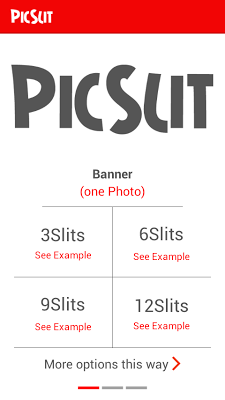
2. Choose which option you want (3, 6, 9, or 12 Slits).
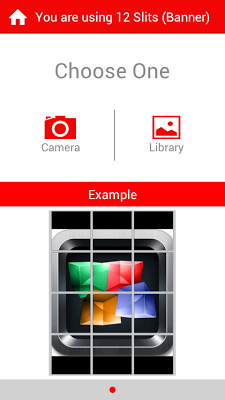
Decide if you want to slit a picture using your camera or by using a picture that is already available in your gallery.
A. BANNER
1. There is a grid that will appear on your chosen picture. MOVE the grid to fit the portion of the picture that you want slit.
2. Click “Slit My Pic”!!
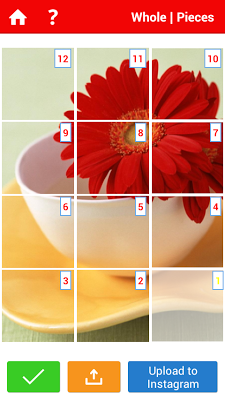
3. On the next page, the pieces of your puzzle are now numbered in the order that they should be uploaded. Click “Upload to Instagram” and start your PicSlit banner.
4. The photo that is highlighted is the photo that is ready to be uploaded to Instagram.
B. TILE
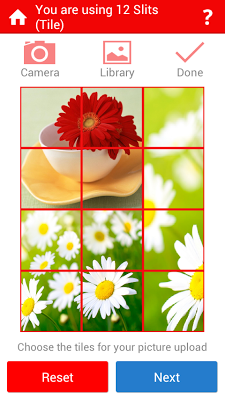
1. Click on the squares that you want to add your first photo
2. Once your photo is inside of the squares, click DONE.
YOU CANNOT ADD YOUR NEXT PHOTO UNTIL YOU HAVE HIT DONE.
3. Continue to add photos by repeating steps 1 and 2.
4. Once you have filled all squares, hit NEXT.
5. You are now able to upload each square to Instagram to create a full banner / tile on your Instagram page.
(36,- Kc)
Pozadavky: Android 2.2 a vyssi
Popis: PicSlit is a BANNER and TILE option for your Instagram!!
NEW: PicSlit now has a BANNER and TILE option. What's the difference? The banner option allows you to upload and slit one picture. The tile option allows you to add more than one photo to your full grid.
Screen:
What's in this version:
PicSlit now has a separate free and paid version. Due to recent issues with the in-app purchase, we made two separate versions.
The new PicSlit now has a tiling option. Before, PicSlit only offered a banner option (1 picture). Use our tile option to have 2 or more pictures.
Vice info:
Kód: Vybrat vše
https://play.google.com/store/apps/details?id=com.picslit.paidKód: Vybrat vše
http://www.tusfiles.net/198xv81tyko3
http://www.kingfiles.net/n80g6reqqeli/com.picslit.paid.ver.1.0.build.13.apk
http://unlimitzone.com/l474ns7we3t1/com.picslit.paid.ver.1.0.build.13.apk.html
http://rapidgator.net/file/cc3f1d46cf4bf8802ab6c68580cc53ff/com.picslit.paid.ver.1.0.build.13.apk.html
http://www15.zippyshare.com/v/35303875/file.html
http://www.tusfiles.net/56ckrfeed6uk
http://uloz.to/x3TAzFMY/picslit-banner-for-instagram-v1-0-apk
http://ulozto.sk/xCJyBNaF/picslit-banner-for-instagram-v1-0-apkHOW IT WORKS
1. Choose the (A) BANNER or (B) TILE option - both are very cool!!
2. Choose which option you want (3, 6, 9, or 12 Slits).
Decide if you want to slit a picture using your camera or by using a picture that is already available in your gallery.
A. BANNER
1. There is a grid that will appear on your chosen picture. MOVE the grid to fit the portion of the picture that you want slit.
2. Click “Slit My Pic”!!
3. On the next page, the pieces of your puzzle are now numbered in the order that they should be uploaded. Click “Upload to Instagram” and start your PicSlit banner.
4. The photo that is highlighted is the photo that is ready to be uploaded to Instagram.
B. TILE
1. Click on the squares that you want to add your first photo
2. Once your photo is inside of the squares, click DONE.
YOU CANNOT ADD YOUR NEXT PHOTO UNTIL YOU HAVE HIT DONE.
3. Continue to add photos by repeating steps 1 and 2.
4. Once you have filled all squares, hit NEXT.
5. You are now able to upload each square to Instagram to create a full banner / tile on your Instagram page.