ScanToPDF Mobile
Napsal: 12. 03. 2014 21:28
ScanToPDF Mobile v1.11.1.0
(72,- Kc)
Pozadavky: Android 2.0 a vyssi
Popis: Create a PDF on 5 touches without warnings or announcements. With over 25 years of experience producing software scanner highest quality , OiC gives them ScanToPDF mobile version.
Screen:
Video:
What's in this version:
Version 1.11.1.0 July 2013
✔ Bug fix in FAQ
Version 1.11.0.0 May 2013
✔ Add Chinese (Simplified) language
Version 1.10.0.0 April 2013
✔ Add Spanish language
Version 1.9.0.0 Jan 2013
✔ Improved Gallery/Gallery+
✔ Print capability (via Google Cloud Print)
✔ General Improvements
Version 1.8.0.0 Nov 2012
✔ Added Cloud sharing for DropBox\Drive\Sky Drive etc
✔ Added Italian language
✔ General Improvements
Vice info:
Stahuj zde:
With over 25 years experience of producing professional scanning software, O Imaging Corporation bring you their mobile version of ScanToPDF.This product puts a scanner app in your pocket that allows you to produce and share a PDF in as little as 5 taps.
Create and share images as great quality PDF files using the same technology which powers our desktop application which has more than 35,000 installations in 105 countries.
The software provides you with all the features you need to make a PDF and then SHARE it:
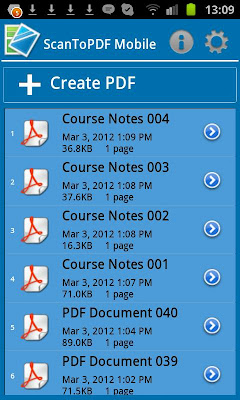
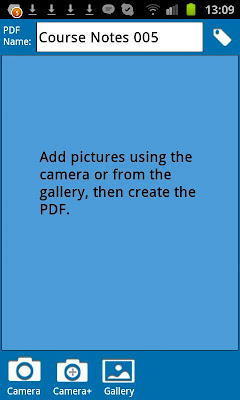
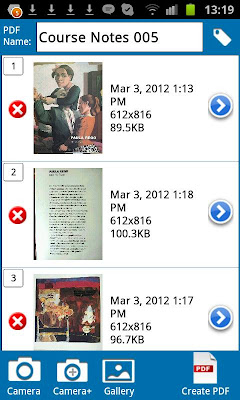
✔ Create multi-page PDFs using your camera or stored images.
✔ Integrates with your EMAIL and SKYPE accounts for easy sharing.
★ Share documents using "Open In" feature to DropBox\Google Drive\SkyDrive
✔ Multilingual (English, French and German, Italian & NEW Spanish)
✔ Set image resolution for small size and quick transfer or high quality, great looking PDF files
✔ Automatically compresses the images to produce optimized PDFs.
✔ Automatically names the PDF using a user definable naming convention.
✔ Unique Camera+ option for speed scanning multiple images.
✔ Ability to override the automatic naming at any point.
✔ Options to Rename, Email, Edit, Delete any existing PDF.
✔ You can define the PDF page size you require - (A4, Legal, Letter, etc.)
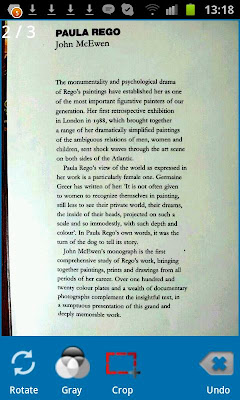
✔ You can enhance each image to produce top quality PDFs.
✔ You can crop each image to select only the part of the image you require.
✔ Easily change the sequence of the pages in your PDFs.
✔ You can add pages to or delete pages from existing ScanToPDF Mobile PDFs.
✔ Easy options to rotate clockwise and anti-clockwise.
✔ Add PDF Tags for document indexing - (Author, Title, Keywords, Subject)
✔ FTP option to POST your PDF onto a server - (Host, User, Password, Folder)
(72,- Kc)
Pozadavky: Android 2.0 a vyssi
Popis: Create a PDF on 5 touches without warnings or announcements. With over 25 years of experience producing software scanner highest quality , OiC gives them ScanToPDF mobile version.
Screen:
Video:
What's in this version:
Version 1.11.1.0 July 2013
✔ Bug fix in FAQ
Version 1.11.0.0 May 2013
✔ Add Chinese (Simplified) language
Version 1.10.0.0 April 2013
✔ Add Spanish language
Version 1.9.0.0 Jan 2013
✔ Improved Gallery/Gallery+
✔ Print capability (via Google Cloud Print)
✔ General Improvements
Version 1.8.0.0 Nov 2012
✔ Added Cloud sharing for DropBox\Drive\Sky Drive etc
✔ Added Italian language
✔ General Improvements
Vice info:
Kód: Vybrat vše
https://play.google.com/store/apps/details?id=com.oic.scantopdffullKód: Vybrat vše
http://www.tusfiles.net/3enwot5auq1i
http://hugefiles.net/1x82ak5fsh6a
http://unlimitzone.com/vjaee0zjxoul/SnTPFMeF10.rar.html
Create and share images as great quality PDF files using the same technology which powers our desktop application which has more than 35,000 installations in 105 countries.
The software provides you with all the features you need to make a PDF and then SHARE it:
✔ Create multi-page PDFs using your camera or stored images.
✔ Integrates with your EMAIL and SKYPE accounts for easy sharing.
★ Share documents using "Open In" feature to DropBox\Google Drive\SkyDrive
✔ Multilingual (English, French and German, Italian & NEW Spanish)
✔ Set image resolution for small size and quick transfer or high quality, great looking PDF files
✔ Automatically compresses the images to produce optimized PDFs.
✔ Automatically names the PDF using a user definable naming convention.
✔ Unique Camera+ option for speed scanning multiple images.
✔ Ability to override the automatic naming at any point.
✔ Options to Rename, Email, Edit, Delete any existing PDF.
✔ You can define the PDF page size you require - (A4, Legal, Letter, etc.)
✔ You can enhance each image to produce top quality PDFs.
✔ You can crop each image to select only the part of the image you require.
✔ Easily change the sequence of the pages in your PDFs.
✔ You can add pages to or delete pages from existing ScanToPDF Mobile PDFs.
✔ Easy options to rotate clockwise and anti-clockwise.
✔ Add PDF Tags for document indexing - (Author, Title, Keywords, Subject)
✔ FTP option to POST your PDF onto a server - (Host, User, Password, Folder)