Pie Control (New)
Napsal: 15. 03. 2014 12:37
Pie Control (New) v1.4.2
(40,- Kc)
Pozadavky: Android 3.1 a vyssi + ROOT
Popis: This is the updated previous app Pie Control which can be found here.
Screen:
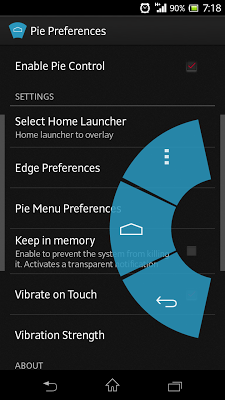
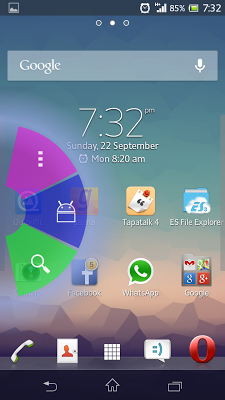
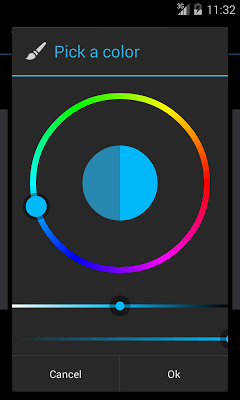
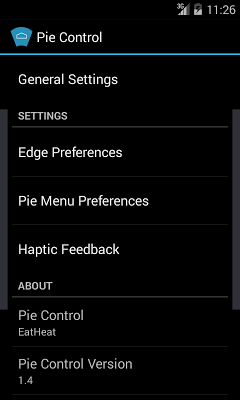
What's in this version:
V1.4
- Complete UI Overhaul
- Internal Code Clean Up
- Added Switch Off Option
- Added Reboot Option
- Added HotBotboot Option
- Added Reboot to Recovery Option
- Added Expand StatusBar Option
- Added Recent Apps Option
- Added Toggle To Last Used App Option
- Added Quick Disable Option
V1.4.2
-Internal improvements
-Added KitKat compliant notification icon(no more transparent)
-Now upto 7 Pie Slices at the same time
Vice info:
Stahuj zde:
+++++++++++++++++++++++++
This is not Paranoid Android's Pie
+++++++++++++++++++++++++
For the first time ever, Pie comes to all phones. Compatible not only with JellyBean devices but all the way from HoneyComb! Works for any ROM and any device!
Brought to you by XDA Recognized Developer EatHeat.
*What is this app?
An app like Paranoid Android's Pie feature with a lot of functions and features.
*What this isn't?
This is not real Pie feature of PA.
*Why is root needed?
Root is needed for some functions. Although some functions can be used without root, I did not allow it as people would ask why the other features do not work. Some basic functions would however work without root but it is recommended to use this app with root.
++++++++
FEATURES
++++++++
1. Can be called over any screen.
2. Fully customizable trigger points and pie.
3. Light weight.
4. Custom app shortcuts.
+++++++++
CONTROLS
+++++++++
[BusyBox is needed for rebooting to recovery]
- Screen Off
- Switch Off Device
- Reboot Device
- Reboot To Recovery
- HotBoot
- Expand StatusBar
- Back Button
- Home Button
- Menu Button
- Play Store
- Recent Apps
- Switch To Last App
- Disable For 3 Seconds
- Screen Rotation
- Search
- System Settings
- Pie Control Settings
- Toggle Bluetooth
- Toggle Sound
- Toggle Wifi
- Voice Search
- Play/Pause Media
- Volume Up
- Volume Down
- Previous Media
- Next Media
(40,- Kc)
Pozadavky: Android 3.1 a vyssi + ROOT
Popis: This is the updated previous app Pie Control which can be found here.
Screen:
What's in this version:
V1.4
- Complete UI Overhaul
- Internal Code Clean Up
- Added Switch Off Option
- Added Reboot Option
- Added HotBotboot Option
- Added Reboot to Recovery Option
- Added Expand StatusBar Option
- Added Recent Apps Option
- Added Toggle To Last Used App Option
- Added Quick Disable Option
V1.4.2
-Internal improvements
-Added KitKat compliant notification icon(no more transparent)
-Now upto 7 Pie Slices at the same time
Vice info:
Kód: Vybrat vše
https://play.google.com/store/apps/details?id=tk.eatheat.pie2Kód: Vybrat vše
http://www.tusfiles.net/xhmhfl0q18tn
http://www77.zippyshare.com/v/85526709/file.html
This is not Paranoid Android's Pie
+++++++++++++++++++++++++
For the first time ever, Pie comes to all phones. Compatible not only with JellyBean devices but all the way from HoneyComb! Works for any ROM and any device!
Brought to you by XDA Recognized Developer EatHeat.
*What is this app?
An app like Paranoid Android's Pie feature with a lot of functions and features.
*What this isn't?
This is not real Pie feature of PA.
*Why is root needed?
Root is needed for some functions. Although some functions can be used without root, I did not allow it as people would ask why the other features do not work. Some basic functions would however work without root but it is recommended to use this app with root.
++++++++
FEATURES
++++++++
1. Can be called over any screen.
2. Fully customizable trigger points and pie.
3. Light weight.
4. Custom app shortcuts.
+++++++++
CONTROLS
+++++++++
[BusyBox is needed for rebooting to recovery]
- Screen Off
- Switch Off Device
- Reboot Device
- Reboot To Recovery
- HotBoot
- Expand StatusBar
- Back Button
- Home Button
- Menu Button
- Play Store
- Recent Apps
- Switch To Last App
- Disable For 3 Seconds
- Screen Rotation
- Search
- System Settings
- Pie Control Settings
- Toggle Bluetooth
- Toggle Sound
- Toggle Wifi
- Voice Search
- Play/Pause Media
- Volume Up
- Volume Down
- Previous Media
- Next Media