AppSync for GDrive
Napsal: 18. 03. 2014 14:05
AppSync for GDrive Pro v1.1
(35,- Kc)
Pozadavky: Android 2.2 a vyssi
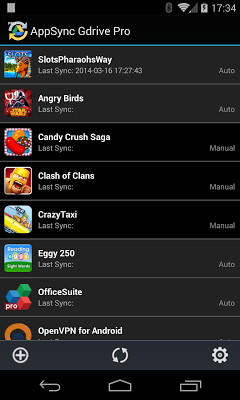
Popis: App Sync for GDrive (Google Drive) can let you run apps seamless on your various handsets (phones, tablets, and other android devices), because it can synchronize app data between handsets and cloud in 1-click or automatically.
Screen:
What's in this version:
- nova aplikace
Vice info:
Stahuj zde:
App Sync for GDrive (Google Drive) can let you run apps seamless on your various handsets (phones, tablets, and other android devices), because it can synchronize app data between handsets and cloud in 1-click or automatically,
Use scenarios:
* Stop running an app on one phone/tablet, and continue it from the same state on another one. e.g Reading books, playing games on different phones without interrupt.
* Migrate app data between phones/tables
* Backup/Restore app data
* Work/play on same app with friends
Requirements:
* ROOT permission
* Have a Google account (of course you do)
Features:
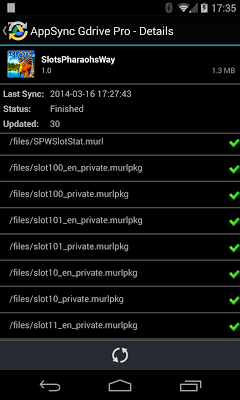
* Sync up app data in 1-click or automatically
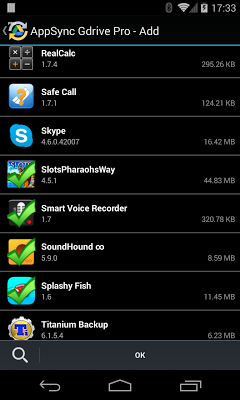
* Multiple apps can be synchronized
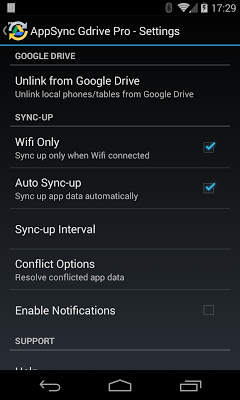
* Automatic sync-up in configurable interval
* Conflict options to resolve different data version on different places
* Wifi only option
Basic Usage:
1. Link to Google Drive. Choose which Google account used to link, and allow this app access google drive if asked.
2. Add apps to sync-up list. Click Add icon to load installed apps, select multiple apps and click "OK" to add them to sync-up list.
3. Sync up apps
(35,- Kc)
Pozadavky: Android 2.2 a vyssi
Popis: App Sync for GDrive (Google Drive) can let you run apps seamless on your various handsets (phones, tablets, and other android devices), because it can synchronize app data between handsets and cloud in 1-click or automatically.
Screen:
What's in this version:
- nova aplikace
Vice info:
Kód: Vybrat vše
https://play.google.com/store/apps/details?id=com.yottamobile.appsyncgdriveKód: Vybrat vše
http://www.tusfiles.net/14ew7yuf769q
http://unlimitzone.com/8p3q55u1mmzj/com.yottamobile.appsyncgdrive.ver.1.1.build.2.apk.html
http://www.kingfiles.net/u07nqg5z9gjq/com.yottamobile.appsyncgdrive.ver.1.1.build.2.apk
http://rapidgator.net/file/09f11458a7a6d0e7a4848104f65bd2e8/com.yottamobile.appsyncgdrive.ver.1.1.build.2.apk.html
Use scenarios:
* Stop running an app on one phone/tablet, and continue it from the same state on another one. e.g Reading books, playing games on different phones without interrupt.
* Migrate app data between phones/tables
* Backup/Restore app data
* Work/play on same app with friends
Requirements:
* ROOT permission
* Have a Google account (of course you do)
Features:
* Sync up app data in 1-click or automatically
* Multiple apps can be synchronized
* Automatic sync-up in configurable interval
* Conflict options to resolve different data version on different places
* Wifi only option
Basic Usage:
1. Link to Google Drive. Choose which Google account used to link, and allow this app access google drive if asked.
2. Add apps to sync-up list. Click Add icon to load installed apps, select multiple apps and click "OK" to add them to sync-up list.
3. Sync up apps