Draft
Napsal: 31. 03. 2014 23:49
Draft v0.13
(82,- Kc)
Pozadavky: Android 2.2 a vyssi
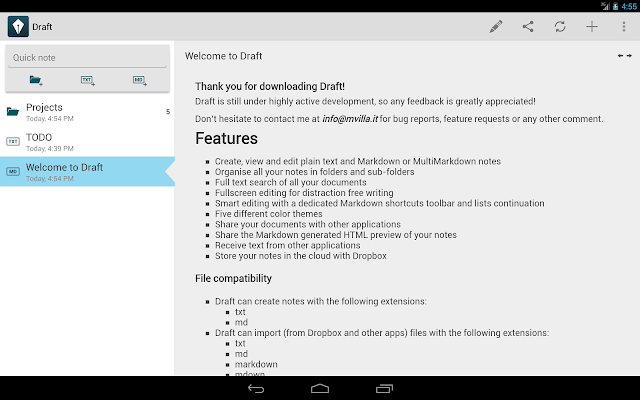
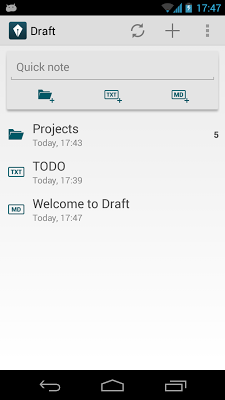
Popis: Draft is a versatile text editor for your Android smartphone and tablet. With Draft you can easily organise, edit and share all your notes.
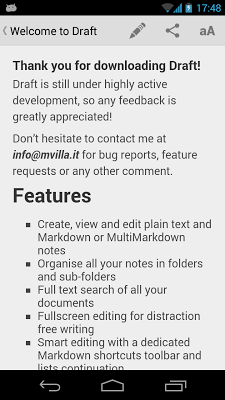
You can create regular plain text files as well as Markdown and MultiMarkdown files.
Draft is powered by Dropbox, so all your documents are stored in the cloud where you can easily access them from any device you have.
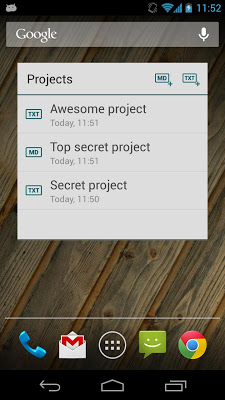
Screen:
What's in this version:
* New icon!
* Experimental: added support for images in markdown notes
* Fixed internote link navigation
* Fixed quick-note creation with external keyboards
* Added option to skip preview when opening a note
* Added inter-note linking support using the standard Markdown syntax.
Vice info:
Stahuj zde:
Draft is a versatile text editor for your Android smartphone and tablet. With Draft you can easily organise, edit and share all your notes.
You can create regular plain text files as well as Markdown and MultiMarkdown files.
Draft is powered by Dropbox, so all your documents are stored in the cloud where you can easily access them from any device you have.
Draft is still under highly active development, so any feedback is greatly appreciated!
(Notes created with Draft are not stored on the public storage of the device, so they cannot be directly accessed by other apps. Synchronization is only possible through the provided Dropbox integration.)
# Features
* Create, view and edit plain text and Markdown or MultiMarkdown notes
* Organise all your notes in folders and sub-folders
* Full text search of all your documents
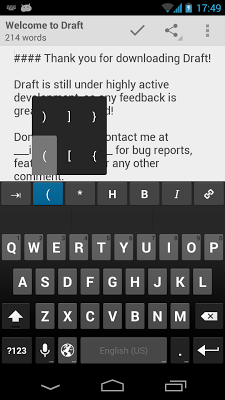
* Fullscreen editing for distraction free writing
* Smart editing with a dedicated Markdown shortcuts toolbar and lists continuation
* Five different color themes
* Share your documents with other applications
* Share the Markdown generated HTML preview of your notes
* Receive text from other applications
* Store your notes in the cloud with Dropbox
# File formats
* Draft can create notes with the following extensions:
- txt
- md
* Draft can import (from Dropbox or other apps) files with the following extensions:
- txt
- md
- markdown
- org
# Dropbox synchronization
By default all your notes are stored in a dedicated folder in your Dropbox called 'Draft'; you can change this location in the application settings.
Draft provides full offline support, so every change you make to your notes will be propagated to Dropbox once the network is available.
(82,- Kc)
Pozadavky: Android 2.2 a vyssi
Popis: Draft is a versatile text editor for your Android smartphone and tablet. With Draft you can easily organise, edit and share all your notes.
You can create regular plain text files as well as Markdown and MultiMarkdown files.
Draft is powered by Dropbox, so all your documents are stored in the cloud where you can easily access them from any device you have.
Screen:
What's in this version:
* New icon!
* Experimental: added support for images in markdown notes
* Fixed internote link navigation
* Fixed quick-note creation with external keyboards
* Added option to skip preview when opening a note
* Added inter-note linking support using the standard Markdown syntax.
Vice info:
Kód: Vybrat vše
https://play.google.com/store/apps/details?id=com.mvilla.draftKód: Vybrat vše
http://www.tusfiles.net/52jj1zc40olu
http://hugefiles.net/6zecgh5k2jiz
http://unlimitzone.com/jzr1fma47zsy/com.mvilla.draft.ver.0.13.build.16.apk.html
http://www21.zippyshare.com/v/13724039/file.html
http://hugefiles.net/jztn65e0v2dz
http://uloz.to/xMnio2BZ/draft-v0-13-build-16-apk
http://ulozto.sk/xajNiPt7/draft-v0-13-build-16-apk
You can create regular plain text files as well as Markdown and MultiMarkdown files.
Draft is powered by Dropbox, so all your documents are stored in the cloud where you can easily access them from any device you have.
Draft is still under highly active development, so any feedback is greatly appreciated!
(Notes created with Draft are not stored on the public storage of the device, so they cannot be directly accessed by other apps. Synchronization is only possible through the provided Dropbox integration.)
# Features
* Create, view and edit plain text and Markdown or MultiMarkdown notes
* Organise all your notes in folders and sub-folders
* Full text search of all your documents
* Fullscreen editing for distraction free writing
* Smart editing with a dedicated Markdown shortcuts toolbar and lists continuation
* Five different color themes
* Share your documents with other applications
* Share the Markdown generated HTML preview of your notes
* Receive text from other applications
* Store your notes in the cloud with Dropbox
# File formats
* Draft can create notes with the following extensions:
- txt
- md
* Draft can import (from Dropbox or other apps) files with the following extensions:
- txt
- md
- markdown
- org
# Dropbox synchronization
By default all your notes are stored in a dedicated folder in your Dropbox called 'Draft'; you can change this location in the application settings.
Draft provides full offline support, so every change you make to your notes will be propagated to Dropbox once the network is available.