instawatermark
Napsal: 21. 04. 2014 20:07
instawatermark v2.0
(20,- Kc)
Pozadavky: Android 2.2 a vyssi
Popis: instawatermark is the fastest way to protect your photography from theft. Instawatermark is the only professional watermarking application on play store which comes with well-designed watermarking patterns to fully protect your artwork/photos without affecting its appearance. Use personalized text and logo images for watermark patterns that cover your entire photo with the ability to adjust the opacity.
Screen:

What's in this version:
1. Added Support for Batch Watermarking
2. Added Support for changing Text Color for free hand watermark.
3. Load images directly from gallery. Go to gallery -> choose share -> select instawatermark
4. Some Bug Fixes
Vice info:
Stahuj zde:
instawatermark is the fastest way to protect your photography from theft. Instawatermark is the only professional watermarking application on play store which comes with well-designed watermarking patterns to fully protect your artwork/photos without affecting its appearance. Use personalized text and logo images for watermark patterns that cover your entire photo with the ability to adjust the opacity.
Add watermarks to your pictures. Instantly add text, copyright/ownership notice, and logo images into your photos with ability to adjust opacity, rotation, translation, size.
Instantly add QR watermarks to your images. Instawatermark comes with inbuilt QR code generator that supports QR Code Contents such as vCard (contact details), email, phone number and simple ownership text.
Full Application Features
- Batch Watermarking. Instantly apply watermark to multiple images.
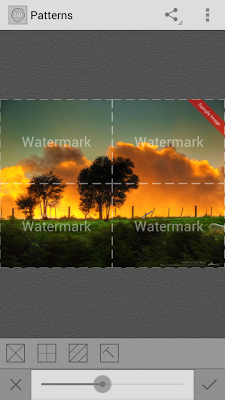
- 4 different well designed watermarking patterns.
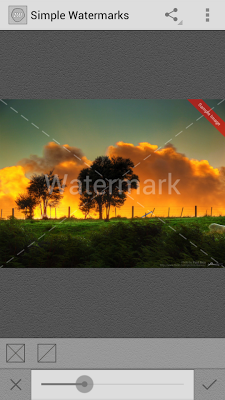
- 2 different styles for simple watermarks.
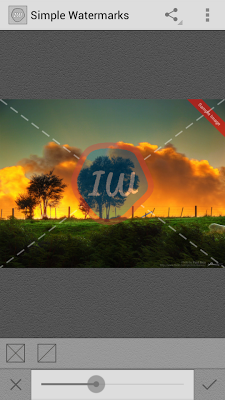
- User defined image watermarks.
- Add property text, logo image anywhere on image, just move them with fingers.
- User defined QR Code watermarks.
- Inbuilt QR Code generator. (Content Support : vCard, Email, Phone Number, Text)
- Load images directly from gallery.
- Unlimited colors for text
- No Ads.
- Instantly add ownership/copyright notice.
- Freehand watermarks (Add text/logo images anywhere on photos with ability to adjust opacity, rotation, translation, size).
- Instant share photos on Facebook, Tumblr, Flickr, Twitter etc.
- Supports image resolution up to 1600px x 1200px for any side.
***** Steps for batch watermarking *****
1. Launch instwatermark.
2. Select any watermark type from menu. Adjust the watermark.
3. Tap on the top-right corner icon in the action bar. From dropdown menu select "Save for batch watermark". It will save your current adjustment for batch watermarking.
4. Go to gallery. Select all images (more than one) you want to process. Then tap on share and select instawatermark.
Limitations of Free Version
- Batch watermarking is disabled.
- Supports only ONE watermarking pattern.
- Supports only ONE style for simple watermarks.
- Supports only Text watermarks. Image watermarks are disabled.
- QR Code watermarks are disabled.
- In-app ads.
(20,- Kc)
Pozadavky: Android 2.2 a vyssi
Popis: instawatermark is the fastest way to protect your photography from theft. Instawatermark is the only professional watermarking application on play store which comes with well-designed watermarking patterns to fully protect your artwork/photos without affecting its appearance. Use personalized text and logo images for watermark patterns that cover your entire photo with the ability to adjust the opacity.
Screen:
What's in this version:
1. Added Support for Batch Watermarking
2. Added Support for changing Text Color for free hand watermark.
3. Load images directly from gallery. Go to gallery -> choose share -> select instawatermark
4. Some Bug Fixes
Vice info:
Kód: Vybrat vše
https://play.google.com/store/apps/details?id=com.instawatermarkKód: Vybrat vše
http://www.tusfiles.net/eamrc3nh8mmi
http://hugefiles.net/w5e8yn6hv8nr
http://unlimitzone.com/7dliy5zm9qhd/instawatermark_2.0.apk.html
http://ulozto.cz/xyY65vYt/instawatermark-2-0-zip
http://ulozto.sk/xvaVb9QT/instawatermark-2-0-zipAdd watermarks to your pictures. Instantly add text, copyright/ownership notice, and logo images into your photos with ability to adjust opacity, rotation, translation, size.
Instantly add QR watermarks to your images. Instawatermark comes with inbuilt QR code generator that supports QR Code Contents such as vCard (contact details), email, phone number and simple ownership text.
Full Application Features
- Batch Watermarking. Instantly apply watermark to multiple images.
- 4 different well designed watermarking patterns.
- 2 different styles for simple watermarks.
- User defined image watermarks.
- Add property text, logo image anywhere on image, just move them with fingers.
- User defined QR Code watermarks.
- Inbuilt QR Code generator. (Content Support : vCard, Email, Phone Number, Text)
- Load images directly from gallery.
- Unlimited colors for text
- No Ads.
- Instantly add ownership/copyright notice.
- Freehand watermarks (Add text/logo images anywhere on photos with ability to adjust opacity, rotation, translation, size).
- Instant share photos on Facebook, Tumblr, Flickr, Twitter etc.
- Supports image resolution up to 1600px x 1200px for any side.
***** Steps for batch watermarking *****
1. Launch instwatermark.
2. Select any watermark type from menu. Adjust the watermark.
3. Tap on the top-right corner icon in the action bar. From dropdown menu select "Save for batch watermark". It will save your current adjustment for batch watermarking.
4. Go to gallery. Select all images (more than one) you want to process. Then tap on share and select instawatermark.
Limitations of Free Version
- Batch watermarking is disabled.
- Supports only ONE watermarking pattern.
- Supports only ONE style for simple watermarks.
- Supports only Text watermarks. Image watermarks are disabled.
- QR Code watermarks are disabled.
- In-app ads.