Autosync for Google Drive
Napsal: 29. 04. 2014 08:15
Autosync PRO for Google Drive v1.2.3
Unlocked Pro features in Autosync for Google Drive!
Pozadavky: Android 2.3.3 a vyšší
Popis: Keep your phone/tablet and your Google Drive in sync at all times. Rock-solid, battery efficient, full two-way(!) sync for Google Drive.
Screen:
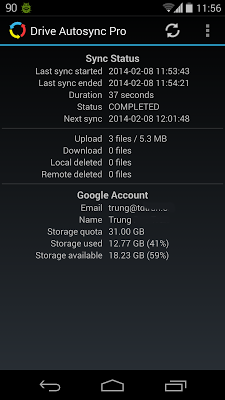
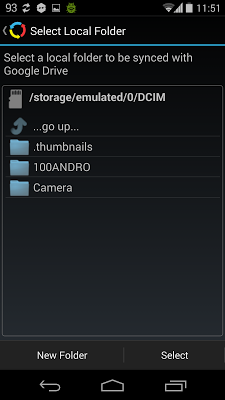
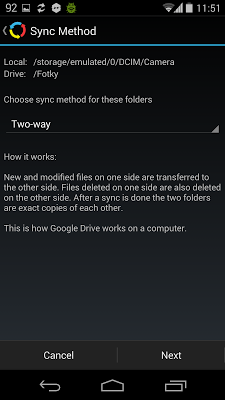
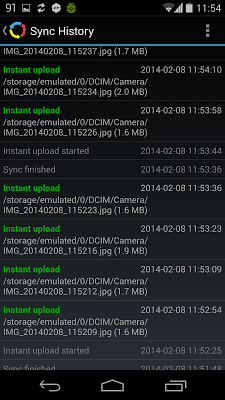
What's in this version:
Version 1.2.3
✓ Fixed broken Upload Mirror sync method
✓ Preserve last modified timestamps when uploading files
Vice info:
Stahuj zde:
Keep your phone/tablet and your Google Drive in sync at all times. Rock-solid, battery efficient, full two-way(!) sync for Google Drive.
FEATURES INCLUDE
★ Full two-way sync. Just like Google Drive on desktop
★ Instant upload: new files (for example photos) are uploaded to Drive immediately
★ Very efficient, consumes almost no battery if there is no change detected and will not slow down your phone either
★ Very easy to set up. Once set up files will be kept in sync without any effort from users
★ Works reliably under ever changing network conditions on your phone
★ Monitors battery level, WiFi/3G/4G/WiMax connectivity and adapts its behavior according to user preferences
★ Configurable autosync interval: 15 minutes, 30 minutes, every hour,...
★ Many sync modes. Not only two-way, you can also choose Upload only, Upload then delete, Download only, Download mirror,...
★ Compact code size, memory efficient, no fancy graphics, no useless animation. We have enough bloatware. Does one thing and does it best
★ Use alongside the official Google Drive client, or any other Drive client of your choice.
Autosync for Google Drive provides the essential feature, two-way sync, which should be in the official Google Drive for Android since the beginning. For whatever reason it wasn't and still isn't. Now you have it.
If you are a serious Google Drive user and want more flexibility, please consider upgrading to PRO version.
PRO FEATURES INCLUDE
★ Sync multiple folders
★ Sync the whole Drive with a folder on your phone or tablet
★ Upload large files, from 10 MB to several GB
★ App settings can be protected with passcode
★ No ads
Unlocked Pro features in Autosync for Google Drive!
Pozadavky: Android 2.3.3 a vyšší
Popis: Keep your phone/tablet and your Google Drive in sync at all times. Rock-solid, battery efficient, full two-way(!) sync for Google Drive.
Screen:
What's in this version:
Version 1.2.3
✓ Fixed broken Upload Mirror sync method
✓ Preserve last modified timestamps when uploading files
Vice info:
Kód: Vybrat vše
https://play.google.com/store/apps/details?id=com.ttxapps.drivesyncKód: Vybrat vše
https://www.oboom.com/V5O36MTW
http://ul.to/ei7xnfug
http://www.tusfiles.net/ablz9mgjmyw1
http://www9.zippyshare.com/v/36845383/file.html
http://hugefiles.net/rtpkbus0mepx
http://uloz.to/xzR3t2Td/autosync-pro-for-google-drive-v1-2-3-apk
http://ulozto.sk/xCRXHwP3/autosync-pro-for-google-drive-v1-2-3-apkFEATURES INCLUDE
★ Full two-way sync. Just like Google Drive on desktop
★ Instant upload: new files (for example photos) are uploaded to Drive immediately
★ Very efficient, consumes almost no battery if there is no change detected and will not slow down your phone either
★ Very easy to set up. Once set up files will be kept in sync without any effort from users
★ Works reliably under ever changing network conditions on your phone
★ Monitors battery level, WiFi/3G/4G/WiMax connectivity and adapts its behavior according to user preferences
★ Configurable autosync interval: 15 minutes, 30 minutes, every hour,...
★ Many sync modes. Not only two-way, you can also choose Upload only, Upload then delete, Download only, Download mirror,...
★ Compact code size, memory efficient, no fancy graphics, no useless animation. We have enough bloatware. Does one thing and does it best
★ Use alongside the official Google Drive client, or any other Drive client of your choice.
Autosync for Google Drive provides the essential feature, two-way sync, which should be in the official Google Drive for Android since the beginning. For whatever reason it wasn't and still isn't. Now you have it.
If you are a serious Google Drive user and want more flexibility, please consider upgrading to PRO version.
PRO FEATURES INCLUDE
★ Sync multiple folders
★ Sync the whole Drive with a folder on your phone or tablet
★ Upload large files, from 10 MB to several GB
★ App settings can be protected with passcode
★ No ads
