Barometer in Status Bar
Napsal: 29. 04. 2014 13:27
Barometer in Status Bar v2.0
(38,- Kc)
Pozadavky: Android 2.1 a vyssi
Popis: «Barometer in the status bar» - is a powerful application for devices based on Android, capable of measuring atmospheric pressure. Despite the name, display pressure in the status bar - just one of the many features of the program.
Screen:
Video:
What's in this version:
v 2.1
- Ability to enter the normal atmospheric pressure at a particular location;
- Displays the status of pressure (low, decreased, normal, increased, high);
- Changes to the user interface;
- Fixed some bugs.
Vice info:
Stahuj zde:
«Barometer in the status bar» - is a powerful application for devices based on Android, capable of measuring atmospheric pressure. Despite the name, display pressure in the status bar - just one of the many features of the program.
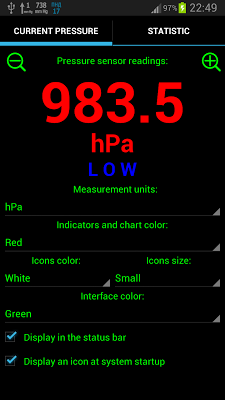
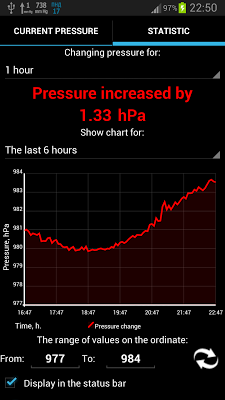
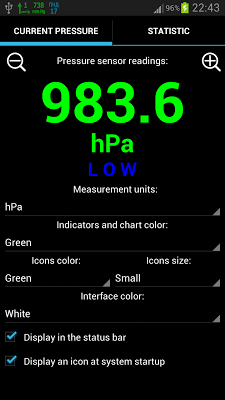
The application window contains two tabs. On the first tab are an indicator that displays the current barometric pressure, buttons for scaling it, as well as some application settings. The second tab contains a graph of pressure change over time and an indicator showing the dynamics of change of pressure (growth/decline).
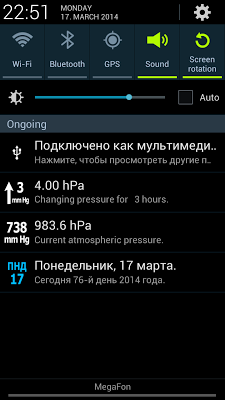
The main feature of the application is to display the current atmospheric pressure, as well as the direction and magnitude of pressure change in the status bar of the device. This is convenient because the pressure and trends are always before your eyes. In addition, this function can be disabled at any time.
This program will be useful to those people who are interested in the weather, enjoys fishing, loves to travel, has an active lifestyle or sensitive to changes in atmospheric pressure.
Details of the application:
• Wide range of units of atmospheric pressure (mmHg, hPa, mbar, inHg, psi, etc.);
• The range of values displayed in the status bar: 680 - 800 mm Hg (range of values displayed in the window is the range of pressure sensor installed on the device);
• Deviation of pressure: 0.1 mmHg;
• Display of pressure changes in a graph for a certain period of time (6 hours, day, week, month);
• Setting min. and max . values on the ordinate;
• Display trends and pressure change for a certain period of time (1 hour, 3 hours, 6 hours, 12 hours, 24 hours);
• Displays the current pressure and pressure change in the status bar ( can be turned off );
• Enable/disable boot an icon at system startup;
• Change the size of icons;
• Resizing the indicator for comfortable viewing on different screens;
• Ability to set indicators, icons and interface color;
• Ability to view information about the pressure sensor installed in the device (name, manufacturer, current consumption, resolution, etc.).
ATTENTION!
The application works only on devices equipped with an atmospheric pressure sensor. Currently it is the following devices:
• Samsung Galaxy S V;
• Samsung Galaxy S IV;
• Samsung Galaxy S III;
• Samsung Galaxy Note III;
• Samsung Galaxy Note II;
• Samsung Galaxy Note;
• Samsung Galaxy Nexus;
• Google Nexus 4;
• Google Nexus 10;
• Motorola Droid RAZR MAXX HD;
• Motorola Moto X;
• Motorola XOOM 2;
• Motorola XY Board;
• Sony Xperia GO;
• Xiaomi MI 2;
• Xiaomi MI 3;
• Runbo Q5;
• Runbo X5;
• Runbo X6;
• Runbo S09;
• RugGear RG210/220;
• RugGear RG960/970;
• DNS SD01;
• Rivotek RT-550;
• Senseit P4;
• Seals TS3.
On Runbo X5 application may not work!
NOTE.
If you do not have an icon appears in the status bar after the restart, follow these steps:
1. Remove the Light version, if it is installed;
2. Reinstall the full version;
3. In the application, set the appropriate checkbox and exit the program by pressing the "Back". Thereafter, the device can be restarted.
(38,- Kc)
Pozadavky: Android 2.1 a vyssi
Popis: «Barometer in the status bar» - is a powerful application for devices based on Android, capable of measuring atmospheric pressure. Despite the name, display pressure in the status bar - just one of the many features of the program.
Screen:
Video:
What's in this version:
v 2.1
- Ability to enter the normal atmospheric pressure at a particular location;
- Displays the status of pressure (low, decreased, normal, increased, high);
- Changes to the user interface;
- Fixed some bugs.
Vice info:
Kód: Vybrat vše
https://play.google.com/store/apps/details?id=com.vtlabs.barometerinsbKód: Vybrat vše
http://www41.zippyshare.com/v/83986674/file.html
http://hugefiles.net/0xzw6ktnn3d2
http://uloz.to/xhXVvbaF/barometer-in-status-bar-v2-0-apk
http://ulozto.sk/xEf8vhrC/barometer-in-status-bar-v2-0-apkThe application window contains two tabs. On the first tab are an indicator that displays the current barometric pressure, buttons for scaling it, as well as some application settings. The second tab contains a graph of pressure change over time and an indicator showing the dynamics of change of pressure (growth/decline).
The main feature of the application is to display the current atmospheric pressure, as well as the direction and magnitude of pressure change in the status bar of the device. This is convenient because the pressure and trends are always before your eyes. In addition, this function can be disabled at any time.
This program will be useful to those people who are interested in the weather, enjoys fishing, loves to travel, has an active lifestyle or sensitive to changes in atmospheric pressure.
Details of the application:
• Wide range of units of atmospheric pressure (mmHg, hPa, mbar, inHg, psi, etc.);
• The range of values displayed in the status bar: 680 - 800 mm Hg (range of values displayed in the window is the range of pressure sensor installed on the device);
• Deviation of pressure: 0.1 mmHg;
• Display of pressure changes in a graph for a certain period of time (6 hours, day, week, month);
• Setting min. and max . values on the ordinate;
• Display trends and pressure change for a certain period of time (1 hour, 3 hours, 6 hours, 12 hours, 24 hours);
• Displays the current pressure and pressure change in the status bar ( can be turned off );
• Enable/disable boot an icon at system startup;
• Change the size of icons;
• Resizing the indicator for comfortable viewing on different screens;
• Ability to set indicators, icons and interface color;
• Ability to view information about the pressure sensor installed in the device (name, manufacturer, current consumption, resolution, etc.).
ATTENTION!
The application works only on devices equipped with an atmospheric pressure sensor. Currently it is the following devices:
• Samsung Galaxy S V;
• Samsung Galaxy S IV;
• Samsung Galaxy S III;
• Samsung Galaxy Note III;
• Samsung Galaxy Note II;
• Samsung Galaxy Note;
• Samsung Galaxy Nexus;
• Google Nexus 4;
• Google Nexus 10;
• Motorola Droid RAZR MAXX HD;
• Motorola Moto X;
• Motorola XOOM 2;
• Motorola XY Board;
• Sony Xperia GO;
• Xiaomi MI 2;
• Xiaomi MI 3;
• Runbo Q5;
• Runbo X5;
• Runbo X6;
• Runbo S09;
• RugGear RG210/220;
• RugGear RG960/970;
• DNS SD01;
• Rivotek RT-550;
• Senseit P4;
• Seals TS3.
On Runbo X5 application may not work!
NOTE.
If you do not have an icon appears in the status bar after the restart, follow these steps:
1. Remove the Light version, if it is installed;
2. Reinstall the full version;
3. In the application, set the appropriate checkbox and exit the program by pressing the "Back". Thereafter, the device can be restarted.