Superimpose
Napsal: 30. 04. 2014 20:30
Superimpose v1.5
(20,- Kc)
Pozadavky: Android 4.1 a vyssi
Popis: The most popular photo blending app on iOS is now available on Android!
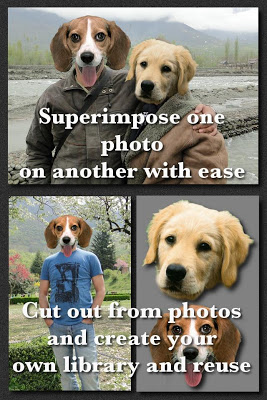
Just with a few taps, create professional grade superimposed or juxtaposed photos on your iPhone! You don't need a computers and expensive software to superimpose or cut/copy/paste one photo on top of another any more.
Screen:
Video:
What's in this version:
- Fixed an important bug that caused the app to defunct when rotated.
Vice info:
Stahuj zde:
The most popular photo blending app on iOS is now available on Android!
Just with a few taps, create professional grade superimposed or juxtaposed photos on your iPhone! You don't need a computers and expensive software to superimpose or cut/copy/paste one photo on top of another any more.
Here is how it works...
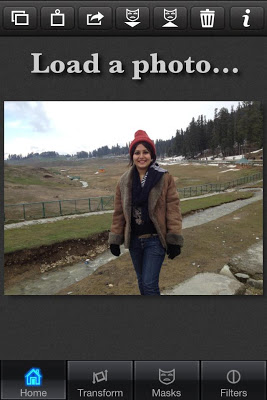
1. Load a background image.
2. Load a foreground image.
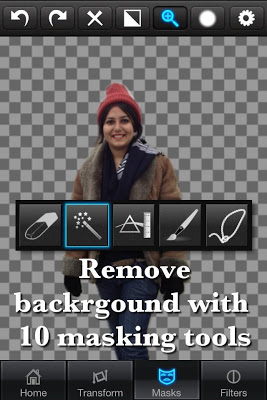
3. Mask out unwanted portion of the foreground image using wide range of masking tools.
4. Smoothen the edges with smoothen tool inside the app, if required.
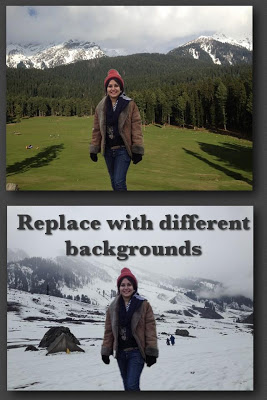
5. Move, Scale, Resize, Rotate, Flip the foreground to place it on the right location on the background image.
6. Adjust the colors/exposure/contrast/hue/saturation etc. of the foreground and the background images if required to match both the images in terms of colors.
7. You are done! Share with your friends and amaze them!
You can also use this tool to do serious photo editing tasks like blending textures or overlaying borders or to do double exposure with adjustable transparency and 18 blending modes.
Masking in the app is the most powerful one available on the app store, just tap on an area of the photo, and the app will mask out all the connected area with similar colors. Or you can use brush, lasso, global color similarity, rectangle, ellipse, linear, bi-linear or radial gradient masking tools. Mask a portion with this tool and that portion of the foreground image will become transparent and reveal the background.
(20,- Kc)
Pozadavky: Android 4.1 a vyssi
Popis: The most popular photo blending app on iOS is now available on Android!
Just with a few taps, create professional grade superimposed or juxtaposed photos on your iPhone! You don't need a computers and expensive software to superimpose or cut/copy/paste one photo on top of another any more.
Screen:
Video:
What's in this version:
- Fixed an important bug that caused the app to defunct when rotated.
Vice info:
Kód: Vybrat vše
https://play.google.com/store/apps/details?id=com.superimposeapp.superimposeappKód: Vybrat vše
http://www.tusfiles.net/tm4erowb50to
http://hugefiles.net/0vx1pe1l7gbg
http://rapidgator.net/file/93009457234ad075cd4f72159b08cea7/Superimpose_v1.5.apk.html
http://www30.zippyshare.com/v/43678362/file.html
http://hugefiles.net/fhx67k9v4gi0
http://uloz.to/xtsdDeU8/superimpose-v1-5-apk
http://ulozto.sk/xibuhdQU/superimpose-v1-5-apkJust with a few taps, create professional grade superimposed or juxtaposed photos on your iPhone! You don't need a computers and expensive software to superimpose or cut/copy/paste one photo on top of another any more.
Here is how it works...
1. Load a background image.
2. Load a foreground image.
3. Mask out unwanted portion of the foreground image using wide range of masking tools.
4. Smoothen the edges with smoothen tool inside the app, if required.
5. Move, Scale, Resize, Rotate, Flip the foreground to place it on the right location on the background image.
6. Adjust the colors/exposure/contrast/hue/saturation etc. of the foreground and the background images if required to match both the images in terms of colors.
7. You are done! Share with your friends and amaze them!
You can also use this tool to do serious photo editing tasks like blending textures or overlaying borders or to do double exposure with adjustable transparency and 18 blending modes.
Masking in the app is the most powerful one available on the app store, just tap on an area of the photo, and the app will mask out all the connected area with similar colors. Or you can use brush, lasso, global color similarity, rectangle, ellipse, linear, bi-linear or radial gradient masking tools. Mask a portion with this tool and that portion of the foreground image will become transparent and reveal the background.