HVAC Buddy®
Napsal: 01. 05. 2014 11:02
HVAC Buddy® v1.9
(189,- Kc)
Pozadavky: Android 1.6 a vyssi
Popis: Make your job easier with our handy refrigerant charging and diagnostic HVAC app - HVAC Buddy®. If you are servicing equipment the best way to begin diagnosis and determine the proper refrigerant charge is to use HVAC Buddy, a set of gauges, and a thermometer.
Screen:
What's in this version:
Release 1.9 February 17, 2013:
• Fix "App Not Licensed" error with Google Play
Release 1.8 February 16, 2013:
• Correct potential force close on Asus Transformer Tablets
• Updates for latest Android devices
Release 1.7 December 2, 2012:
• Add Refrigerants R407F
• Updates for latest Android devices
Release 1.6 July 9, 2012:
• Add Refrigerants R438A (MO99), R422B
• Corrections for sat values in blended refrigerants other than R410A
Vice info:
Stahuj zde:
Make your job easier with our handy refrigerant charging and diagnostic HVAC app - HVAC Buddy®. If you are servicing equipment the best way to begin diagnosis and determine the proper refrigerant charge is to use HVAC Buddy, a set of gauges, and a thermometer.
• Superheat for fixed capillary or Subcool forTXV/EXV systems
• Calculates targeted vs. actual Subcooling
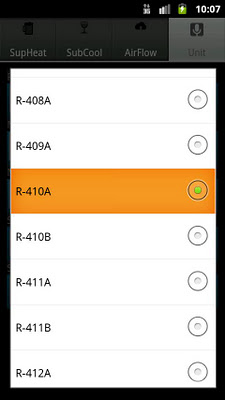
• 73 refrigerants including R-22 (Freon), R-410A (Puron), R-404A, R-134A
• Airflow / Delta-T / TEET Calculation
• Diagnosis tab for leaks, overcharge, contaminants, etc.
• Email System Status Report
• Imperial (IP) or Metric (SI)
• Use Target Superheat and Subcool tables or enter manually
• Fast! Update values realtime with Temp and Press sliders
• User friendly with several pages of step by step instructions
if the early outdoor temperature is 75F and you charge the system to a “beer can cold” suction line your system is likely improperly charged. Later in the afternoon high temperatures will increase head pressure and the resulting overcharge means a lower than desired superheat and wasted energy. Not good!
Features:
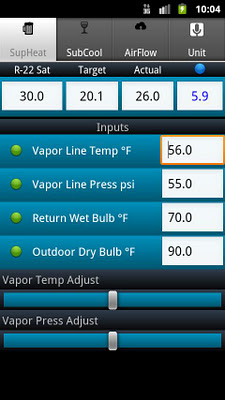
Use HVAC Buddy to enter refrigerant, temperatures, and pressures. The math is done for you to display Superheat or SubcoolingTarget, Actual, and Difference. Use temperature and pressure sliders to see what happens in realtime when these values change. HVAC Buddy contains generic charts for target Superheat and Subcool as well as pressure-temperature tables for 71 Refrigerants. Temperature data for your pressure is displayed on the refrigerant row and changes can easily be viewed by moving the pressure slider. Add or recover refrigerant to get the Actual value to within the displayed target Superheat or Subcool range.
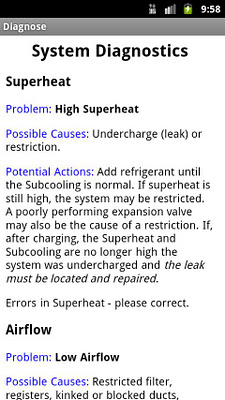
Diagnosis tab - shows common causes for high and low superheat, subcooling.
Instructions - Several pages of detailed step by step instructions.
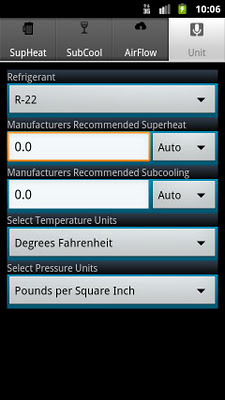
Imperial/Metric - View units in Fahrenheit/Celsius or psi/kPa.
Airflow - For cooling, compares a targeted difference across the coil vs. actual. Also called Delta-T or Target Evaporator Exit Temperature (TEET). Sliders change values in realtime.
System Status Report - Use the email tab to create defaults for email addresses, subject, and System Status Report introductory text. Tap the email button and these values are incorporated into a formatted page including all the parameters recorded in HVAC Buddy. Edit the email and / or add contacts. Then on each service call it's just a couple taps to send a personalized report.
Note: To access Diagnostics, Email, and Instructions use your phones menu button.
This app does NOT have a traditional PT Chart display. However, you can view temperatures in the upper left hand corner given any vapor line pressure (Superheat tab) or Liquid leaving pressure (Subcooling tab).
(189,- Kc)
Pozadavky: Android 1.6 a vyssi
Popis: Make your job easier with our handy refrigerant charging and diagnostic HVAC app - HVAC Buddy®. If you are servicing equipment the best way to begin diagnosis and determine the proper refrigerant charge is to use HVAC Buddy, a set of gauges, and a thermometer.
Screen:
What's in this version:
Release 1.9 February 17, 2013:
• Fix "App Not Licensed" error with Google Play
Release 1.8 February 16, 2013:
• Correct potential force close on Asus Transformer Tablets
• Updates for latest Android devices
Release 1.7 December 2, 2012:
• Add Refrigerants R407F
• Updates for latest Android devices
Release 1.6 July 9, 2012:
• Add Refrigerants R438A (MO99), R422B
• Corrections for sat values in blended refrigerants other than R410A
Vice info:
Kód: Vybrat vše
https://play.google.com/store/apps/details?id=com.gridbuddy.hbuddyKód: Vybrat vše
http://www47.zippyshare.com/v/48864150/file.html
https://www.tusfiles.net/gs4ak86v9z9c
http://unlimitzone.com/vepd2osfdrbd/HVAC.Buddy_v1.9.apk.html
http://rapidgator.net/file/64037dde580ebfee74ae064bed47886c
http://www.sharebeast.com/i8zwo6mu84ai
• Superheat for fixed capillary or Subcool forTXV/EXV systems
• Calculates targeted vs. actual Subcooling
• 73 refrigerants including R-22 (Freon), R-410A (Puron), R-404A, R-134A
• Airflow / Delta-T / TEET Calculation
• Diagnosis tab for leaks, overcharge, contaminants, etc.
• Email System Status Report
• Imperial (IP) or Metric (SI)
• Use Target Superheat and Subcool tables or enter manually
• Fast! Update values realtime with Temp and Press sliders
• User friendly with several pages of step by step instructions
if the early outdoor temperature is 75F and you charge the system to a “beer can cold” suction line your system is likely improperly charged. Later in the afternoon high temperatures will increase head pressure and the resulting overcharge means a lower than desired superheat and wasted energy. Not good!
Features:
Use HVAC Buddy to enter refrigerant, temperatures, and pressures. The math is done for you to display Superheat or SubcoolingTarget, Actual, and Difference. Use temperature and pressure sliders to see what happens in realtime when these values change. HVAC Buddy contains generic charts for target Superheat and Subcool as well as pressure-temperature tables for 71 Refrigerants. Temperature data for your pressure is displayed on the refrigerant row and changes can easily be viewed by moving the pressure slider. Add or recover refrigerant to get the Actual value to within the displayed target Superheat or Subcool range.
Diagnosis tab - shows common causes for high and low superheat, subcooling.
Instructions - Several pages of detailed step by step instructions.
Imperial/Metric - View units in Fahrenheit/Celsius or psi/kPa.
Airflow - For cooling, compares a targeted difference across the coil vs. actual. Also called Delta-T or Target Evaporator Exit Temperature (TEET). Sliders change values in realtime.
System Status Report - Use the email tab to create defaults for email addresses, subject, and System Status Report introductory text. Tap the email button and these values are incorporated into a formatted page including all the parameters recorded in HVAC Buddy. Edit the email and / or add contacts. Then on each service call it's just a couple taps to send a personalized report.
Note: To access Diagnostics, Email, and Instructions use your phones menu button.
This app does NOT have a traditional PT Chart display. However, you can view temperatures in the upper left hand corner given any vapor line pressure (Superheat tab) or Liquid leaving pressure (Subcooling tab).