My Logs Pro
Napsal: 17. 05. 2014 19:26
My Logs Pro v2.8.3
(40,- Kc)
Pozadavky: Android 2.3.3 a vyssi
Popis: My Logs is an application which functions as a log, journal, or note book.
Screen:
What's in this version:
v2.8.3
- Forms: Does not allow negative numbers for numeric text widgets
- Forms: Long label names cutoff for EditText and Choice widgets
- Calendar View: Month names not showing correctly on some phones/tablets
- Remove unnecessary camera and record permissions
Vice info:
Stahuj zde:
Features not found in My Logs:
- App Widget
- Password Access
- Quick log entry and Timed log entry
- Log Stop Time
- Tags (Create relations between log entries with tags)
- Forms (build custom log entry forms)
- Age (time since entry was logged)
- Duration (time spent on log entry)
- Category Data (time ago, duration, plot form data)
- Improved calendar view
- Choose columns to export
- Import log entries from CSV file
* No Internet Permissions, your private data is safe with you. Beware of other log apps that can access your log entries without your knowledge.
* Password Access: Set a password to protect access to your log entries
* Categorized Log Entries. Comes with predefined categories to get you going. If you do not see a category that you need, you can rename existing categories, create new ones, or delete those you don't want to see.
* Quick log entry - one click to add a log entry
* Timed log entry to monitor real time duration. Time tasks or activities
* Stop Time: Add a stop time to a log and keep track of time spent (duration)
* Tags: Create relationships between log entries with tags (Business, Personal, ...)
* Templates: pre-define log details with text when adding a new log entry
* Forms: takes templates to the next level. Build custom forms for quicker and easier log entry. Create plots of numeric data.
* Attach files, photos, or recordings to log entry
* Recognizes Web, Phone, and Email text in log description creating clickable links
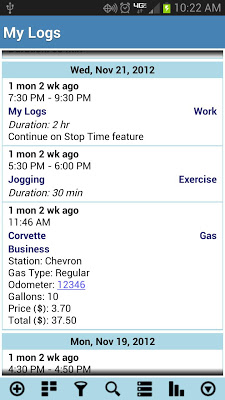
* View log entries in a List view
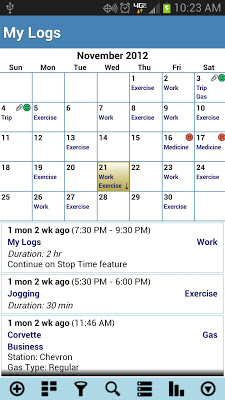
* View log entries from calendar view. Select a day and the log entries will be listed below the calendar.
* Age: time since entry was logged
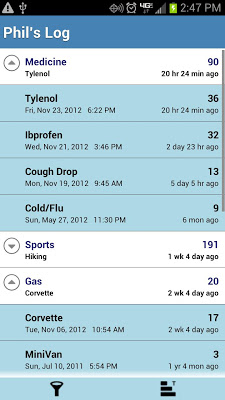
* Category Stats: Time Ago (Age)
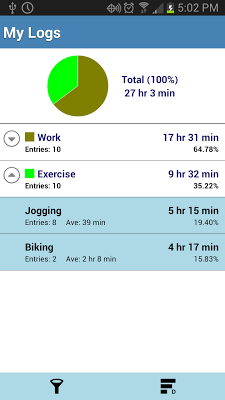
* Category Stats Duration (time spent) - including pie chart and percentage (%)
* Swipe left/right to switch between List/Calendar view
* When in Calendar view, swipe up/down to change month
* Rate logs for additional significance
* Highly configurable. Create new log categories as well as rename existing
* Filter log entries by category, tags, date, and rating
* Search logs for specified text. Highlight search text in log description
* Use Calendar view to set date filter by long pressing on a date
* Save logs as csv or html file with option to email
* Preference to treat "," as delimiter in log description when exporting as .csv file. Use commas in the log description to create separate cells in a spread sheet. Good for recording and plotting data entered in the log description.
* Backup and restore database (NOTE: It is highly recommended that you regularly backup your logs and save to a different storage media)
* Automatic backup of database to SD card
* Uses the phones system time (12 or 24 hr) and date format to ensure consistent time and date format between apps. (Note: You can override the system date and time settings from MyLogs preference settings)
(40,- Kc)
Pozadavky: Android 2.3.3 a vyssi
Popis: My Logs is an application which functions as a log, journal, or note book.
Screen:
What's in this version:
v2.8.3
- Forms: Does not allow negative numbers for numeric text widgets
- Forms: Long label names cutoff for EditText and Choice widgets
- Calendar View: Month names not showing correctly on some phones/tablets
- Remove unnecessary camera and record permissions
Vice info:
Kód: Vybrat vše
https://play.google.com/store/apps/details?id=com.pdr.app.mylogsproKód: Vybrat vše
http://www46.zippyshare.com/v/16982251/file.html
https://www.tusfiles.net/6dn1wzsq9z4f
http://hugefiles.net/5rlphjar9gxt
http://www.2shared.com/file/jDpHKIrO/MyLogsPro_v283.html
http://bit.ly/RJUUb1
http://uloz.to/x4g8h8iQ/my-logs-pro-v2-8-3-apk
http://www11.zippyshare.com/v/31859285/file.html- App Widget
- Password Access
- Quick log entry and Timed log entry
- Log Stop Time
- Tags (Create relations between log entries with tags)
- Forms (build custom log entry forms)
- Age (time since entry was logged)
- Duration (time spent on log entry)
- Category Data (time ago, duration, plot form data)
- Improved calendar view
- Choose columns to export
- Import log entries from CSV file
* No Internet Permissions, your private data is safe with you. Beware of other log apps that can access your log entries without your knowledge.
* Password Access: Set a password to protect access to your log entries
* Categorized Log Entries. Comes with predefined categories to get you going. If you do not see a category that you need, you can rename existing categories, create new ones, or delete those you don't want to see.
* Quick log entry - one click to add a log entry
* Timed log entry to monitor real time duration. Time tasks or activities
* Stop Time: Add a stop time to a log and keep track of time spent (duration)
* Tags: Create relationships between log entries with tags (Business, Personal, ...)
* Templates: pre-define log details with text when adding a new log entry
* Forms: takes templates to the next level. Build custom forms for quicker and easier log entry. Create plots of numeric data.
* Attach files, photos, or recordings to log entry
* Recognizes Web, Phone, and Email text in log description creating clickable links
* View log entries in a List view
* View log entries from calendar view. Select a day and the log entries will be listed below the calendar.
* Age: time since entry was logged
* Category Stats: Time Ago (Age)
* Category Stats Duration (time spent) - including pie chart and percentage (%)
* Swipe left/right to switch between List/Calendar view
* When in Calendar view, swipe up/down to change month
* Rate logs for additional significance
* Highly configurable. Create new log categories as well as rename existing
* Filter log entries by category, tags, date, and rating
* Search logs for specified text. Highlight search text in log description
* Use Calendar view to set date filter by long pressing on a date
* Save logs as csv or html file with option to email
* Preference to treat "," as delimiter in log description when exporting as .csv file. Use commas in the log description to create separate cells in a spread sheet. Good for recording and plotting data entered in the log description.
* Backup and restore database (NOTE: It is highly recommended that you regularly backup your logs and save to a different storage media)
* Automatic backup of database to SD card
* Uses the phones system time (12 or 24 hr) and date format to ensure consistent time and date format between apps. (Note: You can override the system date and time settings from MyLogs preference settings)