Events Settings
Napsal: 18. 05. 2014 12:14
Events Settings v2.2
(20,- Kc)
Pozadavky: Android 2.2 a vyssi
Popis: Events Settings is an app created to make your Android tailored to you!
Events with Settings you can create some rules based on:
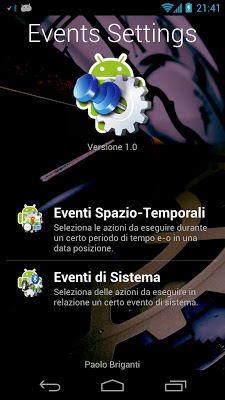
-Space & Time Events
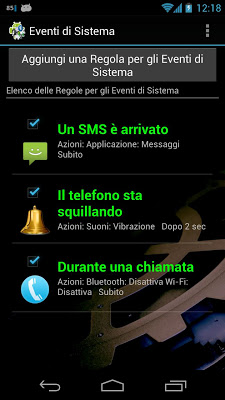
-System Events
Screen:
What's in this version:
Version 2.1:
NB.: A lot of code is changed. You need to uninstall and reinstall app!
-Android KitKat Compatible
-Bug Fix
Vice info:
Stahuj zde:
ANDROID 4.4 KITKAT IS NOT FULLY SUPPORTED BY THIS APP!
Events Settings is an app created to make your Android tailored to you!
Events with Settings you can create some rules based on:
-Space & Time Events
-System Events
These rules will perform a lot of actions that will allow you to turn on / off / switch / display settings you can choose between:
-Wi-Fi
-Data
-Bluetooth
-Rotation
-Sounds
-Brightness
-Timeout Screen
-Flight Mode
-Automatic Synchronization
-Wi-Fi Access Point
You can also choose to:
-Start an application
-Close all applications
-Play sound
-Show a Dialog Window
SPACE & TIME EVENTS:
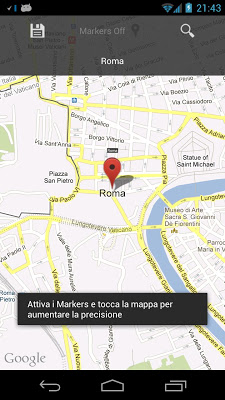
Select a period of time and / or a position and Events Settings will perform all the actions that you choose.
Examples:
-University: from 9.00 am to 12.00 am you have to set the VIBRATION mode and you always forget it...
Choose the interval 9:00 to 12:00, choose the days, the position of your university, set "Vibration" in "Sounds" category and you're done!
SYSTEM EVENTS
Events Settings is able to handle the following system events:
-The battery is very low
-A text message has arrived
-The phone is ringing
-During a call
-The device is fully booted
-Turns on the screen
-Turns off the screen
-The screen is unlocked
-The Wi-Fi network is connected
-The Wi-Fi network is disconnected
-The Wi-Fi is On
-The Wi-Fi is Off
-A Wi-Fi network to connect to was found
-The mobile network is connected
-The mobile network is disconnected
-Bluetooth is on
-Bluetooth is off
-Bluetooth starts the search for devices
-Bluetooth ends search for devices
-Screen orientation changes in portrait mode
-Screen orientation changes in landscape mode
-Sounds are set in normal mode
-Sounds are set in vibration mode
-Sounds are set to silent mode
-Airplane mode is on
-Airplane mode is off
-The Wi-Fi Access Point is on
-The Wi-Fi Access Point is off
(20,- Kc)
Pozadavky: Android 2.2 a vyssi
Popis: Events Settings is an app created to make your Android tailored to you!
Events with Settings you can create some rules based on:
-Space & Time Events
-System Events
Screen:
What's in this version:
Version 2.1:
NB.: A lot of code is changed. You need to uninstall and reinstall app!
-Android KitKat Compatible
-Bug Fix
Vice info:
Kód: Vybrat vše
https://play.google.com/store/apps/details?id=com.eventssettings.paolobrigantiKód: Vybrat vše
http://unlimitzone.com/hfpgum64zy1p
http://www.indishare.com/kpn9siwcrmx2
http://BillionUploads.com/6r4wa2mfjyoj
http://uloz.to/x6AWCxAq/events-settings-2-2-apk
Events Settings is an app created to make your Android tailored to you!
Events with Settings you can create some rules based on:
-Space & Time Events
-System Events
These rules will perform a lot of actions that will allow you to turn on / off / switch / display settings you can choose between:
-Wi-Fi
-Data
-Bluetooth
-Rotation
-Sounds
-Brightness
-Timeout Screen
-Flight Mode
-Automatic Synchronization
-Wi-Fi Access Point
You can also choose to:
-Start an application
-Close all applications
-Play sound
-Show a Dialog Window
SPACE & TIME EVENTS:
Select a period of time and / or a position and Events Settings will perform all the actions that you choose.
Examples:
-University: from 9.00 am to 12.00 am you have to set the VIBRATION mode and you always forget it...
Choose the interval 9:00 to 12:00, choose the days, the position of your university, set "Vibration" in "Sounds" category and you're done!
SYSTEM EVENTS
Events Settings is able to handle the following system events:
-The battery is very low
-A text message has arrived
-The phone is ringing
-During a call
-The device is fully booted
-Turns on the screen
-Turns off the screen
-The screen is unlocked
-The Wi-Fi network is connected
-The Wi-Fi network is disconnected
-The Wi-Fi is On
-The Wi-Fi is Off
-A Wi-Fi network to connect to was found
-The mobile network is connected
-The mobile network is disconnected
-Bluetooth is on
-Bluetooth is off
-Bluetooth starts the search for devices
-Bluetooth ends search for devices
-Screen orientation changes in portrait mode
-Screen orientation changes in landscape mode
-Sounds are set in normal mode
-Sounds are set in vibration mode
-Sounds are set to silent mode
-Airplane mode is on
-Airplane mode is off
-The Wi-Fi Access Point is on
-The Wi-Fi Access Point is off