Clean Music Player PRO
Napsal: 04. 08. 2014 17:57
Clean Music Player PRO v8.8.1
Požadavky: Liší se podle zařízení
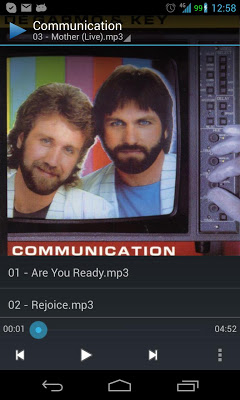
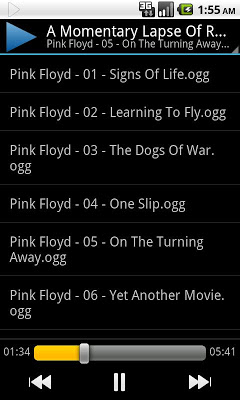
Popis: Clean Music is a simple, fast, and elegant folder-based audio player. You browse to the directory and tap the file; no mangled metadata, no scanning your collection, and no meaningless icons or placeholder album artwork.
Screen:
Vice info:
Stahuj zde: PRO features Unlocked
Description
Clean Music is a simple, fast, and elegant folder-based audio player. You browse to the directory and tap the file; no mangled metadata, no scanning your collection, and no meaningless icons or placeholder album artwork.
Simple doesn't mean basic, and feature-filled doesn't mean slow or difficult to use; Clean Music combines an easy-to-use UI with a small amount of powerful features and meaningful customization options.
There's an in-app purchase to add a few extra features (playlists, scrobbling, and album artwork), but most users are satisfied with the free version.
WHAT'S IN THE FREE VERSION
☆ Take advantage of all the cool Android features: Gapless playback and notification controls on Android 4.1+, lockscreen controls and an equalizer on Android 4.0+, and integration with other apps on all Android versions.
☆ Specify exactly what you want to play by long-click selecting songs and folders. For example, loop a single song by long clicking it, clicking the play button, and turning repeat on. And/or shuffle all your music by long-clicking your music folder, tapping play, and shuffling.
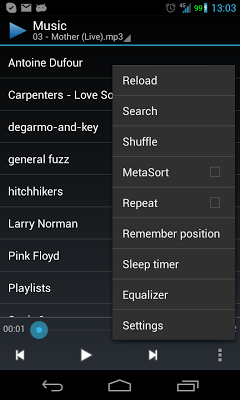
☆ In a long song or audiobook, keep your place with Remember Position, and move around by tapping the numbers next to the seek bar.
☆ If order is important, and the file names are not already sorted, MetaSort them.
☆ Go to sleep to your music using the Sleep Timer.
☆ And search (even using Google Now's "listen to" command).
WHAT'S IN THE PRO VERSION
★ Save a selection of songs, or what you're listening to now, as a playlist.
★ Push what you're listening to Last.fm (using ScrobbleDroid), and they can recommend new music.
★ And show off your album artwork.
Požadavky: Liší se podle zařízení
Popis: Clean Music is a simple, fast, and elegant folder-based audio player. You browse to the directory and tap the file; no mangled metadata, no scanning your collection, and no meaningless icons or placeholder album artwork.
Screen:
Vice info:
Kód: Vybrat vše
https://play.google.com/store/apps/details?id=com.myskyspark.music&hl=enKód: Vybrat vše
http://ul.to/xpy23tbs
http://www.tusfiles.net/4grwj7e8nqkw
https://webshare.cz/group/1B544m2U51/
http://ulozto.cz/xp8WxTeW/clean-music-player-pro-apkClean Music is a simple, fast, and elegant folder-based audio player. You browse to the directory and tap the file; no mangled metadata, no scanning your collection, and no meaningless icons or placeholder album artwork.
Simple doesn't mean basic, and feature-filled doesn't mean slow or difficult to use; Clean Music combines an easy-to-use UI with a small amount of powerful features and meaningful customization options.
There's an in-app purchase to add a few extra features (playlists, scrobbling, and album artwork), but most users are satisfied with the free version.
WHAT'S IN THE FREE VERSION
☆ Take advantage of all the cool Android features: Gapless playback and notification controls on Android 4.1+, lockscreen controls and an equalizer on Android 4.0+, and integration with other apps on all Android versions.
☆ Specify exactly what you want to play by long-click selecting songs and folders. For example, loop a single song by long clicking it, clicking the play button, and turning repeat on. And/or shuffle all your music by long-clicking your music folder, tapping play, and shuffling.
☆ In a long song or audiobook, keep your place with Remember Position, and move around by tapping the numbers next to the seek bar.
☆ If order is important, and the file names are not already sorted, MetaSort them.
☆ Go to sleep to your music using the Sleep Timer.
☆ And search (even using Google Now's "listen to" command).
WHAT'S IN THE PRO VERSION
★ Save a selection of songs, or what you're listening to now, as a playlist.
★ Push what you're listening to Last.fm (using ScrobbleDroid), and they can recommend new music.
★ And show off your album artwork.