Next Launcher Theme Red-Drift
Napsal: 01. 09. 2014 02:21
Next Launcher Theme Red-Drift v1.0.2
41,-kc
Požadavky: Android 2.2 a vyšší
Popis: Please read the "Directions" before buying completely.
Screen:
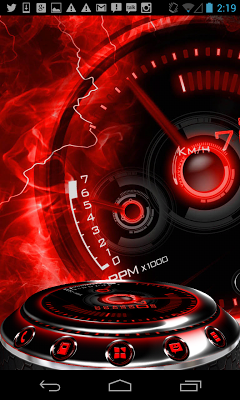
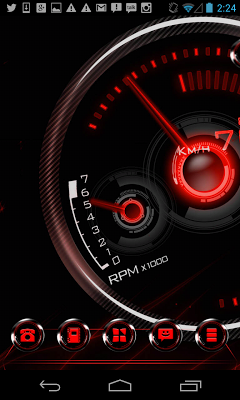
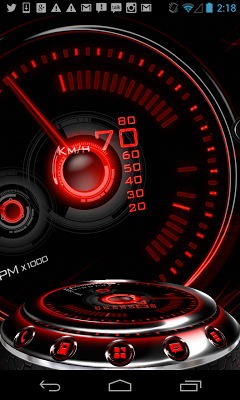
Vice info:
Stahuj zde:
• 2D (Normal) and 3D Modes (as shown in pics)
• Over 2700 custom HD Icons (HD=Tablet Compatible)
Note: 20 special icons, covers the main apps of the phone such as dial, SMS, Playstore and so on. The other special icons must be set manually.
• 12 HD custom wallpapers, plus 16 extra ones in our app's cloud.
• High End Design for all elements down to a little indicator.
• Optimized file size to save you storage space
Directions:
This is a highly customizable theme for Next Launcher 3D.
Please make sure that you have purchased and installed the latest version of the Next Launcher 3D.
Installation in 2D normal classical mode
1. Open Next Launcher 3D
2. Press menu on your desktop
3. Select Theme in Menu
4. Select "Installed"
5. Select theme Red Drift and Apply
Change to 3D mode
1. Open Next Launcher 3D
2. Press menu on your desktop
3. Select "Preferences"
4. Switch to "3D mode"
Select Theme in 3D mode
1. Press Menu on your desktop
("Menu" also the 5th button on your dock on your desktop)
2. Select "Theme"
(the button looks like a T-shirt)
3. Select "Installed"
4. Select Red Drift 3D and Apply
Change wallpaper: Open this app
1. Open your app drawer and open this app.
2. Select Wallpaper in this app menu.
3. Select Extra Wallpaper
You can create a shortcut to the app for easier finding.
Troubleshooting:
1.If you don't see the theme, try the following:
- Update NEXT Launcher to latest verison.
- Close Next Launcher 3d
- Open it again.
- Apply a NEXT Default theme
- Follow Installation for 2D mode direction above again.
- Follow Installation for 3D mode after.
41,-kc
Požadavky: Android 2.2 a vyšší
Popis: Please read the "Directions" before buying completely.
Screen:
Vice info:
Kód: Vybrat vše
https://play.google.com/store/apps/details?id=com.gtp.nextlauncher.theme.xoreddriftKód: Vybrat vše
http://ul.to/xsysvhge
http://ulozto.cz/xtAksSEA/red-apk
http://ulozto.net/xpZsSTpk/red-apk
https://webshare.cz/group/1l23t0f42k/
http://unlimitzone.com/ov6e4ocrmtit/Red.apk.html
http://www66.zippyshare.com/v/22498016/file.html
• Over 2700 custom HD Icons (HD=Tablet Compatible)
Note: 20 special icons, covers the main apps of the phone such as dial, SMS, Playstore and so on. The other special icons must be set manually.
• 12 HD custom wallpapers, plus 16 extra ones in our app's cloud.
• High End Design for all elements down to a little indicator.
• Optimized file size to save you storage space
Directions:
This is a highly customizable theme for Next Launcher 3D.
Please make sure that you have purchased and installed the latest version of the Next Launcher 3D.
Installation in 2D normal classical mode
1. Open Next Launcher 3D
2. Press menu on your desktop
3. Select Theme in Menu
4. Select "Installed"
5. Select theme Red Drift and Apply
Change to 3D mode
1. Open Next Launcher 3D
2. Press menu on your desktop
3. Select "Preferences"
4. Switch to "3D mode"
Select Theme in 3D mode
1. Press Menu on your desktop
("Menu" also the 5th button on your dock on your desktop)
2. Select "Theme"
(the button looks like a T-shirt)
3. Select "Installed"
4. Select Red Drift 3D and Apply
Change wallpaper: Open this app
1. Open your app drawer and open this app.
2. Select Wallpaper in this app menu.
3. Select Extra Wallpaper
You can create a shortcut to the app for easier finding.
Troubleshooting:
1.If you don't see the theme, try the following:
- Update NEXT Launcher to latest verison.
- Close Next Launcher 3d
- Open it again.
- Apply a NEXT Default theme
- Follow Installation for 2D mode direction above again.
- Follow Installation for 3D mode after.