Automatic File Mover PRO
Napsal: 18. 01. 2015 04:54
Automatic File Mover PRO v1.7
51,-kc
Požadavky: Android 1.6 a vyšší
Popis: File Mover makes it easy to handle your latest download files.If you use Android 4.4 (KitKat), this app won't be able to copy/move to your external SD Card.
Screen:
Vice info:
Stahuj zde:

File Mover makes it easy to handle your latest download files.
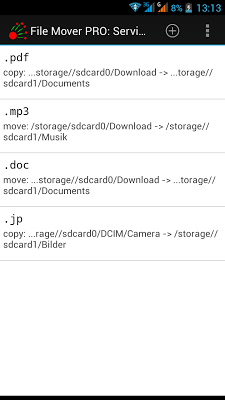
File Mover distributes your files automatically from different source folders to different target folders.
For example, .MP3 files from /sdcard/download to /sdcard/music. And .PDF Files from /sdcard/external_sd/office to /sdcard/Documents...
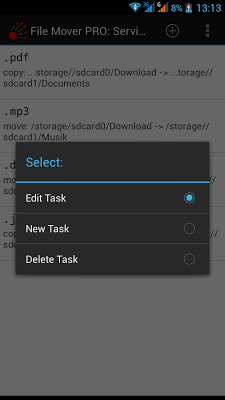
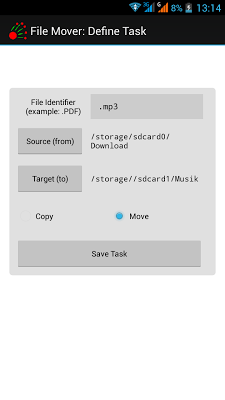
Just define Copy or Move tasks in this app. Define the file identifier (a search string within the file name), source directory and target directory and decide, if the file should be copied or moved.
After that, chose 'Start Service' from the app menu. That's it.
File Mover service runs as long as you don't stop the service. Every time new files show up in your source folder, File Mover will handle them as you defined it.
With the new 1x1 widget, you can also fire the copy/move service one-time by just pushing the small widget on your homescreen!
51,-kc
Požadavky: Android 1.6 a vyšší
Popis: File Mover makes it easy to handle your latest download files.If you use Android 4.4 (KitKat), this app won't be able to copy/move to your external SD Card.
Screen:
Vice info:
Kód: Vybrat vše
https://play.google.com/store/apps/details?id=de.cmweb.filemover&hl=enKód: Vybrat vše
http://hugefiles.net/yh6rmmhlkdjc
https://userscloud.com/2v71vzo5zeat
http://www.tusfiles.net/v4av7m3r4zln
https://webshare.cz/#/file/75443s51c7/automaric-file-mover-pro-v1-7-4allmobile-eu-apk
http://ulozto.net/xqRKKeP6/automaric-file-mover-pro-4allmobile-eu-apk
http://ulozto.cz/xGz2YZxF/automaric-file-mover-pro-v1-7-4allmobile-eu-apk
File Mover makes it easy to handle your latest download files.
File Mover distributes your files automatically from different source folders to different target folders.
For example, .MP3 files from /sdcard/download to /sdcard/music. And .PDF Files from /sdcard/external_sd/office to /sdcard/Documents...
Just define Copy or Move tasks in this app. Define the file identifier (a search string within the file name), source directory and target directory and decide, if the file should be copied or moved.
After that, chose 'Start Service' from the app menu. That's it.
File Mover service runs as long as you don't stop the service. Every time new files show up in your source folder, File Mover will handle them as you defined it.
With the new 1x1 widget, you can also fire the copy/move service one-time by just pushing the small widget on your homescreen!