Video To GIF Pro
Napsal: 16. 05. 2015 22:04
Video To GIF Pro v1.4c
(41,- Kc)
Pozadavky: Android 4.0 a vyssi
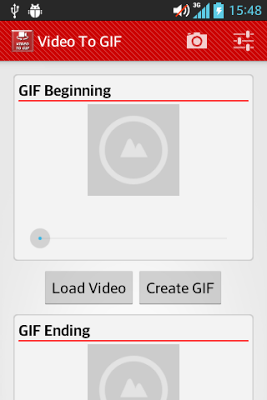
Popis: Load a video or create a new one, then select a time range, beginning and ending. You can view the preview for the time selected.
Screen:
What's in this version:
Version 1.4b
- Adds rotate image in gif visor
- Fixes minor bugs
Vice info:
Stahuj zde:
Convert your videos into funny GIFs!
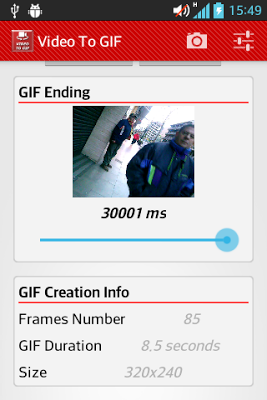
Load a video or create a new one, then select a time range, beginning and ending. You can view the preview for the time selected. Remember 1 second is 1000 milliseconds.
Keep it mind that you're using a mobile device and memory and other resources are limited. You can view the gif specs at the end of the main window. When gif is created touch and hold for view it in the gallery.
Press Menu -> About for more info
**ATENTION**
This is a beta version yet and maybe it is not running in your device. Please let me know via mail your device model and video type that you're trying to load. Thank you.
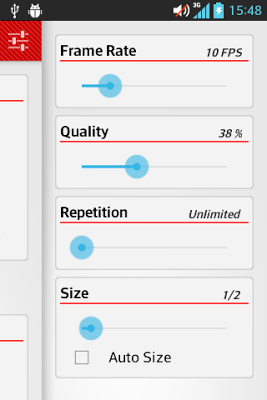
I suggest these settings (depends of your device):
-Quality: 25%
-Size: max 320x240
-Gif duration: max 4 seconds
-Frames number: max 80
*Avoid vertical videos*
**How to deal with out of memory issue?
Try to use the settings above. If it does not works you can try to lower Frame Rate. Frame Rate is set from the video loaded and is the most important spec because gives to the gif the smooth movement. But I suggest you lower time range, size or quality before. Feel free to test.
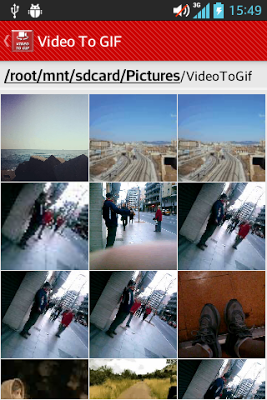
**Where are my GIFs?
Into your sdcard (or internal memory) folder Pictures/VideoToGif
(41,- Kc)
Pozadavky: Android 4.0 a vyssi
Popis: Load a video or create a new one, then select a time range, beginning and ending. You can view the preview for the time selected.
Screen:
What's in this version:
Version 1.4b
- Adds rotate image in gif visor
- Fixes minor bugs
Vice info:
Kód: Vybrat vše
https://play.google.com/store/apps/details?id=net.atredroid.videotogifproKód: Vybrat vše
http://uloz.to/xcF4utrQ/video-to-gif-pro-v1-4c-apk
http://ulozto.sk/xHEjp3ug/video-to-gif-pro-v1-4c-apk
https://webshare.cz/file/2hf49x5Gs7/video-to-gif-pro-v1-4c-apk
Convert your videos into funny GIFs!
Load a video or create a new one, then select a time range, beginning and ending. You can view the preview for the time selected. Remember 1 second is 1000 milliseconds.
Keep it mind that you're using a mobile device and memory and other resources are limited. You can view the gif specs at the end of the main window. When gif is created touch and hold for view it in the gallery.
Press Menu -> About for more info
**ATENTION**
This is a beta version yet and maybe it is not running in your device. Please let me know via mail your device model and video type that you're trying to load. Thank you.
I suggest these settings (depends of your device):
-Quality: 25%
-Size: max 320x240
-Gif duration: max 4 seconds
-Frames number: max 80
*Avoid vertical videos*
**How to deal with out of memory issue?
Try to use the settings above. If it does not works you can try to lower Frame Rate. Frame Rate is set from the video loaded and is the most important spec because gives to the gif the smooth movement. But I suggest you lower time range, size or quality before. Feel free to test.
**Where are my GIFs?
Into your sdcard (or internal memory) folder Pictures/VideoToGif