Screen Stream Mirroring
Napsal: 18. 05. 2015 11:02
Screen Stream Mirroring v2.1.2b + patched
160,-Kc
Požadavky: Android 4.0 a vyšší
Popis: Screen Stream is a powerful app to "cast" your Android device display in real time!
Screen:
Vice info:
Stahuj zde: original:

Stahuj zde: patched:
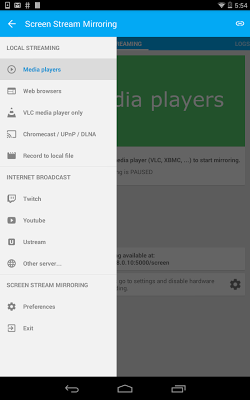
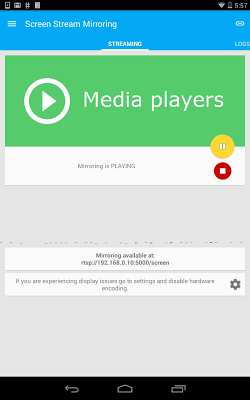
You can share your android screen live just like a dual screen to other computers or devices (mobiles, some Smart TVs or ADSL boxes if compatible with RTSP network stream) on the same network.You can even make powerful presentation for work or education.IMPORTANT: /! Instructions for unrooted devices /!
If your device is not rooted please use our one-time startup script that you can download here: >
You need to start it only one time (the first time you want to use the application), and run it again only when your device is restarted.
The watchers have just to read the stream in their favorite stream video player (such as VLC media player available for computers and mobile devices, or the one embedded into Smart Tv or Adsl box if compatible with RTSP).
No other specific client is needed and you will benefit of the power of VLC.
Any number of connections can be made to your video stream, so multiple people can connect at the same time !
Following settings and features are available:
[✔] No root: the application is compatible with unrooted devices!
[✔] Set resolution, video format, framerate, and bitrate/quality to let you optimize performances
[✔] 3 different video formats available: MPEG4 Software, MPEG4 hardware accelerated, and JPEG Software
[✔] 2 network protocols available: RTSP and TCP
[✔] Secure stream with username and password (RTSP)
[✔] Logs screen to know who is connected
[✔] Share the stream url directly with emails, sms, or other apps, or copy it to the clipboard
[✔] Orientation change if you want to change your device orientation display
[✔] You can also stream your sound with the screen
Try different settings to check which one best fit your device.
Usage recommandations:
- Depending on your device the stream can be slower. Please wait a moment to let the stream stabilize.
- If the stream is not smooth enough:
-> try to modify resolution, video format, and encoding quality or bitrate settings.
-> switch video format to MPEG4 Hardware accelerated (for Android 4.1+ devices) ! It is faster !
- The stream is made to work over RTSP or TCP network protocols, so please use a compatible video player/device.
- RTSP protocol is faster and more powerful. It should be compatible with more client software and hardware (such Smart TVs and Adsl boxes).
- The stream is intended to work through a local network only.
- You can try to make it work through an Internet connection but that would probably need some network configuration from your side, so it cannot work as is and you'll have to know what you do.
- If you don't know what video player to use, just use VLC. It just works fine and it is free.
- If you use VLC please update it to the last available version.
160,-Kc
Požadavky: Android 4.0 a vyšší
Popis: Screen Stream is a powerful app to "cast" your Android device display in real time!
Screen:
Vice info:
Kód: Vybrat vše
https://play.google.com/store/apps/details?id=com.mobzapp.screenstream Kód: Vybrat vše
http://ulozto.cz/x1x7w4X2/screen-stream-4allmobile-eu-apk
http://ulozto.net/xb5o2ybB/screen-stream-4allmobile-eu-apk
https://webshare.cz/file/78Q4gf5333/screen-stream-4allmobile-eu-apk
Stahuj zde: patched:
Kód: Vybrat vše
http://ulozto.cz/x57y1dP6/screen-stream-mirroring-4allmobile-eu-apk
http://ulozto.net/xCWFv9o4/screen-stream-mirroring-4allmobile-eu-apk
https://webshare.cz/file/6px4mF24L6/screen-stream-mirroring-4allmobile-eu-apk
You can share your android screen live just like a dual screen to other computers or devices (mobiles, some Smart TVs or ADSL boxes if compatible with RTSP network stream) on the same network.You can even make powerful presentation for work or education.IMPORTANT: /! Instructions for unrooted devices /!
If your device is not rooted please use our one-time startup script that you can download here: >
You need to start it only one time (the first time you want to use the application), and run it again only when your device is restarted.
The watchers have just to read the stream in their favorite stream video player (such as VLC media player available for computers and mobile devices, or the one embedded into Smart Tv or Adsl box if compatible with RTSP).
No other specific client is needed and you will benefit of the power of VLC.
Any number of connections can be made to your video stream, so multiple people can connect at the same time !
Following settings and features are available:
[✔] No root: the application is compatible with unrooted devices!
[✔] Set resolution, video format, framerate, and bitrate/quality to let you optimize performances
[✔] 3 different video formats available: MPEG4 Software, MPEG4 hardware accelerated, and JPEG Software
[✔] 2 network protocols available: RTSP and TCP
[✔] Secure stream with username and password (RTSP)
[✔] Logs screen to know who is connected
[✔] Share the stream url directly with emails, sms, or other apps, or copy it to the clipboard
[✔] Orientation change if you want to change your device orientation display
[✔] You can also stream your sound with the screen
Try different settings to check which one best fit your device.
Usage recommandations:
- Depending on your device the stream can be slower. Please wait a moment to let the stream stabilize.
- If the stream is not smooth enough:
-> try to modify resolution, video format, and encoding quality or bitrate settings.
-> switch video format to MPEG4 Hardware accelerated (for Android 4.1+ devices) ! It is faster !
- The stream is made to work over RTSP or TCP network protocols, so please use a compatible video player/device.
- RTSP protocol is faster and more powerful. It should be compatible with more client software and hardware (such Smart TVs and Adsl boxes).
- The stream is intended to work through a local network only.
- You can try to make it work through an Internet connection but that would probably need some network configuration from your side, so it cannot work as is and you'll have to know what you do.
- If you don't know what video player to use, just use VLC. It just works fine and it is free.
- If you use VLC please update it to the last available version.