Screen On Full
Napsal: 17. 08. 2015 19:50
Screen On Full v1.1.3
21,-Kc
Požadavky: Android 2.3 a vyšší
Popis: Screen on allows you to keep the screen ON with five options to adjust the brightness preventing the screen to lock and to keep the screen awake .
Screen:
Vice info:
Stahuj zde:

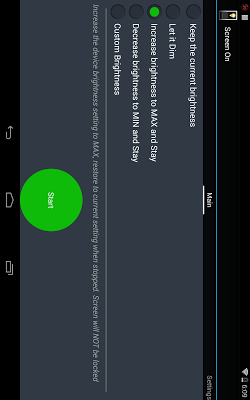
It offers five options,
1) Keep the current brightness (Don't dim)
2) Allow to Dim
Allows the screen to dim but will not allow it to lock.
3) Increase brightness to MAX
4) Decrease brightness to MIN
5) Set the custom brightness
Supports Landscape mode
New Features:
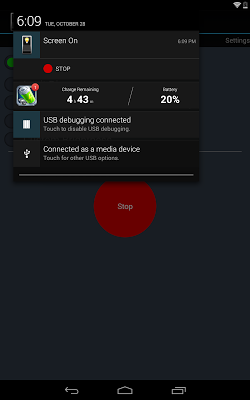
1. Stop from Notification bar:
You can stop by clicking the "Stop" button in the notification, no more opening the app.
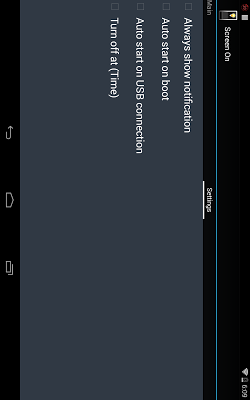
2. Always show Notification:
This option will always show the notification and allows you to START and STOP without opening the app. It currently picks up the last used option or the first option.
3. Start on Boot:
Selecting this option will automatically launch this app and apply the affect without even starting the app.
4. Start on USB:
This option will auto launch the selected option and disable immediately after disconnecting the device from USB. This is very helpful, especially for the developers.
21,-Kc
Požadavky: Android 2.3 a vyšší
Popis: Screen on allows you to keep the screen ON with five options to adjust the brightness preventing the screen to lock and to keep the screen awake .
Screen:
Vice info:
Kód: Vybrat vše
https://play.google.com/store/apps/details?id=com.brilliant.apps.screenon.full Kód: Vybrat vše
http://ulozto.cz/xGjENZRH/screenon-4allmobile-eu-apk
http://ulozto.net/xxtdacbD/screenon-4allmobile-eu-apk
https://webshare.cz/file/33Vv73sa65/screenon-4allmobile-eu-apk
It offers five options,
1) Keep the current brightness (Don't dim)
2) Allow to Dim
Allows the screen to dim but will not allow it to lock.
3) Increase brightness to MAX
4) Decrease brightness to MIN
5) Set the custom brightness
Supports Landscape mode
New Features:
1. Stop from Notification bar:
You can stop by clicking the "Stop" button in the notification, no more opening the app.
2. Always show Notification:
This option will always show the notification and allows you to START and STOP without opening the app. It currently picks up the last used option or the first option.
3. Start on Boot:
Selecting this option will automatically launch this app and apply the affect without even starting the app.
4. Start on USB:
This option will auto launch the selected option and disable immediately after disconnecting the device from USB. This is very helpful, especially for the developers.