DocumentScanner (Acadoid Developer)
Napsal: 16. 04. 2016 21:13
DocumentScanner v1.1.2
(99,- Kc)
Pozadavky: Android 3.0 a vyssi
Popis: DocumentScanner is an Android app for document scanning by taking photographs using the device camera.
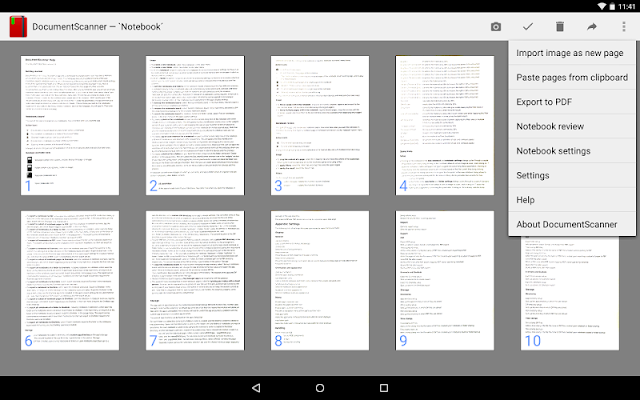
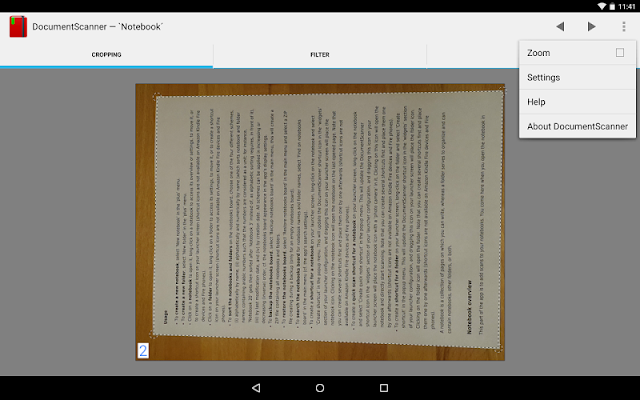
Screen:


What's in this version:
* several minor improvements
* notebook review improved
* filter performance improved
* Russian and Japanese localization added (languages of the largest user proportions after English, German, Korean, Portuguese, Spanish, Italian, and French, other languages will follow in order of user proportion)
* quick notebooks added
* path made adjustable in new notebook, new folder, notebook settings, and folder settings dialogs
* second cropping mode added
Vice info:
Stahuj zde:
DocumentScanner is an Android app for document scanning by taking photographs using the device camera.
It has been designed while having a user at university or in a company in mind, for instance a student who is using it to digitize notes or a businessman who is using it for collecting and organizing receipts.
Its major target devices are tablets with Android 3.0 or later (it is developed on a Samsung Galaxy Note 10.1, an Asus Nexus 7, a Samsung Nexus 10, and an Asus MeMO Pad).
User feedback:
We would love to hear from you, please send feedback and feature requests to us by email (devel [a] acadoid.com). If you encounter a problem with the app, please email us and we will do our very best to fix it quickly.
Major features:
* requires only minimal permissions and no internet connection (we do respect your privacy!)
* allows efficient scanning
Additional features:
* free choice of notebook's page width and height (i.e. horizontal and vertical resolution of pages' bitmaps)
* single page and sequential multiple page scanning
* notebook export as compressed PDF
* notebook export to Evernote (requires Evernote app to be installed)
* notebook export to OneNote (requires OneNote app to be installed)
* sharing and import of notebook pages
* insertion, deletion, and rearrangement of notebook pages
* sharing and import of notebooks
* organization of notebooks in folders
* backup and restore of notebooks board
Possible issue: For certain functionality, the app requires other apps to be installed: Scanning requires a camera app to be installed; notebook and folder import, and notebooks board restore require a file manager app to be installed; export to Evernote requires the Evernote app to be installed; export to OneNote requires the OneNote app to be installed.
(99,- Kc)
Pozadavky: Android 3.0 a vyssi
Popis: DocumentScanner is an Android app for document scanning by taking photographs using the device camera.
Screen:
What's in this version:
* several minor improvements
* notebook review improved
* filter performance improved
* Russian and Japanese localization added (languages of the largest user proportions after English, German, Korean, Portuguese, Spanish, Italian, and French, other languages will follow in order of user proportion)
* quick notebooks added
* path made adjustable in new notebook, new folder, notebook settings, and folder settings dialogs
* second cropping mode added
Vice info:
Kód: Vybrat vše
https://play.google.com/store/apps/details?id=com.acadoid.documentscannerKód: Vybrat vše
https://uploadshub.com/evw8r9rbcyxw
https://revclouds.com/b282d000y0ch
https://userscloud.com/hc33a88hjvbk
https://uplod.it/kl5qawdonikxIt has been designed while having a user at university or in a company in mind, for instance a student who is using it to digitize notes or a businessman who is using it for collecting and organizing receipts.
Its major target devices are tablets with Android 3.0 or later (it is developed on a Samsung Galaxy Note 10.1, an Asus Nexus 7, a Samsung Nexus 10, and an Asus MeMO Pad).
User feedback:
We would love to hear from you, please send feedback and feature requests to us by email (devel [a] acadoid.com). If you encounter a problem with the app, please email us and we will do our very best to fix it quickly.
Major features:
* requires only minimal permissions and no internet connection (we do respect your privacy!)
* allows efficient scanning
Additional features:
* free choice of notebook's page width and height (i.e. horizontal and vertical resolution of pages' bitmaps)
* single page and sequential multiple page scanning
* notebook export as compressed PDF
* notebook export to Evernote (requires Evernote app to be installed)
* notebook export to OneNote (requires OneNote app to be installed)
* sharing and import of notebook pages
* insertion, deletion, and rearrangement of notebook pages
* sharing and import of notebooks
* organization of notebooks in folders
* backup and restore of notebooks board
Possible issue: For certain functionality, the app requires other apps to be installed: Scanning requires a camera app to be installed; notebook and folder import, and notebooks board restore require a file manager app to be installed; export to Evernote requires the Evernote app to be installed; export to OneNote requires the OneNote app to be installed.