SystemInfo Zooper Widget Skin
Napsal: 11. 05. 2014 15:20
SystemInfo Zooper Widget Skin v1.0
(24,- Kc)
Pozadavky: Android 4.0.3 a vyssi
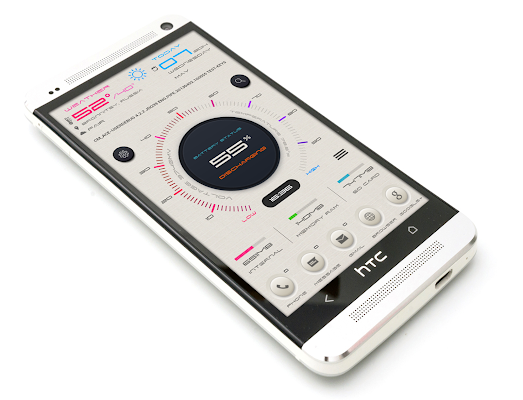
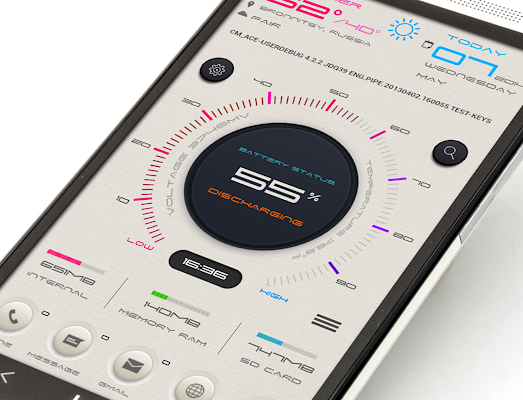
Popis: Theme for Zooper Widget
Screen:
What's in this version:
- nova aplikace
Vice info:
Stahuj zde:
SCREEN OF THE DAY ON MYCOLORSCREEN
Theme for Zooper Widget
Required to install Nova Launcher (or any other widget supports scaling) Zooper Widget.
Nova Launcher settings: hide statusbar top, remove the padding around the edges of the screen, set the desktop 10x10 grid. Else at your discretion.
Installation:
Add a widget on your desktop. Click on it and get into the selection of sources from which can be installed templates. See the icon in the designated theme. Click on it and get into the menu theme templates. Choose a template. He appears on the desktop. I repeat once again: it does not matter what size you add a widget you can stretch it (long press on it and from the menu select "change"). Also, do not forget to use the menu "Scaling". With these two functions, you will achieve the desired result. In fact, everything is very simple. All of the above steps you are doing with the other templates.
To systemic progress bars are displayed correctly on your device information you need to go to the menu, select "Edit progress bar" and in "maximum" set the value of which is provided by your system (if the memory card 8GB, you set the maximum to 8000 (I used the map in MB).
After adding all the widgets reboot the device.
(24,- Kc)
Pozadavky: Android 4.0.3 a vyssi
Popis: Theme for Zooper Widget
Screen:
What's in this version:
- nova aplikace
Vice info:
Kód: Vybrat vše
https://play.google.com/store/apps/details?id=com.vladikus.zwskin.systeminfoKód: Vybrat vše
http://www.tusfiles.net/qbkhlvm4q7p0
http://hugefiles.net/3dy5x2gg2bme
Theme for Zooper Widget
Required to install Nova Launcher (or any other widget supports scaling) Zooper Widget.
Nova Launcher settings: hide statusbar top, remove the padding around the edges of the screen, set the desktop 10x10 grid. Else at your discretion.
Installation:
Add a widget on your desktop. Click on it and get into the selection of sources from which can be installed templates. See the icon in the designated theme. Click on it and get into the menu theme templates. Choose a template. He appears on the desktop. I repeat once again: it does not matter what size you add a widget you can stretch it (long press on it and from the menu select "change"). Also, do not forget to use the menu "Scaling". With these two functions, you will achieve the desired result. In fact, everything is very simple. All of the above steps you are doing with the other templates.
To systemic progress bars are displayed correctly on your device information you need to go to the menu, select "Edit progress bar" and in "maximum" set the value of which is provided by your system (if the memory card 8GB, you set the maximum to 8000 (I used the map in MB).
After adding all the widgets reboot the device.