Ultra Widget Prime
Napsal: 22. 05. 2014 20:19
Ultra Widget Prime v201
(20,- Kc)
Pozadavky: Android 4.0.3 a vyšší
Popis: You must have Zooper Widget Pro 2.38 or above installed for this to work.
Ultra Widget is for Zooper only at this time. It is inspired by the Verizon droid lineup. Also known as the "Droid command center" All images, layouts and files were 100% created by me. The Motorola Droid widget was simply inspiration and NONE of the images or files made by Motorola have been used in this Widget.
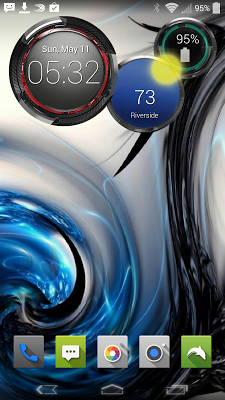
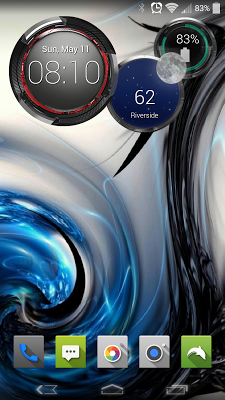
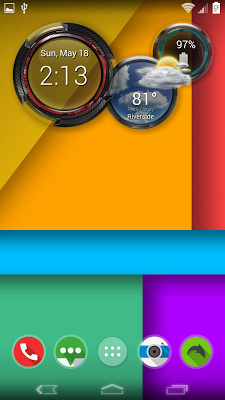
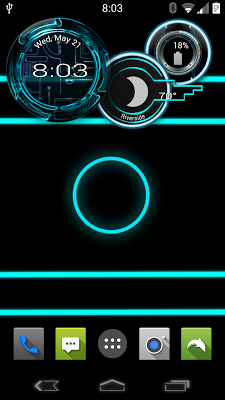
Screen:
Video:
What's in this version:
V5.0
Added new theme.. Ultra Widget TRON! look at screenshots to see this beauty
V4.1
Fixed issue not showing up in Zooper...again! sorry
V.4.0
New Version, with Tasker integration. read description or watch the video
V3.0
Added a new option. Ultra Widget 3D. gives a more 3D look to the widget. was a complete overhaul from the ground up!
Vice info:
Stahuj zde:
There are many versions in the app. all with 4 colors.
Ultra Widget (stock looking)
Ultra Widget White
Ultra Widget Blue
Ultra Widget Orange
You get the standard ring style widget
You get just the clock option
You get just the clock with a battery indicator in side the ring around the clock
and you get an analog clock
If you have an issue, Please email me first before rating poorly.
Features
Clock with Date and month
Weather, with a dynamically changing background based on the current weather
Battery indicator ring with battery %
How to install:
1 - Download and install the skin
2 - Add a Zooper widget (preferably 4x2 or 5x2) to your homescreen (via long press on homescreen if you're running a launcher or via appdrawer if you're on stock ROM),
3 - When Zooper widget skins list pops up, choose Ultra Widget to apply,
4 - Touch the image of the version you want
5- ALL DONE!
(20,- Kc)
Pozadavky: Android 4.0.3 a vyšší
Popis: You must have Zooper Widget Pro 2.38 or above installed for this to work.
Ultra Widget is for Zooper only at this time. It is inspired by the Verizon droid lineup. Also known as the "Droid command center" All images, layouts and files were 100% created by me. The Motorola Droid widget was simply inspiration and NONE of the images or files made by Motorola have been used in this Widget.
Screen:
Video:
What's in this version:
V5.0
Added new theme.. Ultra Widget TRON! look at screenshots to see this beauty
V4.1
Fixed issue not showing up in Zooper...again! sorry
V.4.0
New Version, with Tasker integration. read description or watch the video
V3.0
Added a new option. Ultra Widget 3D. gives a more 3D look to the widget. was a complete overhaul from the ground up!
Vice info:
Kód: Vybrat vše
https://play.google.com/store/apps/details?id=com.zathus.ultrawidgetKód: Vybrat vše
http://www.oboom.com/QQ0IYH4E/ultra_widget_201.apk
http://www.tusfiles.net/laj9gkytr14k
http://unlimitzone.com/an7upzv1ownj/ultra_widget_201.apk.html
Ultra Widget (stock looking)
Ultra Widget White
Ultra Widget Blue
Ultra Widget Orange
You get the standard ring style widget
You get just the clock option
You get just the clock with a battery indicator in side the ring around the clock
and you get an analog clock
If you have an issue, Please email me first before rating poorly.
Features
Clock with Date and month
Weather, with a dynamically changing background based on the current weather
Battery indicator ring with battery %
How to install:
1 - Download and install the skin
2 - Add a Zooper widget (preferably 4x2 or 5x2) to your homescreen (via long press on homescreen if you're running a launcher or via appdrawer if you're on stock ROM),
3 - When Zooper widget skins list pops up, choose Ultra Widget to apply,
4 - Touch the image of the version you want
5- ALL DONE!