Objects #Red PA/CM11 Theme
Napsal: 29. 06. 2014 20:38
Objects #Red PA/CM11 Theme v1.1.1
41,-kc
Požadavky: Liší se podle zařízení
Popis:
WARNING 1 : For NEW CM11 Theme Engine only! If you don't have a custom ROM installed with New Theme Engine this is not for you!
WARNING 2: Be sure to be on LATEST PA/CM11/AOKP Weekly/Nighlty to get it working/install properly!
WARNING 3: Be sure to reboot after install/update before applying!
WARNING 4: Icons used in screenshots are not included. They are from Moonshine/Flux Icon Pack/Theme
Screen:
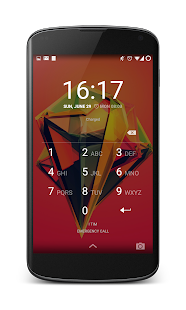
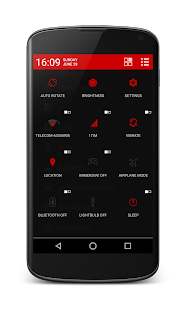
Vice info:
Stahuj zde:
IMPORTANT If you find an issue contact me and if solved update your rating.
IMPORTANT BATTERY TILE:
Code changed, #Red support a new patch ParanoidAndroid just merged and will be from release after 4.4 FINAL coming this monday. So till that release battery tile will not show themed but Theme has support for what’s next!
CM11 & Derivates: Since only Quick Settings tile can’t be themed alone, i’ve just addressed a change to CyanogenMod team to let status bar and quick settings tile themeable separately. So till they merge that patch battery tile will not show themed (or status bar white will get same color).
Red theme is compatible with PA/CM11/AOKP (and every other rom with the new Theme Engine included) and works best with xxhdpi & xhdpi screen resolutions. It marriage holo dark grey, white, and red beautifully.
Objects Themes Line makes you able to pick your favorite holo color theme and change all default holo blue painting with theme color one, all over main system interface, settings app, dialogs etc. All apps using system resources like some Google ones will use themed ones.
Size may be >10 MB but that's due to drawables' high quality.
What gets themed?
STYLE
• Holo Dark & Holo Light & Holo Bright Values
• Notification(s) template icon(s)
• Action Bars (Top/Bottom)
• Buttons
• Radio Buttons
• Checkboxes
• Scrubber Tabs
• Switches
• Quicksettings Action Bar Date -> full white
• Quicksettings Dual Switchers (PA) -> full white
• Quicksettings Icons (PA+CM11 full toggles) -> full active states holo dark red, partial active states holo white
• PIE (PA)
• AOSP Keyboard
• Google Keyboard
• Hover (PA)
• HeadsUp (CM11)
• Dialog Windows
• Alert Windows
• List Views
• Menu Windows/Lists/Dropdowns
• Progress Bars
• Stats bars (Battery & Mobile Data Usage(s))
• Scrubbers
• Rating Stars
• Appwidget Settings
• DeskClock App (Only holo blue parts)
• Dialer
• InCallUI
• Telephony
• Navigation Bar Keys
• Loading Spinners
• First Time Informative Clings (Immersive, Hover etc)
• Fastscroll Indicators
• Toggle Buttons
• Clear all drawable (Recents + Notification)
• Quicksettings Panel Switch
• Notification Panel Switch
• Grid Borders
• Volume Panel
• Default Avatar (Red One)
• Invisible Secondary Separators (Keep main categories ones only)
• Expanded Status Bar Bottom Close Tray
41,-kc
Požadavky: Liší se podle zařízení
Popis:
WARNING 1 : For NEW CM11 Theme Engine only! If you don't have a custom ROM installed with New Theme Engine this is not for you!
WARNING 2: Be sure to be on LATEST PA/CM11/AOKP Weekly/Nighlty to get it working/install properly!
WARNING 3: Be sure to reboot after install/update before applying!
WARNING 4: Icons used in screenshots are not included. They are from Moonshine/Flux Icon Pack/Theme
Screen:
Vice info:
Kód: Vybrat vše
https://play.google.com/store/apps/details?id=com.carlosavignano.objects.redKód: Vybrat vše
https://www.tusfiles.net/x99hfi8lhxhk
http://ulozto.cz/xofjCSTd/objects-red-v1-1-1-apk
http://ulozto.net/xEK4RhqP/objects-red-v1-1-1-apk
IMPORTANT BATTERY TILE:
Code changed, #Red support a new patch ParanoidAndroid just merged and will be from release after 4.4 FINAL coming this monday. So till that release battery tile will not show themed but Theme has support for what’s next!
CM11 & Derivates: Since only Quick Settings tile can’t be themed alone, i’ve just addressed a change to CyanogenMod team to let status bar and quick settings tile themeable separately. So till they merge that patch battery tile will not show themed (or status bar white will get same color).
Red theme is compatible with PA/CM11/AOKP (and every other rom with the new Theme Engine included) and works best with xxhdpi & xhdpi screen resolutions. It marriage holo dark grey, white, and red beautifully.
Objects Themes Line makes you able to pick your favorite holo color theme and change all default holo blue painting with theme color one, all over main system interface, settings app, dialogs etc. All apps using system resources like some Google ones will use themed ones.
Size may be >10 MB but that's due to drawables' high quality.
What gets themed?
STYLE
• Holo Dark & Holo Light & Holo Bright Values
• Notification(s) template icon(s)
• Action Bars (Top/Bottom)
• Buttons
• Radio Buttons
• Checkboxes
• Scrubber Tabs
• Switches
• Quicksettings Action Bar Date -> full white
• Quicksettings Dual Switchers (PA) -> full white
• Quicksettings Icons (PA+CM11 full toggles) -> full active states holo dark red, partial active states holo white
• PIE (PA)
• AOSP Keyboard
• Google Keyboard
• Hover (PA)
• HeadsUp (CM11)
• Dialog Windows
• Alert Windows
• List Views
• Menu Windows/Lists/Dropdowns
• Progress Bars
• Stats bars (Battery & Mobile Data Usage(s))
• Scrubbers
• Rating Stars
• Appwidget Settings
• DeskClock App (Only holo blue parts)
• Dialer
• InCallUI
• Telephony
• Navigation Bar Keys
• Loading Spinners
• First Time Informative Clings (Immersive, Hover etc)
• Fastscroll Indicators
• Toggle Buttons
• Clear all drawable (Recents + Notification)
• Quicksettings Panel Switch
• Notification Panel Switch
• Grid Borders
• Volume Panel
• Default Avatar (Red One)
• Invisible Secondary Separators (Keep main categories ones only)
• Expanded Status Bar Bottom Close Tray