Nexus 5 Multi Launcher Theme
Napsal: 24. 08. 2014 17:41
Nexus 5 Multi Launcher Theme v1.8.1
36,-kc
Požadavky: Android 2.2+ a vyšší
Popis: Theme for Next Launcher 3D, Smart Launcher, Nova Launcher, Action Launcher, ADW Launcher, Holo Launcher, Apex Launcher, SOLO Launcher, TSF Shell, Mini Launcher, Epic Launcher, Kcin Launcher и Go Launcher and other!
Screen:
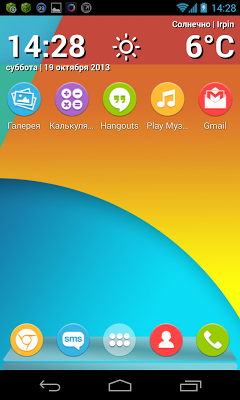
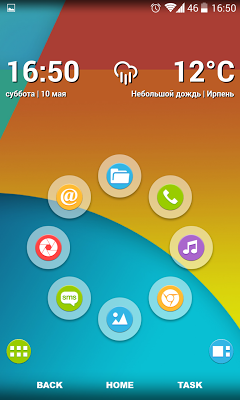
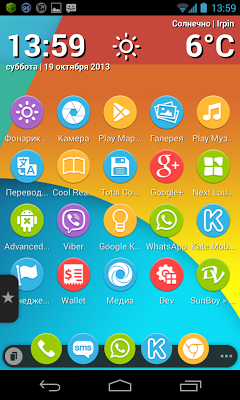
Vice info:
Stahuj zde:
Attention! Please make sure that you have purchased and installed the latest version of the Next Launcher 3D, Nova Launcher or Smart Launcher!
Good reviews and high ratings lead developer in delight! Show your love, if you want this theme became even better.
Features:
• 23 high resolution wallpaper of the theme (1920x1080) - including the original wallpaper (+ 5 wallpapers from Samsung Galaxy S5)
• 425 special icons
• replace everything application icons (now there will not be a different theme icons)
• no "menu theme" (apply from your launcher settings)
How to apply the theme:
Next Launcher:
- Menu-> Themes->Installed-> "Nexus 5"
Smart Launcher:
- Preferences Smart Launcher-> Theme-> "Nexus 5"
- Then: Theme-> Settings-> Theme drawer-> "Nexus 5"
Nova Launcher:
- Menu-> Settings nova-> Look and Feel-> Icon theme-> "Nexus 5"
Action Launcher:
- Settings-> Display-> Icon pack-> "Nexus 5"
ADW Launcher:
- Settings-> Themes-> "Nexus 5"
Holo Launcher:
- Settings-> Appearance Settings-> Icon pack-> "Nexus 5"
Apex Launcher:
- Apex Settings-> Theme Settings-> "Nexus 5"
SOLO Launcher:
- Appearance-> Solo Themes-> "Nexus 5"
TSF Shell:
- Dock-> Settings-> Theme(Theme mix)-> Icons-> "Nexus 5"
Go Launcher:
- GO Themes-> Installed-> "Nexus 5"
36,-kc
Požadavky: Android 2.2+ a vyšší
Popis: Theme for Next Launcher 3D, Smart Launcher, Nova Launcher, Action Launcher, ADW Launcher, Holo Launcher, Apex Launcher, SOLO Launcher, TSF Shell, Mini Launcher, Epic Launcher, Kcin Launcher и Go Launcher and other!
Screen:
Vice info:
Kód: Vybrat vše
https://play.google.com/store/apps/details?id=com.gtp.nextlauncher.theme.nexus5Kód: Vybrat vše
http://ul.to/n8h7avzx
https://www.oboom.com/6ECHKJQI
http://www.tusfiles.net/vra2bwlfuhzl
https://webshare.cz/group/2vJJ52vw3a/
http://ulozto.cz/xy4VDMrQ/nexus-5-v1-8-1-apk
http://ulozto.net/xnmmx1EG/nexus-5-v1-8-1-apkGood reviews and high ratings lead developer in delight! Show your love, if you want this theme became even better.
Features:
• 23 high resolution wallpaper of the theme (1920x1080) - including the original wallpaper (+ 5 wallpapers from Samsung Galaxy S5)
• 425 special icons
• replace everything application icons (now there will not be a different theme icons)
• no "menu theme" (apply from your launcher settings)
How to apply the theme:
Next Launcher:
- Menu-> Themes->Installed-> "Nexus 5"
Smart Launcher:
- Preferences Smart Launcher-> Theme-> "Nexus 5"
- Then: Theme-> Settings-> Theme drawer-> "Nexus 5"
Nova Launcher:
- Menu-> Settings nova-> Look and Feel-> Icon theme-> "Nexus 5"
Action Launcher:
- Settings-> Display-> Icon pack-> "Nexus 5"
ADW Launcher:
- Settings-> Themes-> "Nexus 5"
Holo Launcher:
- Settings-> Appearance Settings-> Icon pack-> "Nexus 5"
Apex Launcher:
- Apex Settings-> Theme Settings-> "Nexus 5"
SOLO Launcher:
- Appearance-> Solo Themes-> "Nexus 5"
TSF Shell:
- Dock-> Settings-> Theme(Theme mix)-> Icons-> "Nexus 5"
Go Launcher:
- GO Themes-> Installed-> "Nexus 5"