Swift Black Substratum Theme +Oreo & Samsung theme
Napsal: 26. 12. 2019 01:04
Swift Black Substratum Theme +Oreo & Samsung theme v200 [Patched]
Požadavky: Android 6.0 a vyšší + Substratum Theme Engine + Root
Popis: Boost your stock rooted ROM with this pitch black theme for the Substratum theme engine. It fully supports Android 6, 7.0 and 7.1 / Google Pixel / OxygenOS 4 / LineageOS / OMS + it works without TBO Theme ready gapps! Please read the description below before using the theme
Screen:


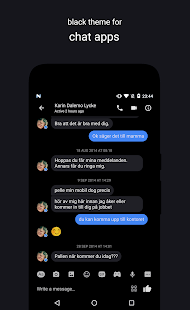
Stahuj zde: 10Q
Stahuj zde: Pie:
Stahuj zde: Oreo 8.1:
Stahuj zde: Oreo 8.0:
Stahuj zde: Nougat:
Více info:
• GBOARD INFORMATION: It’s not possible to theme the latest Gboard version. But you can make it look just like before by setting a custom keyboard background image that matches the Swift Dark background color, which is #202026. We uploaded an image and you’ll find the link in the FAQ.
• NOTICE FOR NEXUS & PIXEL USERS: After updating to the April firmware version you might experience issues applying the theme. In some cases it takes a very long time installing the overlays or applying the overlays have no effect. A common fix is to re-flash the vendor.img in fastboot. If the issue persist try the following: clear Substratum app data and reboot, before trying again.
Important information
• Installing / updating theme: The theme is stable to use on ROMs with support for Substratum. The Substratum app on legacy devices is not yet perfectly stable though, and if you run in to problems when installing or updating the theme please try to fix this by clearing Substratum data, followed by a reboot. Don't forget to grant all prompted permissions when opening the Substratum app the first time. If it's still not fixed please contact me by email or Telegram for personal assistance. Any issue related to installation or updating is a Substratum app legacy issue, and not a theme issue, so I would appreciate if you don't tell me about it in the review system but instead reach out to me personally.
• Easy fix for app issues: If an app stops working as it should after you update it from the Play Store, please reapply the overlay + reboot
• Notice for 7.1.1 users: The Substratum app will display a warning message about using themes on a 7.1.1 device. You can ignore this warning when using this theme as it have full support for this version.
Požadavky: Android 6.0 a vyšší + Substratum Theme Engine + Root
Popis: Boost your stock rooted ROM with this pitch black theme for the Substratum theme engine. It fully supports Android 6, 7.0 and 7.1 / Google Pixel / OxygenOS 4 / LineageOS / OMS + it works without TBO Theme ready gapps! Please read the description below before using the theme
Screen:
Stahuj zde: 10Q
Kód: Vybrat vše
https://dropapk.to/8y2i6iiocm76
https://upload.ac/4mpneeakzvtr
https://uploadrar.com/yldp66kf66uq
https://www.uploadship.com/5c4b4003cc59fd4fKód: Vybrat vše
https://dropapk.to/uax6tpefe7ql
https://upload.ac/opfd4f0e7urb
https://uploadrar.com/ned7drvra5v4
https://www.uploadship.com/7a6783458ba72813Kód: Vybrat vše
https://dropapk.to/vtp7smaw8r0o
https://upload.ac/ehhvv8arjcti
https://uploadrar.com/648ufrp7zkzm
https://www.uploadship.com/ac9d5504245303e2Kód: Vybrat vše
https://dropapk.to/k8x92773y9ih
https://upload.ac/g4tijwroll7i
https://uploadrar.com/9rfdqroo4es5
https://www.uploadship.com/db266a3cd669f45aKód: Vybrat vše
https://dropapk.to/zbfh93o4f2sg
https://upload.ac/vo7vzftiet0r
https://uploadrar.com/i03t85yv9y2m
https://www.uploadship.com/da68246fb3e50f13Kód: Vybrat vše
https://play.google.com/store/apps/details?id=com.brit.swiftblack.layers• GBOARD INFORMATION: It’s not possible to theme the latest Gboard version. But you can make it look just like before by setting a custom keyboard background image that matches the Swift Dark background color, which is #202026. We uploaded an image and you’ll find the link in the FAQ.
• NOTICE FOR NEXUS & PIXEL USERS: After updating to the April firmware version you might experience issues applying the theme. In some cases it takes a very long time installing the overlays or applying the overlays have no effect. A common fix is to re-flash the vendor.img in fastboot. If the issue persist try the following: clear Substratum app data and reboot, before trying again.
Important information
• Installing / updating theme: The theme is stable to use on ROMs with support for Substratum. The Substratum app on legacy devices is not yet perfectly stable though, and if you run in to problems when installing or updating the theme please try to fix this by clearing Substratum data, followed by a reboot. Don't forget to grant all prompted permissions when opening the Substratum app the first time. If it's still not fixed please contact me by email or Telegram for personal assistance. Any issue related to installation or updating is a Substratum app legacy issue, and not a theme issue, so I would appreciate if you don't tell me about it in the review system but instead reach out to me personally.
• Easy fix for app issues: If an app stops working as it should after you update it from the Play Store, please reapply the overlay + reboot
• Notice for 7.1.1 users: The Substratum app will display a warning message about using themes on a 7.1.1 device. You can ignore this warning when using this theme as it have full support for this version.
